4.2 If you're looking for a solid push-to-talk (PTT) walkie-talkie app, Zello PTT Walkie Talkie is a great option. It's easy to use and has a wide range of features, including group chat, location sharing, and voice messaging. Plus, it's available for both Android and iOS devices.
Features & Highlights
Zello PTT Walkie Talkie is not just another communication app; it's a powerful tool that brings the simplicity of walkie-talkies into the digital age. Here are some standout features that make it a must-have:
Real Experience Using Zello PTT Walkie Talkie
Application Scenarios
I've found Zello PTT Walkie Talkie to be incredibly useful in various aspects of my daily life. One of my favorite scenarios is during my weekend hiking trips. As someone who enjoys exploring nature with friends, we often venture into areas with limited cell service. Zello's offline messaging feature has been a game-changer. I can send voice messages to my friends even when we lose signal, and they receive them once we're back in range. This feature ensures that no one feels left out during our adventures.
Another scenario where Zello shines is at work. I work in a busy restaurant where communication is key. We use the group channel feature to coordinate between the kitchen and the floor staff. If a table has a special request or if there's a sudden rush, we can quickly relay messages, ensuring smooth service. It's like having a walkie-talkie, but with the added benefits of modern technology.
User Experience
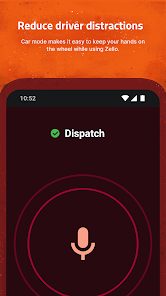
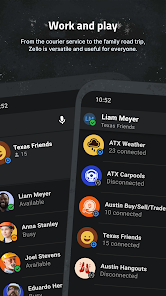
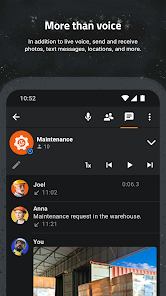
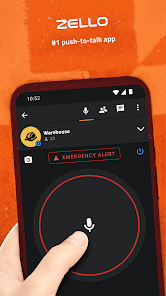
Using the Zello app has been a pleasant experience overall. The user interface is intuitive and straightforward, making it easy for anyone to jump in and start using it right away. The main screen displays your contacts and channels clearly, and the large push-to-talk button is user-friendly, even for those who may not be tech-savvy.
The performance is impressive; I rarely experience lag during conversations, and the voice quality is crystal clear, even in noisy environments. I appreciate how Zello has integrated features like private messaging, allowing for more intimate conversations when needed. My overall feelings after using this app are overwhelmingly positive. It has bridged communication gaps in both my personal and professional life.
Pricing
Zello PTT Walkie Talkie is free to download and use, making it accessible for anyone looking to enhance their communication experience. While there are optional premium features available for businesses, the core functionalities that make Zello so effective are available at no cost. This affordability makes it a fantastic choice for individuals and teams alike.
Updates & Support
Zello frequently updates its app to improve user experience and add new features. I appreciate the responsiveness of their customer support as well; they offer various channels for assistance, including FAQs and direct support via email. It's reassuring to know that if I encounter any issues, help is readily available. Additionally, the community forums provide insights and tips from other users, enhancing the overall experience.
Security & Privacy Review
As an American user, I take security and privacy seriously, and Zello does a commendable job addressing these concerns. The app is available on both the App Store and Google Play, ensuring that it meets the standards set by these platforms. When signing up, users are required to provide minimal personal information, mainly just a username and password, which is a significant plus for those wary of sharing too much data.
In terms of ads and tracking behavior, Zello is relatively straightforward. The app does not bombard users with ads, which is refreshing compared to many free apps available today. However, it does collect some data to enhance user experience, which is standard practice. Users can review the privacy policy to understand what data is collected and how it is used, providing transparency that is crucial in today's digital landscape. Overall, Zello PTT Walkie Talkie provides a secure and user-friendly experience, making it a reliable communication tool for anyone looking to stay connected.
Yes, users can submit feedback and suggestions through the app or on the Zello website.
Yes, Zello collects some user data for functionality and service improvements, but respects user privacy.
Zello requires an internet connection to function, so it does not support offline use.
You can cancel your subscription through your app store's settings or your Zello account settings.
Premium features are offered through subscriptions starting at a monthly fee, which may vary by region.
You can contact Zello customer service through their official website or by emailing support
To activate Zello, simply download the app, create an account, and follow the on-screen prompts to complete the setup.
Open the Zello app, enter your username and password, then tap "Log in." If you forgot your password, use the "Forgot password?" link.
Zello does not have a direct customer support number; they primarily offer support via email and their help center.