This site uses cookies to enhance your user experience. By clicking any link on this site you are giving your consent to our cookie policy. Read more
Reject
Accept All

Advertiser and Editorial Disclosures

Firefox: el navegador privado

Firefox: el navegador privado

verified Verified App

Developer: Mozilla

  • category

    Category: Communication

  • price

    Price: 0

  • age rating

    Age Rating: Everyone

  • rating

    Rating: 4.6

  • download

    Downloads: /

  • version

    Version: 132.0.2

Screenshot 1
Screenshot 2
Screenshot 3
Screenshot 4
Screenshot 5
Screenshot 6
Screenshot 7
Screenshot 8

Features & Highlights

Cross-Device Sync

With Firefox's cross-device sync feature, you can access your bookmarks, passwords, and open tabs seamlessly across all your devices. Whether you're on your phone or computer, your browsing experience remains consistent and convenient.

Customizable Interface

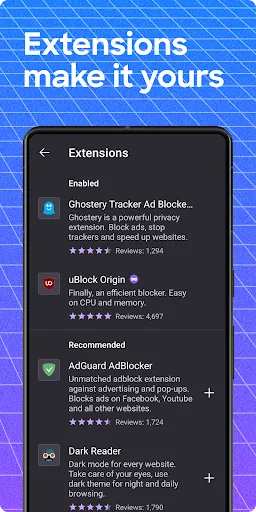
Firefox allows users to personalize their browsing experience with a variety of themes and extensions. You can easily tweak the layout, add tools, and adjust settings to suit your preferences, making your online time more enjoyable and efficient.

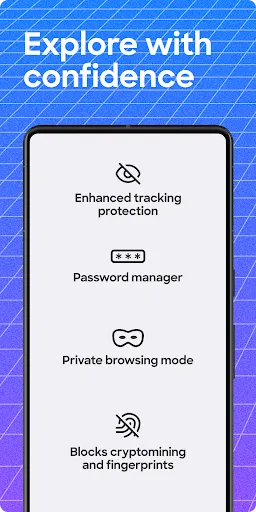
Enhanced Tracking Protection

This feature actively blocks known trackers that monitor your online behavior. By using Enhanced Tracking Protection, Firefox helps to safeguard your personal data and enhance your browsing experience by making it faster and more secure.

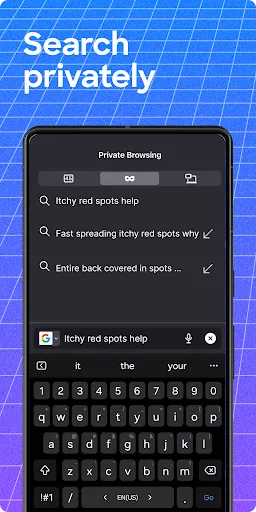
Private Browsing Mode

Firefox offers a robust private browsing mode that ensures your online activity remains confidential. With this feature, your browsing history is not saved, and tracking cookies are blocked, allowing you to surf the web without leaving a trace.

Pros & Cons

Pros
  • Firefox prioritizes user privacy with robust tracking protection.
  • The browser features a built-in password manager for secure logins.
  • Regular updates ensure protection against the latest online threats.
  • It offers customizable settings to enhance your browsing experience.
  • Firefox supports a wide range of privacy-focused extensions and tools.
Cons
  • Limited support for some popular extensions can hinder functionality.
  • Slower performance compared to competitors may affect browsing speed.
  • Occasional compatibility issues with certain websites can disrupt user experience.

Real Experience Using Firefox: el navegador privado

Application Scenarios

Firefox: el navegador privado is designed for users who prioritize privacy and security while browsing the internet. It is particularly beneficial for individuals who frequently access public Wi-Fi networks, as it helps shield personal information from potential threats. Additionally, it caters to users in regions with restricted internet access, providing tools like VPN and proxy settings to bypass censorship. Whether you’re a student researching online, a professional managing sensitive data, or simply browsing for leisure, Firefox offers a versatile browsing experience tailored to various scenarios. The browser's private mode ensures that your browsing history, cookies, and other personal data remain confidential, making it an ideal choice for those who share devices or want to maintain anonymity.

User Experience

The user experience on Firefox: el navegador privado is intuitive and streamlined, making it accessible for users of all skill levels. The interface is clean, with easy-to-navigate menus and customizable features that allow users to tailor their browsing environment according to their preferences. Users can enjoy a wide range of extensions that enhance functionality, including ad-blockers and password managers, which improve overall browsing efficiency. The browser's speed is commendable, with quick page loading times and smooth transitions between tabs. Moreover, users appreciate the built-in tracking protection, which blocks unwanted trackers and ads, leading to a more enjoyable browsing experience. The search functionality is robust, allowing users to find information swiftly without hassle. Overall, the user experience is designed to be user-friendly while prioritizing security.

Pricing

Firefox: el navegador privado is a free application, which is one of its most appealing features. Users can download and utilize the browser without any initial costs or subscription fees. While the base application is free, there are optional premium features available, such as enhanced VPN services that provide additional layers of security and anonymity for a monthly fee. This pricing model allows users to choose whether they want to invest in enhanced features without feeling pressured to pay for basic functionalities. The affordability of the application makes it accessible for a wide audience, reinforcing its reputation as a go-to choice for privacy-conscious consumers.

Updates & Support

Firefox: el navegador privado is regularly updated to ensure optimal performance and security. The development team frequently rolls out patches and updates that address bugs, introduce new features, and enhance existing functionalities. Users are notified of available updates, making it easy to keep the application current. The support system is robust, with extensive documentation available online, including FAQs, troubleshooting guides, and community forums where users can share experiences and solutions. For more personalized assistance, users can reach out to the support team through email or live chat. This commitment to ongoing support and frequent updates demonstrates the developers' dedication to providing a reliable and secure browsing experience.

verified Security & Privacy Review

The Firefox: el navegador privado app prioritizes user security and privacy, offering a robust suite of features designed to keep browsing data safe. The app employs advanced encryption protocols to protect sensitive information, ensuring that users can browse the internet without fear of data breaches or unauthorized access. Firefox is committed to privacy by minimizing data collection. The browser does not track users’ browsing activities, and it provides users with tools to block trackers and cookies that may compromise personal information. Additionally, the app allows users to customize privacy settings, giving them control over what data is shared. Permissions requested by the app are minimal, focusing primarily on essential functions required for browsing. This approach reduces the risk of exposing personal data to third parties. Furthermore, Firefox offers features such as private browsing mode and a built-in VPN, enhancing anonymity and security while online. Overall, Firefox: el navegador privado stands out as a secure and privacy-focused option for users who prioritize their online safety and want to maintain control over their data.

Reviews

4.6

“Fast and reliable for private browsing sessions”

“User-friendly interface, easy to navigate”

“Great privacy features, feels secure”

“Syncing across devices is seamless”

“Occasional slowdowns during heavy usage”

FAQ

1

Can I submit suggestions or feedback to Firefox: Private, Safe Browser?

Yes, users can submit suggestions or feedback through the app's support section or by visiting the official Firefox website.

2

Does Firefox: Private, Safe Browser collect my personal data?

Firefox: Private, Safe Browser is designed to minimize data collection and prioritizes user privacy, but some anonymous data may be collected for performance improvement.

3

Does Firefox: Private, Safe Browser support offline use?

Firefox: Private, Safe Browser does not support offline use, as it requires an internet connection to browse the web.

4

How do I cancel my Firefox: Private, Safe Browser subscription?

To cancel your subscription, go to your app store account settings, find the subscription section, and select the option to cancel the Firefox subscription.

5

How much does a subscription to Firefox: Private, Safe Browser cost?

While the app itself is free, there may be premium features available through subscription services, typically priced at a competitive rate, which can vary based on the offering.

How to use Firefox: el navegador privado

1

How can I contact customer service for Firefox: el navegador privado?

You can reach Firefox customer service through their support website or by checking the help section in the app for contact options.

2

How do I activate additional features in Firefox: el navegador privado?

To activate additional features, go to the app settings and enable the relevant options.

3

How do I log in to Firefox: el navegador privado?

You can log in by opening the app and entering your Firefox account credentials in the settings menu.

4

Is activation necessary for Firefox: el navegador privado?

No activation is necessary; you can use the app immediately after downloading it.

5

What is the customer number for Firefox: el navegador privado?

Firefox does not have a dedicated customer number; support is primarily provided through online resources and forums.

Editor's Choice