This site uses cookies to enhance your user experience. By clicking any link on this site you are giving your consent to our cookie policy. Read more
Reject
Accept All
Yahoo Mail

Yahoo Mail

verified Verified App

Developer: Yahoo

  • category

    Category: Communication

  • price

    Price: free

  • age rating

    Age Rating: Everyone

  • rating

    Rating: 4.3

  • download

    Downloads: 100,000,000+

  • version

    Version: /

Screenshot 1
Screenshot 2
Screenshot 3
Screenshot 4
Screenshot 5
Screenshot 6
Screenshot 7
Screenshot 8

Features & Highlights

Advanced Search Functionality

Yahoo Mail's advanced search functionality allows you to find specific emails or attachments in seconds. With filters for sender, date, and keywords, you can quickly locate what you need, saving you time and frustration in your busy email life.

Customizable Interface

Yahoo Mail offers a highly customizable interface that allows users to tailor their email experience. You can choose from different themes, arrange your inbox layout, and even personalize your folders to make managing emails more enjoyable and efficient.

Integrated Calendar

The built-in calendar feature in Yahoo Mail helps you keep track of important dates and events without leaving your inbox. You can easily schedule appointments, set reminders, and manage your time all in one place, enhancing your productivity.

Smart Filters

With smart filters, Yahoo Mail intelligently categorizes your incoming emails, making it easier to find what’s important. You can quickly sort messages into folders like Promotions or Social, ensuring your inbox remains organized and clutter-free.

Pros & Cons

Pros
  • Generous storage space for all your emails
  • User-friendly interface for easy navigation
  • Robust spam protection keeps inbox clean
  • Integration with Yahoo Calendar for scheduling
  • Customizable themes for personalized experience
Cons
  • Limited storage compared to competitors
  • Frequent ads disrupt user experience
  • Interface may feel outdated to users
  • Security breaches have raised concerns

Real Experience Using Yahoo Mail

Application Scenarios

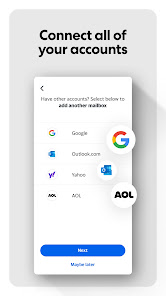
Yahoo Mail is a versatile email application that caters to a wide range of users, from professionals managing their business correspondence to families keeping in touch with loved ones. Whether you need to send quick notes, share documents, or organize events, Yahoo Mail provides a robust platform for all these activities. Users can easily integrate their Yahoo Mail account with other email services, enabling them to manage multiple inboxes in one place. This makes it particularly useful for people juggling personal and professional emails. Additionally, the app features a calendar tool that helps users keep track of important dates, making it a valuable tool for both personal and work-related scheduling.

User Experience

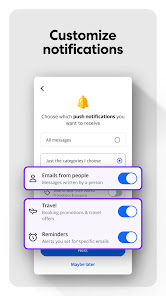
The user experience of Yahoo Mail is designed with simplicity and efficiency in mind. The interface is clean and intuitive, allowing users to navigate through their inboxes, folders, and settings with ease. The app offers a customizable layout, enabling users to adjust their view according to their preferences. Features such as smart folders, a powerful search function, and the ability to filter spam effectively enhance productivity. Notifications are timely and customizable, ensuring users never miss important messages. Moreover, the app's integration with Yahoo's other services, such as Yahoo News and Yahoo Finance, provides users with a seamless experience while accessing additional content without leaving the application.

Pricing

Yahoo Mail operates on a freemium model, providing users with a free account that comes with ample storage and essential features. The free version includes ads, which can sometimes be intrusive. However, for those looking for an ad-free experience and additional features such as enhanced storage, the app offers a premium subscription. The premium plan is reasonably priced and includes features like a personalized email address, advanced security options, and priority customer support. This tiered pricing strategy ensures that Yahoo Mail remains accessible to a broad audience while also catering to users who desire enhanced functionality.

Updates & Support

Yahoo Mail receives regular updates that focus on improving functionality and user experience. These updates often include performance enhancements, new features, and security improvements, ensuring that users have access to the latest tools and protections. Customer support is readily available through various channels, including email and a comprehensive help center filled with articles and FAQs. Users can also engage with Yahoo Mail’s community forums to share experiences and seek advice. Yahoo's commitment to user satisfaction is evident in their proactive approach to addressing concerns and continuously refining the app based on user feedback.

verified Security & Privacy Review

The Yahoo Mail app prioritizes user security and privacy through a robust set of features designed to protect sensitive information. It employs end-to-end encryption for emails, ensuring that only the sender and recipient can access the content of their messages. Yahoo also utilizes two-step verification to add an extra layer of security, requiring users to confirm their identity through a secondary device or method. Privacy practices include a clear and transparent data handling policy, where users are informed about the types of data collected, such as email content, contacts, and usage statistics. Yahoo Mail allows users to manage their privacy settings, enabling them to control who can access their information and how it is shared. Regarding permissions, the app requests access to contacts and storage, which are necessary for features like attaching files and managing contacts efficiently. Users are encouraged to review these permissions and make informed decisions about their data. Overall, Yahoo Mail demonstrates a commitment to safeguarding user data while providing essential functionalities.

Reviews

4.3

“User-friendly interface makes email management easy.”

“Great spam filter keeps inbox clean.”

“Mobile app is convenient for on-the-go access.”

“Customization options enhance user experience.”

“Occasional lag during peak times, but overall reliable.”

Editor's Choice