This site uses cookies to enhance your user experience. By clicking any link on this site you are giving your consent to our cookie policy. Read more
Reject
Accept All
Google Voice

Google Voice

verified Verified App

Developer: Google LLC

  • category

    Category: Communication

  • price

    Price: free

  • age rating

    Age Rating: Everyone

  • rating

    Rating: 4.2

  • download

    Downloads: 10,000,000+

  • version

    Version: 2026.01.11.855674769

Screenshot 1
Screenshot 2
Screenshot 3
Screenshot 4
Screenshot 5
Screenshot 6

Features & Highlights

Call Forwarding

Google Voice allows you to forward calls to multiple devices, ensuring you never miss an important call. Whether you’re at home, in the office, or on the go, you can stay connected effortlessly by managing incoming calls through your preferred devices with ease.

International Calling

Need to make calls abroad? Google Voice simplifies international calling with competitive rates and a straightforward interface. You can connect with loved ones around the world without worrying about complicated dialing procedures or hefty phone bills.

Text Messaging

With Google Voice, sending and receiving text messages is a breeze. You can communicate with friends and family through SMS or MMS right from your Google Voice number, making it easy to keep in touch without needing to switch between different messaging apps.

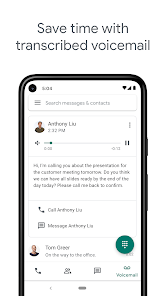
Voicemail Transcription

Google Voice offers a unique voicemail transcription feature that automatically converts your voicemail messages into text. This way, you can quickly read through your messages and decide which ones require your immediate attention, saving you time and keeping you organized.

Pros & Cons

Pros
  • Affordable calling and texting options available.
  • Unified communication across devices and platforms.
  • Voicemail transcription for easy message management.
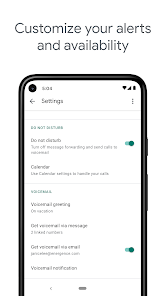
  • Customizable settings for call forwarding and screening.
  • Integration with Google services enhances productivity.
Cons
  • Limited customer support options available
  • Only works well in the U.S.
  • Lacks advanced features of traditional phone systems
  • Voicemail transcriptions may be inaccurate

Real Experience Using Google Voice

Application Scenarios

Google Voice serves a diverse set of use cases, making it a versatile tool for both personal and professional communication. For individuals, it offers a single phone number that can be used across multiple devices, allowing seamless connectivity whether you are at home, at work, or on the go. This is particularly useful for those who want to separate personal and work communications without needing multiple devices. Small business owners benefit from Google Voice by establishing a professional presence without the need for a dedicated business phone line. Features like voicemail transcription and call forwarding enhance productivity, enabling users to manage calls efficiently. Additionally, remote workers find Google Voice invaluable for maintaining communication with colleagues or clients, ensuring that they never miss an important call regardless of their location.

User Experience

The user experience of Google Voice is generally smooth and intuitive. The app's interface is clean and straightforward, allowing users to navigate through features with ease. Setting up a Google Voice number is a quick process, and the integration with other Google services further enhances usability. Users appreciate the ability to send and receive text messages, make calls, and access voicemails all from one platform. The voicemail transcription feature is particularly praised, as it allows users to read messages at a glance. Some users, however, have reported occasional connectivity issues, which can impact call quality. Overall, Google Voice provides a user-friendly experience that meets the needs of a wide range of users.

Pricing

Google Voice offers a competitive pricing structure that caters to various user needs. For personal use, the app is free, providing essential features such as a phone number, voicemail, and unlimited text messaging. However, for businesses, Google Voice offers subscription plans that start at a modest monthly fee. These plans include additional features like increased storage for voicemail and call routing capabilities, making them worthwhile for teams looking to enhance their communication. The cost-effectiveness of Google Voice, especially for small businesses, makes it an attractive alternative to traditional phone services.

Updates & Support

Google Voice is consistently updated, with new features and improvements introduced regularly based on user feedback. The development team actively addresses bugs and connectivity issues to enhance the overall functionality of the app. Support resources are easily accessible through Google’s help center, where users can find FAQs, troubleshooting tips, and community forums. For more direct assistance, users can reach out via email or chat support, although response times may vary. Overall, Google’s commitment to maintaining and improving Google Voice ensures that users have access to reliable communication tools backed by ongoing support.

verified Security & Privacy Review

The Google Voice app prioritizes user security and privacy through a robust set of practices. It employs end-to-end encryption for calls and messages, ensuring that your conversations remain confidential. Google regularly updates its security protocols to address emerging threats, which enhances the app’s resilience against unauthorized access. Regarding permissions, Google Voice requires access to your contacts, microphone, and storage, which are essential for its core functionalities. Users are encouraged to review and manage these permissions through their device settings to maintain control over personal data. Google adheres to strict privacy policies and complies with regulations like GDPR, giving users transparency about how their data is collected and used. Additionally, Google offers two-factor authentication for added account security, allowing users to protect their accounts from potential breaches. Users can also easily delete their Google Voice account and associated data if they choose, which reflects a commitment to user autonomy. Overall, Google Voice provides a secure environment for communication while emphasizing user privacy and data protection.

Reviews

4.2

“Reliable for international calls, great quality!”

“User-friendly interface, easy to navigate.”

“Love the voicemail transcription feature, very helpful.”

“Integration with other Google services is seamless.”

“Affordable rates for calls, saves me money!”

Editor's Choice