This site uses cookies to enhance your user experience. By clicking any link on this site you are giving your consent to our cookie policy. Read more
Reject
Accept All
GroupMe

GroupMe

verified Verified App

Developer: GroupMe

  • category

    Category: Communication

  • price

    Price: free

  • age rating

    Age Rating: Teen

  • rating

    Rating: 4.6

  • download

    Downloads: 10,000,000+

  • version

    Version: 15.25.4

Screenshot 1
Screenshot 2
Screenshot 3
Screenshot 4
Screenshot 5
Screenshot 6
Screenshot 7
Screenshot 8

Features & Highlights

Custom Notifications

GroupMe offers customizable notification settings, allowing users to tailor alerts for specific groups. This means you can silence notifications for less important chats while staying updated on your favorite conversations, ensuring you never miss a beat while managing your time effectively.

Event Planning

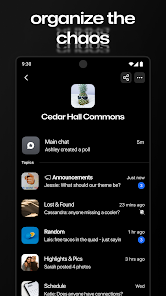
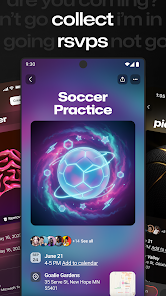
The app features tools for organizing events, making it simple to coordinate gatherings with your group. You can create polls, set dates, and share details seamlessly, helping everyone stay in the loop and ensuring that planning is collaborative and stress-free.

Group Messaging

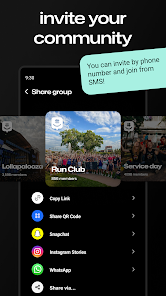
GroupMe allows users to create and manage groups effortlessly, making it easy to chat with friends, family, or colleagues. You can name your groups, customize them with images, and invite anyone, even if they don’t have the app, ensuring everyone stays connected in one space.

Media Sharing

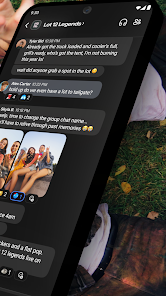
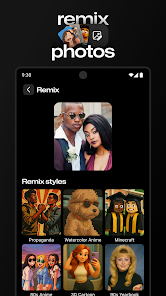
With GroupMe, sharing photos, videos, and memes is a breeze. You can send images directly in the chat, making conversations more engaging and fun. This feature enhances group interactions by allowing users to express themselves visually, adding a personal touch to each discussion.

Pros & Cons

Pros
  • Easy group messaging for seamless communication
  • Customizable chat settings for personalized experience
  • No phone number required for added privacy
  • Supports multimedia sharing for richer interactions
  • Available on multiple platforms for accessibility
Cons
  • Limited customization options for notifications
  • Difficult to manage large group sizes
  • Lacks advanced features found in other apps
  • Reliance on internet connection can hinder access

Real Experience Using GroupMe

Application Scenarios

GroupMe is designed to facilitate communication among groups, whether for personal use, school projects, or professional collaborations. Users can create dedicated chat groups for different purposes, making it easy to stay connected with friends, family, or colleagues. For instance, a group of college friends can use GroupMe to plan outings, share schedules, or discuss assignments. Similarly, a project team in a corporate setting can leverage this app to share updates, files, and important deadlines. The ability to create multiple groups allows users to keep their conversations organized and context-specific, enhancing the overall utility of the app.

User Experience

The user experience with GroupMe is generally positive, characterized by a clean interface and intuitive navigation. Upon launching the app, users are greeted with a straightforward dashboard where they can easily access their existing groups or create new ones. The messaging features are robust, allowing users to send text messages, images, and even GIFs, enhancing the expressive capabilities of the chats. Notifications are timely, ensuring that users don't miss important messages. Moreover, the option to customize notifications for individual groups adds a personalized touch, helping users manage their engagement levels effectively. However, some users have reported occasional lags, especially in larger groups, which can slightly detract from the overall experience. Nonetheless, the ability to communicate seamlessly with multiple people remains a standout feature.

Pricing

GroupMe is completely free to use, making it an attractive option for anyone looking to communicate without incurring costs. There are no hidden fees or premium subscriptions, which sets it apart from many other messaging apps that often charge for advanced features. This accessibility makes it an appealing choice for students and budget-conscious users who want a reliable group messaging platform without financial barriers.

Updates & Support

The developers of GroupMe regularly update the app to improve functionality and user experience. These updates often include bug fixes, performance enhancements, and occasional new features that keep the app relevant in a competitive market. In terms of support, GroupMe offers a help center with FAQs, troubleshooting guides, and user forums where users can seek assistance. While some users have expressed a desire for more responsive customer support, the available resources generally suffice for resolving common issues. Overall, the commitment to regular updates contributes to the app's longevity and reliability in group communication.

verified Security & Privacy Review

GroupMe prioritizes user security and privacy, implementing several measures to protect personal information. The app employs encryption protocols to safeguard messages during transmission, ensuring that conversations remain confidential. However, users should be aware that while messages are encrypted, the app collects metadata, which can include user interactions and device information. Permissions requested by GroupMe are primarily related to user functionality, such as access to contacts for easy group creation and notifications for message alerts. Users can manage these permissions within their device settings, allowing for greater control over their data sharing. GroupMe's privacy policy outlines how user data is collected, used, and shared. The app does not sell personal information to third parties, but may share aggregated data for analytical purposes. Users are encouraged to review privacy settings regularly and utilize features that enhance their privacy, such as adjusting visibility and blocking unwanted contacts. Overall, while GroupMe provides a secure platform for group messaging, users should remain vigilant about their privacy settings and data sharing preferences.

Reviews

4.6

“Great for group chats and event planning!”

“User-friendly interface, easy to navigate.”

“Love the GIF and sticker options!”

“Perfect for coordinating with friends.”

“Notifications can be overwhelming at times.”

Editor's Choice