This site uses cookies to enhance your user experience. By clicking any link on this site you are giving your consent to our cookie policy. Read more
Reject
Accept All

Advertiser and Editorial Disclosures

Opera: Private Web Browser

Opera: Private Web Browser

verified Verified App

Developer: Opera

  • category

    Category: Communication

  • price

    Price: free

  • age rating

    Age Rating: Everyone

  • rating

    Rating: 4.7

  • download

    Downloads: 100,000,000+

  • version

    Version: 94.3.4936.87024

Screenshot 1
Screenshot 2
Screenshot 3
Screenshot 4
Screenshot 5
Screenshot 6
Screenshot 7
Screenshot 8
Screenshot 9
Screenshot 10
Screenshot 11
Screenshot 12
Screenshot 13
Screenshot 14

Features & Highlights

Ad Blocker

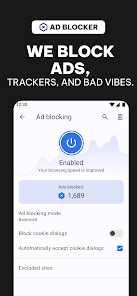
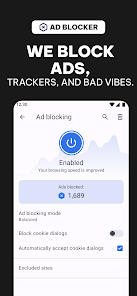
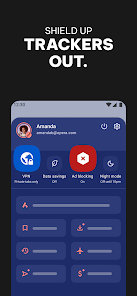
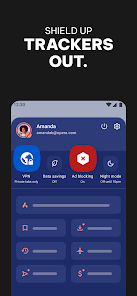
With its integrated ad blocker, Opera significantly improves your browsing experience by removing intrusive ads and pop-ups. This not only speeds up page loading times but also saves your data, making your online sessions smoother and more enjoyable.

Built-In VPN

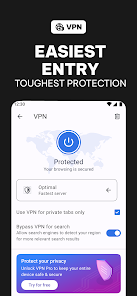
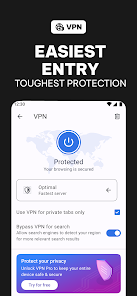
Opera offers a built-in VPN service that enhances your online privacy by masking your IP address and encrypting your data. This feature allows you to browse securely from anywhere, ensuring that your internet connection remains private and protected from prying eyes.

Crypto Wallet

Opera includes a secure crypto wallet that allows you to manage your digital assets conveniently. You can send, receive, and store cryptocurrencies directly within the browser, making it an excellent choice for users who are active in the crypto space.

Personalized News Feed

Opera features a customizable news feed that curates content based on your interests. This personalized approach ensures you stay informed about topics that matter to you, all while enjoying a clutter-free browsing experience tailored specifically to your preferences.

Pros & Cons

Pros
  • Opera browser offers a built-in VPN for enhanced online privacy.
  • It features an AI-driven personal assistant for smarter browsing.
  • The browser includes ad-blocking technology for faster page loads.
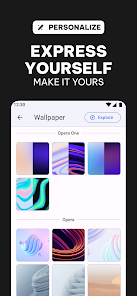
  • Users enjoy a customizable interface for a personalized experience.
  • Opera integrates with social media for seamless communication while browsing.
Cons
  • Limited extension support can hinder customization options for users.
  • Performance may lag behind leading competitors in resource-intensive tasks.
  • Privacy features often require additional configuration to ensure optimal protection.

Real Experience Using Opera: Private Web Browser

Application Scenarios

Opera: Private Web Browser serves a variety of scenarios for users looking for enhanced privacy and browsing efficiency. Whether you're a student researching sensitive topics or a professional accessing confidential documents, this browser offers a safe environment. The built-in VPN feature allows users to bypass geographical restrictions, making it a great choice for individuals traveling abroad or living in regions with restricted internet access. Moreover, its ad blocker ensures a smoother browsing experience, enabling users to focus on the content without interruptions. Users can also benefit from the browser's ability to save and organize bookmarks, which is ideal for those who frequently visit multiple sites for news, research, or entertainment.

User Experience

The overall user experience with Opera is seamless and intuitive. The interface is user-friendly, with a sleek design that makes navigation a breeze. Users can easily access their favorite sites from the speed dial feature, while the customizable homepage allows personalization according to individual preferences. The browser is also equipped with a night mode, which not only reduces eye strain during late-night browsing but also enhances battery life on mobile devices. One standout feature is the integrated messaging and social media apps, including WhatsApp and Facebook Messenger, which allow users to stay connected without switching tabs. Additionally, users have reported fast load times and efficient performance, even with multiple tabs open, making it a reliable choice for multitaskers.

Pricing

Opera: Private Web Browser is free to download and use, which is a significant advantage when compared to other browsers that may have premium features locked behind a paywall. While the basic version provides ample functionality for most users, Opera's business model is supported through partnerships and ads. However, users can opt for additional features, such as the VPN service, without incurring any costs. This makes it an attractive choice for those looking for a high-quality browsing experience without financial commitment.

Updates & Support

Opera is committed to providing regular updates to enhance performance, security, and user experience. Users can expect timely updates that often include new features, bug fixes, and security enhancements to keep their browsing experience safe and up-to-date. The support system is robust, with an extensive help center that offers FAQs, troubleshooting tips, and community forums where users can seek advice and share their experiences. For more personalized assistance, customers can reach out via email or through social media channels, ensuring that help is always accessible. The proactive approach to updates and support reflects Opera's dedication to user satisfaction and security in an ever-evolving digital landscape.

verified Security & Privacy Review

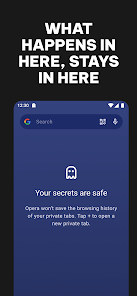
The Opera: Private Web Browser prioritizes security and privacy, offering users a robust suite of features designed to protect their online presence. The app incorporates a built-in VPN, allowing users to browse anonymously while masking their IP address, which enhances data security and helps bypass geo-restrictions. Opera employs advanced encryption protocols to secure user data during transmission, ensuring that sensitive information remains safe from prying eyes. Additionally, the browser includes an ad blocker that not only improves loading times but also reduces the risk of tracking by advertisers. Regarding permissions, Opera requests only the necessary access to function optimally, minimizing the potential for data misuse. Users can also manage their privacy settings easily, allowing for customizable control over cookies, browsing history, and tracking preferences. Opera's commitment to user privacy is evident in its policy of not collecting personal data or browsing habits without consent, providing a transparent approach to data handling. Overall, Opera: Private Web Browser stands out as a secure choice for users keen on maintaining their privacy online.

Reviews

4.7

“Fast browsing with great privacy features.”

“User-friendly interface, easy to navigate.”

“Built-in ad blocker works exceptionally well.”

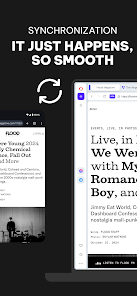
“Syncing across devices is seamless and reliable.”

“Dark mode enhances the browsing experience.”

FAQ

1

Can I submit suggestions or feedback to Opera browser with AI?

Yes, users can submit suggestions or feedback directly through the app or via the official Opera website, where there are dedicated channels for user input.

2

Does Opera browser with AI collect my personal data?

Opera browser with AI prioritizes user privacy and minimizes data collection, but it may collect certain information for improving services, which is outlined in their privacy policy.

3

Does Opera browser with AI support offline use?

Opera browser with AI offers some offline capabilities, such as storing previously visited pages for offline access, but full functionality typically requires an internet connection.

4

How do I cancel my Opera browser with AI subscription?

You can cancel your Opera browser with AI subscription by going to your account settings within the app or through the platform where you purchased the subscription. Instructions will be provided there.

5

How much does a subscription to Opera browser with AI cost?

The subscription to Opera browser with AI typically costs a monthly fee, but pricing may vary based on the specific features and services offered at the time.

How to use Opera: Private Web Browser

1

Can customer service help me reset my Opera account password?

Yes, customer service can assist you with resetting your password. Visit the Opera support page for detailed steps.

2

How can I contact customer service for help with my Opera account?

You can reach customer service through the help section in the Opera browser or by visiting the official Opera website for support options.

3

How can I efficiently log in to Opera on multiple devices?

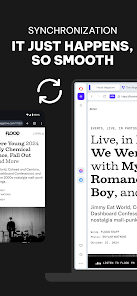
Use the same account credentials on each device. Make sure to enable sync settings for a seamless experience across all devices.

4

How do I find my customer number in the Opera settings?

You can find your customer number by navigating to the account settings within the Opera browser. Look for account details or information.

5

How do I log in to my Opera account on a new device?

To log in on a new device, open Opera, go to the login section, and enter your credentials. Follow the prompts to verify your account.

Editor's Choice