This site uses cookies to enhance your user experience. By clicking any link on this site you are giving your consent to our cookie policy. Read more
Reject
Accept All

Advertiser and Editorial Disclosures

Messenger Kids

Messenger Kids

verified Verified App

Developer: Meta Platforms, Inc.

  • category

    Category: Communication

  • price

    Price: free

  • age rating

    Age Rating: Everyone

  • rating

    Rating: 3.8

  • download

    Downloads: 50,000,000+

  • version

    Version: 310.0.0.57.220

Screenshot 1
Screenshot 2
Screenshot 3
Screenshot 4
Screenshot 5
Screenshot 6
Screenshot 7
Screenshot 8
Screenshot 9
Screenshot 10
Screenshot 11
Screenshot 12
Screenshot 13
Screenshot 14
Screenshot 15

Features & Highlights

Creative Tools

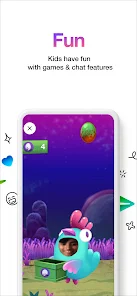
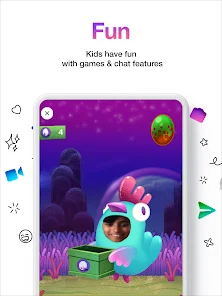
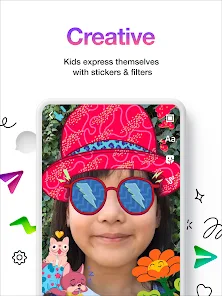
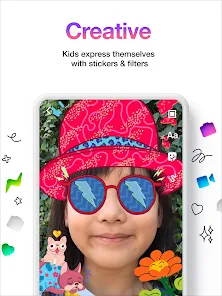
Encourage creativity with a variety of fun tools like stickers, GIFs, and drawing features. Kids can express themselves through vibrant visuals and playful content, making chatting an enjoyable and imaginative experience that goes beyond just text messages.

Group Chat Functionality

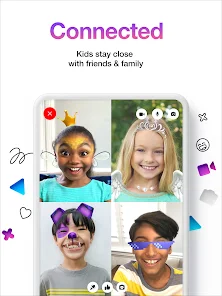
Messenger Kids supports group chats, enabling children to connect with multiple friends simultaneously. This feature fosters social interaction and collaboration, allowing kids to plan events or simply have fun conversations together in a safe and controlled environment.

Kid-Friendly Interface

Messenger Kids offers a bright and engaging interface designed specifically for children. With fun colors and easy navigation, kids can explore features without feeling overwhelmed, making it a safe space for them to connect with friends and family.

Parental Controls

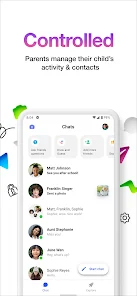
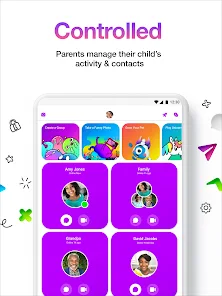
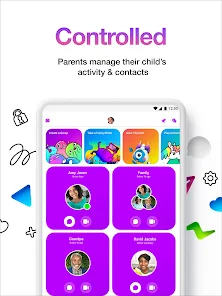
Parents can rest easy with robust parental controls that allow them to manage their children's contacts and monitor conversations. This feature empowers parents to ensure a safe and secure messaging experience while giving their kids the freedom to communicate.

Pros & Cons

Pros
  • Safe environment for kids to communicate with friends.
  • Parental controls allow supervision of contacts and interactions.
  • Fun stickers and emojis enhance creative expression in chats.
  • Encourages social skills development through online interactions.
  • No ads ensure a distraction-free chatting experience for children.
Cons
  • Limited privacy controls may expose kids to unwanted interactions
  • Features can oversimplify online communication skills
  • Parental monitoring can hinder kids' independence and trust-building

Real Experience Using Messenger Kids

Application Scenarios

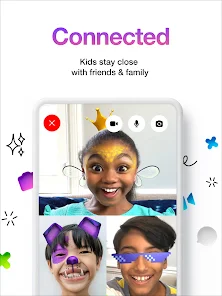
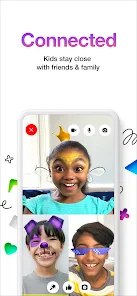
Messenger Kids is designed specifically for children aged 6 to 12, providing a safe and engaging platform for them to communicate with friends and family. Parents can create accounts for their children and manage their contacts, allowing kids to chat, share photos, and engage in video calls within a controlled environment. The app is particularly useful for maintaining connections with family members who may live far away, allowing kids to interact with grandparents or cousins without the risks associated with traditional social media. Additionally, it serves as a bridge for kids to connect with classmates, making it ideal for group projects or simply staying in touch after school hours.

User Experience

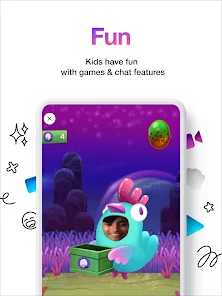
The user interface of Messenger Kids is vibrant and user-friendly, catering to the needs and preferences of young users. Children can easily navigate through the app thanks to its intuitive design, which includes colorful icons and simple controls. The app also features fun stickers, GIFs, and sound effects, making conversations lively and engaging. Parents appreciate the various safety features, such as the ability to approve contact requests and monitor conversations through a dedicated parent dashboard. However, some users have noted occasional glitches during video calls, which can disrupt the experience. Overall, the app successfully fosters a sense of connection while prioritizing the safety and privacy of young users.

Pricing

Messenger Kids is completely free to use, which is a significant advantage for families looking for a safe messaging platform without the burden of subscription fees. This free model allows parents to provide their children with a communication tool without the financial commitment often associated with other apps. The absence of ads makes it even more appealing, ensuring that children can enjoy the app without distractions or potential exposure to inappropriate content. The free nature of the app also encourages widespread use, enabling kids to connect with friends and family without limitations.

Updates & Support

Facebook regularly updates Messenger Kids to enhance user experience and security. The updates often include new features, improved safety measures, and bug fixes, showing a commitment to providing a reliable service. Parents can access support resources through the app and on the official website, including guides on managing their child's account and understanding privacy settings. The responsive customer support team is available to assist with any issues that may arise, ensuring that both parents and children have a smooth experience. Overall, regular updates and robust support make Messenger Kids a trustworthy choice for family communication.

verified Security & Privacy Review

The security and privacy of Messenger Kids are paramount, given its target audience of children. The app requires parental approval for account creation, ensuring that only authorized users can access the platform. Messenger Kids does not allow children to connect with strangers, as communication is limited to pre-approved contacts, enhancing safety. Data security measures include encryption for messages, which protects conversations from unauthorized access. The app does not collect location data, prioritizing the privacy of its young users. Additionally, Facebook commits to not using data from Messenger Kids for ad targeting, aligning with child protection guidelines. In terms of permissions, the app requires basic access to the device's microphone and camera for messaging features. However, parents are notified and can control these permissions, ensuring transparency. Overall, Messenger Kids incorporates robust privacy practices, providing a secure environment for children to communicate while keeping parental oversight at the forefront.

Reviews

3.8

“Safe and fun for kids to connect!”

“Great parental controls for monitoring.”

“Kids love the fun stickers and games.”

“User-friendly interface for young children.”

“A fantastic way to stay in touch!”

FAQ

1

Can I submit suggestions or feedback to Messenger Kids?

Yes, users can submit suggestions or feedback through the app's settings or by visiting the Messenger Kids support page on the official website.

2

Does Messenger Kids collect my personal data?

Messenger Kids is designed with privacy in mind and does not collect personal data from children. It follows strict privacy guidelines to ensure a safe experience.

3

Does Messenger Kids support offline use?

Messenger Kids requires an internet connection to send and receive messages, so it does not support offline use.

4

How do I cancel my Messenger Kids subscription?

Since Messenger Kids does not have a subscription model, there is no cancellation process required. Users can simply stop using the app at any time.

5

How much does a subscription to Messenger Kids cost?

Messenger Kids does not require a subscription, as it is a free app.

How to use Messenger Kids

1

Can I activate my Messenger Kids account on multiple devices?

Yes, you can activate your Messenger Kids account on multiple devices by logging in with the same credentials on each device.

2

Can I change my customer number for Messenger Kids?

Unfortunately, you cannot change your customer number once it's assigned. Please contact customer service for more help.

3

How can I contact customer service for Messenger Kids?

You can reach customer service through the Help Center in the app or on the website for assistance.

4

How do I activate my Messenger Kids account?

To activate your account, download the app and follow the on-screen instructions to set it up.

5

How do I contact customer service for issues with my account?

You can contact customer service via the Help Center in the app or visit the website for assistance with account issues.

Editor's Choice