This site uses cookies to enhance your user experience. By clicking any link on this site you are giving your consent to our cookie policy. Read more
Reject
Accept All

Advertiser and Editorial Disclosures

Wish: Shop and Save

Wish: Shop and Save

verified Verified App

Developer: Wish US Holdings LLC

  • category

    Category: Shopping

  • price

    Price: free

  • age rating

    Age Rating: Teen

  • rating

    Rating: 4.8

  • download

    Downloads: 500,000,000+

  • version

    Version: 24.37.11

Screenshot 1
Screenshot 2
Screenshot 3
Screenshot 4
Screenshot 5
Screenshot 6

Features & Highlights

Incredible Discounts

The app is known for offering unbeatable prices on a wide range of products, from fashion to gadgets. With frequent flash sales and exclusive deals, you'll find amazing bargains that help you save money while still getting high-quality items.

Personalized Shopping Experience

Wish: Shop and Save uses advanced algorithms to tailor product suggestions based on your preferences and past purchases. This means you'll discover items that truly resonate with your style, making your shopping experience more enjoyable and efficient.

User-Friendly Interface

Navigating through Wish is a breeze thanks to its intuitive design. The app's layout allows you to quickly search for products, filter results, and easily manage your orders, making the shopping process smooth and hassle-free.

Wish List Feature

Keep track of your favorite items with the Wish List feature, which allows you to save products for later purchase. This handy tool ensures that you never miss out on deals for things you love, all while letting you organize your shopping priorities.

Pros & Cons

Pros
  • Discover unbeatable prices on millions of products worldwide
  • Enjoy personalized shopping recommendations based on your preferences
  • Access exclusive deals and discounts for even greater savings
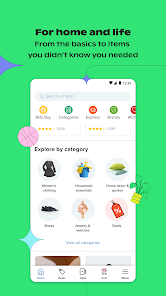
  • Shop from a wide variety of categories, all in one app
  • Experience a user-friendly interface that makes shopping effortless
Cons
  • Long shipping times can delay receiving your orders.
  • Product quality may not always meet expectations.
  • Customer service responses can be slow and unhelpful.

Real Experience Using Wish: Shop and Save

Application Scenarios

Wish: Shop and Save is an innovative shopping app designed for users looking to find unique products at unbeatable prices. This app is particularly useful for bargain hunters and those who enjoy discovering quirky items that are not typically available in local stores. Users can browse through a vast array of categories, including fashion, electronics, home goods, and more, making it suitable for anyone from college students to busy parents. Whether you are looking to redecorate your space, update your wardrobe, or simply treat yourself to something new, Wish offers a treasure trove of options that cater to various tastes and preferences.

User Experience

The user experience on Wish is a mixed bag. The app interface is user-friendly, with an intuitive design that allows for easy navigation. Users can scroll through endless product listings, complete with vivid images and detailed descriptions. However, some users report inconsistencies in product quality and delivery times, which can sometimes lead to disappointment. While many items arrive as expected, others may fall short of the advertised standards or take longer than anticipated to reach customers. Additionally, the app's algorithm tends to push certain products based on browsing history, which can be both beneficial and overwhelming. Regular promotions and discounts incentivize users to make purchases, enhancing the overall shopping experience despite some minor hiccups.

Pricing

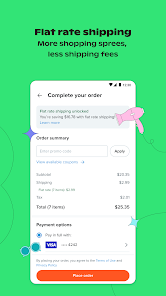
One of the standout features of the Wish app is its competitive pricing. The platform often offers products at significantly lower prices than traditional retail outlets. This is primarily made possible through partnerships with manufacturers and suppliers worldwide, allowing for direct sales to consumers. Users can find items that are marked down by as much as 80%, making it an attractive option for budget-conscious shoppers. However, it’s essential to keep in mind that while the prices are low, shipping costs may vary and can sometimes add up, particularly for smaller orders. Users are encouraged to compare prices and factor in shipping fees when making purchasing decisions to ensure they are getting the best deal possible.

Updates & Support

Wish consistently rolls out updates to enhance the app's functionality and user experience. The developers are responsive to user feedback, often implementing changes based on common concerns. Customer support options include in-app messaging and email assistance, which are generally efficient but can vary in response times. Users have reported mixed experiences with customer service, with some appreciating the quick resolutions while others experienced delays. Overall, the commitment to improvement and the regular influx of new products keep the shopping experience fresh and engaging, making Wish a continually evolving platform.

verified Security & Privacy Review

The Wish: Shop and Save app places a significant emphasis on user security and privacy, implementing various measures to protect sensitive information. The app employs encryption protocols to safeguard personal data during transmission, ensuring that user details are not easily intercepted by malicious entities.In terms of permissions, the app requests access to certain device features, such as location services and storage, which are necessary for providing tailored shopping experiences. Users are informed about these permissions during the installation process, allowing for informed consent. However, users should remain vigilant and review these permissions to ensure they align with their privacy preferences.Wish maintains a privacy policy that outlines how user data is collected, used, and shared. The app collects data to enhance user experience, personalize recommendations, and facilitate transactions. Users have the option to manage their privacy settings, including the ability to opt-out of targeted advertising. Overall, while the app offers convenient shopping features, users should carefully consider their privacy settings to ensure their data is handled in a manner that aligns with their expectations.

Reviews

4.8

“Great deals on unique products every time!”

“Shipping takes longer than expected, but worth it.”

“Love the variety of items available for purchase.”

“User-friendly interface makes shopping a breeze.”

“Quality can be hit or miss, but affordable!”

FAQ

1

Can I submit suggestions or feedback to Wish: Shop and Save?

Yes, users can submit suggestions or feedback through the app's customer support section or via their official website.

2

Does Wish: Shop and Save collect my personal data?

Yes, the app collects personal data to enhance user experience, process transactions, and provide tailored recommendations, but it adheres to privacy policies to protect user information.

3

Does Wish: Shop and Save support offline use?

No, the Wish: Shop and Save app requires an internet connection to browse products, make purchases, and access features.

4

How do I cancel my Wish: Shop and Save subscription?

Since there is no subscription fee, users do not need to cancel; however, they can uninstall the app at any time if they choose to stop using it.

5

How much does a subscription to Wish: Shop and Save cost?

Wish: Shop and Save does not have a subscription model; users can shop for free while paying only for the products they choose to purchase.

How to use Wish: Shop and Save

1

Can I change my customer number?

Unfortunately, customer numbers can't be changed. If you have issues, please contact customer service.

2

How can I contact customer service for Wish?

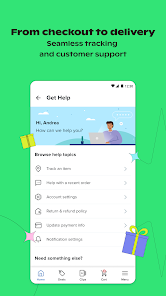
You can reach customer service through the app or website by going to the Help section.

3

How can I update my customer information?

Log in to your account, go to Settings, and you can update your customer information there.

4

How do I log in to my Wish account?

Simply open the app or website, enter your email and password, then click "Log In."

5

How do I reset my password to log in?

Click on "Forgot Password?" on the login page, then follow the instructions sent to your email.

Editor's Choice