This site uses cookies to enhance your user experience. By clicking any link on this site you are giving your consent to our cookie policy. Read more
Reject
Accept All
Verizon Call Filter

Verizon Call Filter

verified Verified App

Developer: Verizon Consumer Group

  • category

    Category: Communication

  • price

    Price: free

  • age rating

    Age Rating: Everyone

  • rating

    Rating: 4.7

  • download

    Downloads: 100,000,000+

  • version

    Version: 18.1

Screenshot 1
Screenshot 2
Screenshot 3
Screenshot 4
Screenshot 5
Screenshot 6

Features & Highlights

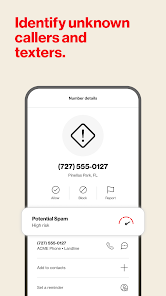
Caller ID Recognition

With Caller ID recognition, Verizon Call Filter helps you identify incoming calls, even from unknown numbers. This feature provides you with essential information about who's calling, empowering you to make informed decisions about whether to answer or ignore a call.

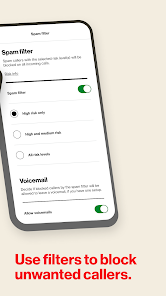
Personalized Blocklist

You can create a personalized blocklist to manage calls from specific numbers that you find bothersome. This feature allows you to take control of your call experience by easily adding or removing numbers, giving you peace of mind from persistent telemarketers or unwanted callers.

Real-Time Alerts

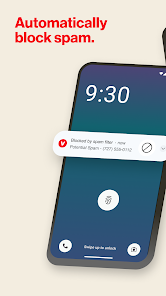
Verizon Call Filter sends real-time alerts for suspected spam calls, helping you stay aware of potential threats. This proactive approach not only informs you of unwanted calls but also enhances your overall calling safety, allowing you to focus on the calls that truly matter.

Spam Detection

Verizon Call Filter utilizes advanced algorithms to identify and block spam calls, ensuring that your phone remains free from unwanted interruptions. This smart detection system learns over time, becoming more effective at filtering out nuisance calls to give you a more peaceful calling experience.

Pros & Cons

Pros
  • Blocks unwanted spam calls effectively
  • Identifies potential fraud calls instantly
  • Customizable settings for personalized experience
  • Voicemail transcription for easy access
  • User-friendly interface for quick navigation
Cons
  • Occasional false positives may block legitimate calls.
  • Limited customization options for filtering preferences.
  • Users may miss important calls without notification.
  • Interface can be confusing for some users.

Real Experience Using Verizon Call Filter

Application Scenarios

The Verizon Call Filter app is designed to enhance the calling experience by minimizing unwanted calls. Users frequently encounter spam, robocalls, and telemarketers, which can disrupt their day-to-day activities. In scenarios where important calls are often missed due to these disturbances, Verizon Call Filter proves to be invaluable. For instance, business professionals who rely on clear communication can use the app to automatically filter out potential spam while ensuring that genuine clients and contacts reach them without hassle. Similarly, families can utilize the app to protect themselves from intrusive sales calls, allowing parents to focus on their children's needs without interruptions. Overall, the app is well-suited for anyone looking to streamline their calling experience while maintaining the ability to receive important calls seamlessly.

User Experience

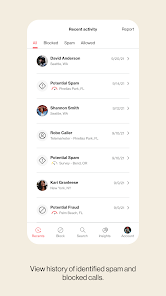
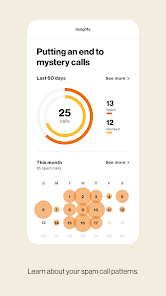
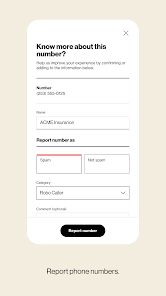
User experience with Verizon Call Filter is generally positive, with the interface being user-friendly and intuitive. Upon installation, users are guided through the setup process, which includes enabling call filtering features and customizing settings to suit personal preferences. The app’s dashboard provides clear insights into potential spam calls, allowing users to review and block numbers easily. Many users appreciate the real-time alerts that notify them of suspected spam calls, helping them make informed decisions about which calls to answer. Additionally, the app provides a community reporting feature, where users can report spam numbers, contributing to a more comprehensive spam database. However, some users have reported occasional false positives where legitimate calls were incorrectly flagged as spam, highlighting the need for ongoing refinement in the app's filtering algorithms.

Pricing

Updates & Support Verizon Call Filter is regularly updated to enhance its features and improve performance. Users can expect periodic updates that not only fix bugs but also introduce new functionalities based on user feedback. The support system for the app is robust, with a dedicated help center offering FAQs, troubleshooting guides, and customer service contact options. Users can reach out via chat or phone for more personalized assistance. Additionally, Verizon actively engages with its users through feedback channels, ensuring that the app evolves according to the needs and concerns of its audience. This commitment to continuous improvement and support is a significant aspect of the overall user experience.

verified Security & Privacy Review

The Verizon Call Filter app prioritizes user security and privacy by implementing robust data protection measures. It employs encryption protocols to safeguard user information, ensuring that call data and personal details remain confidential. The app requires specific permissions, such as access to contacts and call logs, which are essential for its functionality in identifying and filtering unwanted calls. Users should be aware that while Verizon aims to minimize data usage, some information may be collected for service improvement and personalization. Verizon’s privacy policy outlines how user data is handled, emphasizing transparency in data collection practices. Users can manage their privacy settings within the app, allowing them to control what data is shared. Additionally, the app provides users with the ability to report spam and block unwanted numbers, which enhances overall security. However, it is vital for users to regularly review permissions and stay informed about any updates to privacy policies to ensure their data remains protected. Overall, Verizon Call Filter demonstrates a commitment to maintaining user privacy while delivering effective call management solutions.

Reviews

4.7

“Effective spam blocking, highly recommend!”

“User-friendly interface, easy to navigate.”

“Missed some spam calls occasionally.”

“Great for identifying unknown numbers.”

“Notifications can be a bit overwhelming at times.”

Editor's Choice