This site uses cookies to enhance your user experience. By clicking any link on this site you are giving your consent to our cookie policy. Read more
Reject
Accept All

Advertiser and Editorial Disclosures

TownSq Community

TownSq Community

verified Verified App

Developer: TownSq

  • category

    Category: Communication

  • price

    Price: free

  • age rating

    Age Rating: Teen

  • rating

    Rating: 4.2

  • download

    Downloads: 500,000+

  • version

    Version: 11.14.10

Screenshot 1
Screenshot 2
Screenshot 3
Screenshot 4
Screenshot 5
Screenshot 6

Features & Highlights

Community Engagement

TownSq Community fosters a vibrant atmosphere by connecting residents through discussion forums and event calendars. Users can easily share ideas, organize gatherings, and stay updated on neighborhood happenings, creating a sense of belonging and active participation within the community.

Document Access

TownSq Community provides residents with easy access to important documents such as community guidelines, bylaws, and meeting minutes. This centralized document hub ensures that all residents are informed and can refer back to essential information whenever needed, promoting transparency and trust.

Maintenance Requests

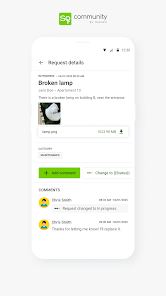
With TownSq Community, submitting maintenance requests is a breeze. Residents can report issues directly through the app, track the status of their requests, and communicate with property management, ensuring that concerns are addressed promptly and efficiently, enhancing overall satisfaction.

Payment Simplification

Managing community fees and payments has never been easier with TownSq Community. The app allows residents to view their account balances, make secure payments, and set up recurring billing, streamlining financial interactions and eliminating the hassle of traditional payment methods.

Pros & Cons

Pros
  • Enhances communication between residents and management for better engagement.
  • Streamlines community events and activities organization for increased participation.
  • Facilitates easy access to community resources and important documents.
  • Promotes safety through quick reporting of issues and concerns by residents.
  • Encourages collaboration among neighbors, fostering a stronger community spirit.
Cons
  • Limited customization options can hinder community-specific branding efforts.
  • User interface may feel outdated compared to modern platforms.
  • Customer support response times can be slower than expected, impacting user experience.

Real Experience Using TownSq Community

Application Scenarios

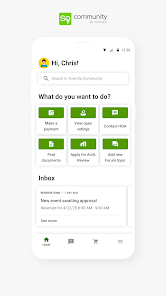
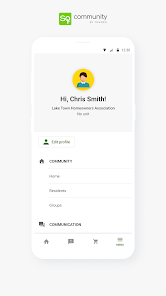
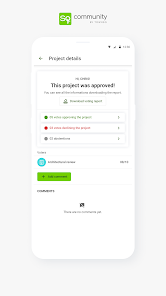
TownSq Community serves as a versatile platform designed for residents of communities and homeowners associations (HOAs). It is particularly beneficial in scenarios where communication and organization are key. For instance, users can utilize the app to stay updated on community events, board meetings, and announcements. Residents can easily access important documents such as bylaws or financial reports, fostering transparency within the community. Additionally, the app allows for the creation of sub-groups, enabling residents to connect over shared interests or concerns. This feature is especially advantageous during community improvement projects or neighborhood watch initiatives, as it streamlines communication and collaboration among residents.

User Experience

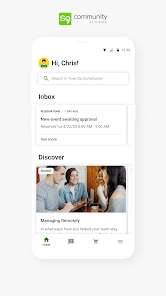
The user experience of TownSq Community is largely positive, with an intuitive interface that makes navigation seamless. Upon logging in, users are greeted with a clean dashboard that provides quick access to essential features. The app allows easy posting of announcements, sharing of community news, and the ability to create polls for resident feedback. Users appreciate the notification system that keeps them informed about updates without overwhelming them. The messaging feature also stands out, enabling direct communication between residents and board members, which enhances community engagement. While some users have reported occasional technical glitches, the overall functionality remains strong, making it a preferred choice for many communities seeking better communication.

Pricing

TownSq Community operates on a subscription-based pricing model, which varies depending on the size of the community and the features selected. For smaller communities, the pricing is relatively affordable, making it accessible for associations that may have budget constraints. Larger communities may incur higher costs, but the value provided through enhanced communication and management tools often justifies the investment. The app typically offers a free trial period, allowing potential users to explore its features before committing to a subscription. This pricing structure is competitive, especially when compared to traditional communication methods that can be costly in terms of time and resources.

Updates & Support

The developers of TownSq Community are committed to continuous improvement, regularly releasing updates that enhance functionality and address user feedback. These updates often include new features, bug fixes, and performance enhancements, ensuring that the app remains relevant and user-friendly. Customer support is readily available through various channels, including email and in-app chat, which users find helpful for resolving issues promptly. The active community forum further supports users, allowing them to share tips and experiences. Overall, TownSq Community excels in providing timely updates and robust support, ensuring a positive experience for residents and community managers alike.

verified Security & Privacy Review

The TownSq Community app prioritizes user security and privacy, employing robust measures to safeguard personal information. It utilizes end-to-end encryption to ensure that communications between users remain confidential and protected from unauthorized access. This encryption standard helps to mitigate risks associated with data breaches and ensures that sensitive information is transmitted securely. In terms of data handling, TownSq collects only the necessary information to enhance user experience, such as contact details and location data. Users are informed about the types of data being collected and the purposes for which it is used, aligning with best practices in transparency. The app also provides users with control over their privacy settings, allowing them to manage who can view their information and interact with them. Permissions required by the app are clearly outlined during the installation process, and users can easily revoke access at any time. Overall, TownSq demonstrates a commitment to maintaining user trust through its comprehensive security measures and responsible data handling practices.

Reviews

4.2

“Great for community engagement and communication!”

“User-friendly interface makes it easy to navigate.”

“Helps organize neighborhood events efficiently.”

“Outstanding customer support and quick issue resolution.”

“A vital tool for staying connected with neighbors.”

FAQ

1

Can I submit suggestions or feedback to TownSq Community?

Yes, users are encouraged to submit suggestions or feedback through the app's feedback feature or by contacting customer support, as the team values input for future improvements.

2

Does TownSq Community collect my personal data?

Yes, TownSq Community collects personal data to create user accounts and enhance the functionality of the app, but it adheres to privacy policies to protect user information.

3

Does TownSq Community support offline use?

TownSq Community requires an internet connection for most of its functionalities, but certain features may be available offline depending on the device and previous usage.

4

How do I cancel my TownSq Community subscription?

Users can cancel their TownSq Community subscription through their account settings in the app or by contacting customer support for assistance.

5

How much does a subscription to TownSq Community cost?

The cost of a subscription to TownSq Community can vary based on the community and specific services offered; users should check within the app for detailed pricing information.

How to use TownSq Community

1

Can I activate my TownSq account using my customer number?

Yes, you can activate your account by entering your customer number during the registration process in the app.

2

Can I log in with my social media account?

Currently, TownSq requires a dedicated email and password to log in. Social media logins are not supported at this time.

3

How do I activate my account after signing up?

After signing up, check your email for an activation link. Click it to activate your account and log in.

4

How do I contact customer service for TownSq?

You can reach our customer service team via the help section in the app or by emailing support

5

How do I log in to my TownSq account?

To log in, open the app, enter your email and password, and click 'Log In.' If you encounter issues, reset your password.

Editor's Choice