This site uses cookies to enhance your user experience. By clicking any link on this site you are giving your consent to our cookie policy. Read more
Reject
Accept All
T-Mobile Visual Voicemail

T-Mobile Visual Voicemail

verified Verified App

Developer: T-Mobile USA

  • category

    Category: Communication

  • price

    Price: free

  • age rating

    Age Rating: Everyone

  • rating

    Rating: 3.0

  • download

    Downloads: 100,000,000+

  • version

    Version: 10.7.0.784475

Screenshot 1
Screenshot 2
Screenshot 3
Screenshot 4
Screenshot 5
Screenshot 6

Features & Highlights

Custom Greetings

T-Mobile Visual Voicemail enables users to create personalized greetings for their callers. You can record a unique message that reflects your personality or professionalism, ensuring that your callers feel welcomed. This customization adds a personal touch that can enhance your interactions with others.

Seamless Playback

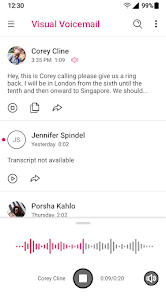
With seamless playback, you can easily listen to your voicemails in any order you prefer. This feature enhances user experience by allowing you to skip to the most important messages first, while also providing the option to rewind or fast forward as needed. It brings a personalized touch to managing your communications.

Smart Transcription

T-Mobile Visual Voicemail offers smart transcription that converts your voicemails into readable text. This feature allows you to quickly glance at messages without listening, making it easier to prioritize your responses. It’s a handy tool for those on the go who want to stay organized and informed.

Visual Management

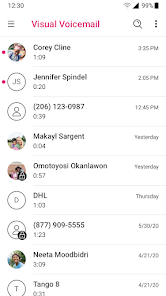
The app presents your voicemails in a visually appealing list format, making it easy to navigate through your messages. You can quickly identify missed calls and see who left a message at a glance. This visual management helps streamline your communication process and ensures you never miss an important voicemail.

Pros & Cons

Pros
  • Easily view and manage messages at a glance
  • Listen to messages in any order you prefer
  • Save time with transcriptions of voicemails
  • Receive notifications for new messages instantly
  • Enjoy a user-friendly interface for seamless navigation
Cons
  • Limited compatibility with non-T-Mobile devices
  • Voicemail access requires data or Wi-Fi connection
  • Can be confusing for users unfamiliar with technology
  • Occasional delays in receiving new voicemail notifications

Real Experience Using T-Mobile Visual Voicemail

Application Scenarios

The T-Mobile Visual Voicemail app serves as a crucial tool for users looking to manage their voicemail more efficiently. Whether you're a busy professional who receives numerous calls daily or a casual user who prefers to keep their inbox organized, this app caters to a variety of scenarios. For instance, if you're in a meeting and can't take calls, you can quickly glance at your voicemail list to see who has left messages without having to listen to each one sequentially. This feature is especially valuable for those who want to prioritize their callbacks. Additionally, travelers can benefit from the app's ability to transcribe voicemails, making it easier to understand messages without needing to dial in and listen, which can be particularly useful when roaming internationally.

User Experience

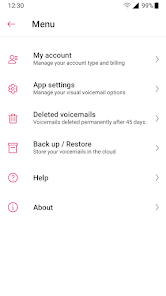
User experience with T-Mobile Visual Voicemail is generally positive, as the app is designed with a clean and intuitive interface. Upon opening the app, users are greeted with a straightforward layout displaying all voicemails in a list format, complete with timestamps and caller information. The ability to delete, save, and manage messages with simple taps makes navigation seamless. Moreover, the transcription feature is often praised for its accuracy, allowing users to read voicemails at a glance, which saves time and enhances accessibility. However, some users have reported occasional glitches, such as delayed updates or issues with notifications, which can detract from the overall experience. Nevertheless, the app's ease of use and essential functionalities often outweigh these minor inconveniences.

Pricing

The T-Mobile Visual Voicemail app is provided at no additional cost for T-Mobile customers. This makes it an attractive option for users who are already subscribed to T-Mobile services, as they can enjoy premium voicemail features without incurring extra fees. It is important to note that while the app itself is free, users should be aware of their data usage if accessing voicemails while not connected to Wi-Fi. Overall, the lack of a subscription fee adds significant value to T-Mobile's offerings, making it a worthwhile investment for effective voicemail management.

Updates & Support

T-Mobile is known for providing regular updates to its Visual Voicemail app, ensuring that users benefit from the latest features and security enhancements. The company actively seeks user feedback, which often leads to improvements in functionality and performance. In terms of support, T-Mobile offers a dedicated help center where users can find troubleshooting guides and FAQs. Additionally, customer support is readily available for those needing personalized assistance. This commitment to ongoing support and enhancement makes the T-Mobile Visual Voicemail app a reliable choice for managing voicemail effectively.

verified Security & Privacy Review

The T-Mobile Visual Voicemail app prioritizes user security and privacy, implementing several measures to protect personal information. The app requires permissions such as access to contacts and storage, which are essential for its functionality in managing voicemails efficiently. However, it is crucial for users to review these permissions and ensure they align with their comfort level regarding data sharing. T-Mobile employs encryption protocols to safeguard voicemail messages during transmission and storage, minimizing the risk of unauthorized access. Additionally, the app adheres to industry standards for data protection and complies with applicable privacy regulations, ensuring that user data is handled responsibly. T-Mobile also provides users with the option to manage their privacy settings, allowing them to control data sharing and notification preferences. While the app collects usage data to enhance performance and user experience, T-Mobile is transparent about its data practices and provides a clear privacy policy. Users are encouraged to familiarize themselves with these policies to make informed decisions about their data security and privacy while using the app.

Reviews

3.0

“Easy to use and very convenient for managing messages”

“Works flawlessly, never had any issues”

“Love the transcription feature, super helpful”

“Notifications could be more reliable for new voicemails”

“Interface is clean, makes checking messages a breeze”

Editor's Choice