This site uses cookies to enhance your user experience. By clicking any link on this site you are giving your consent to our cookie policy. Read more
Reject
Accept All
Sling: Employee Scheduling App

Sling: Employee Scheduling App

verified Verified App

Developer: Sling Inc.

  • category

    Category: Communication

  • price

    Price: free

  • age rating

    Age Rating: Everyone

  • rating

    Rating: 4.5

  • download

    Downloads: 1,000,000+

  • version

    Version: 1.90.74

Screenshot 1
Screenshot 2
Screenshot 3
Screenshot 4
Screenshot 5
Screenshot 6
Screenshot 7
Screenshot 8

Features & Highlights

Shift Reminders

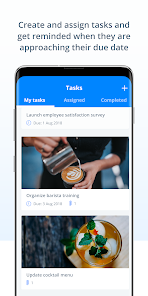
Sling offers customizable shift reminders to keep your team informed and reduce no-shows. Employees receive notifications about upcoming shifts, making it easier for them to stay organized and ensuring that your business runs smoothly without unexpected gaps in coverage.

Smart Scheduling

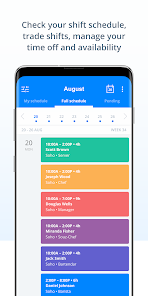
Sling's Smart Scheduling feature simplifies the process of creating shifts by analyzing employee availability and preferences. This means you can quickly fill open slots while keeping your team happy, ultimately reducing scheduling conflicts and improving overall productivity.

Team Communication

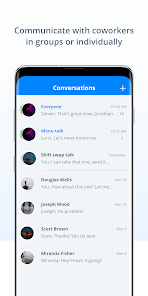
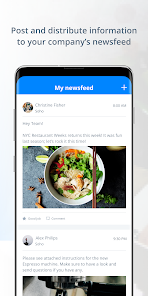
With Sling's integrated communication tools, team members can easily chat, share updates, and discuss shifts in real-time. This feature fosters a collaborative environment and ensures everyone is on the same page, making it easier to manage your workforce effectively.

Time Tracking

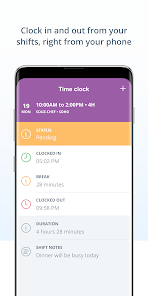
The app includes a robust time tracking feature that allows employees to clock in and out directly from their mobile devices. This not only streamlines payroll processing but also provides managers with accurate data on hours worked, helping to eliminate discrepancies and improve accountability.

Pros & Cons

Pros
  • Streamlines scheduling for improved team efficiency
  • Facilitates easy shift swapping between employees
  • Enhances communication with real-time updates
  • Offers mobile access for on-the-go management
  • Simplifies labor law compliance and tracking
Cons
  • Limited customization options for schedules
  • Difficulties with mobile usability
  • Customer support can be slow to respond
  • Lacks advanced reporting features for analysis

Real Experience Using Sling: Employee Scheduling App

Application Scenarios

Sling: Employee Scheduling App is designed for a variety of workplace environments, making it a versatile tool for businesses looking to streamline their scheduling processes. It is especially useful in industries such as retail, hospitality, healthcare, and food service, where shift management is crucial. For instance, a restaurant manager can easily create and modify weekly schedules to accommodate fluctuating customer demand, while a healthcare facility can ensure that there are enough staff members available for each shift. Additionally, the app allows employees to swap shifts, request time off, and communicate with each other, thereby enhancing workplace collaboration and improving overall efficiency. This flexibility makes Sling an ideal solution for businesses of all sizes, from small startups to large enterprises.

User Experience

The user experience of Sling is notably intuitive and user-friendly. The app’s interface is clean and organized, allowing users to navigate through its features with ease. Scheduling shifts can be done with just a few taps, making it simple for managers to assign tasks and for employees to view their schedules. The ability to receive notifications about schedule changes and upcoming shifts keeps everyone in the loop, reducing the likelihood of miscommunication. Furthermore, the app offers a mobile version, ensuring that users can access their schedules on the go. Feedback from users highlights the convenience of having all scheduling needs in one place, as well as the positive impact on team communication and morale. Overall, users appreciate how Sling simplifies the scheduling process while enhancing collaboration among team members.

Pricing

Sling offers a variety of pricing plans to accommodate different business needs. The basic version of the app is free, providing essential features such as shift scheduling and team messaging. For businesses that require more advanced functionalities, such as time tracking and labor cost management, Sling offers premium plans at competitive prices. These plans are designed to provide additional tools that enhance productivity while remaining budget-friendly. The pricing structure is transparent, with no hidden fees, making it easy for businesses to choose the plan that best fits their requirements. This flexibility in pricing ensures that Sling remains accessible to businesses of all sizes, making it a valuable investment for those looking to improve their employee scheduling processes.

Updates & Support

Sling is committed to continuous improvement, regularly releasing updates that enhance functionality and user experience. These updates often include new features based on user feedback, ensuring that the app remains relevant and effective in addressing the needs of its users. The support team is readily accessible, providing assistance through various channels, including email and live chat. Users can also find a comprehensive knowledge base on the Sling website, offering tutorials and FAQs to help them navigate any challenges they may encounter. This dedication to customer support and ongoing development ensures that businesses can rely on Sling as a robust solution for their scheduling needs.

verified Security & Privacy Review

The Sling Employee Scheduling App takes data security and user privacy seriously, implementing several measures to protect sensitive information. The app uses encryption protocols to safeguard user data during transmission, ensuring that personal and business details remain confidential. Additionally, Sling adheres to industry-standard security practices, including regular security audits and vulnerability assessments. In terms of privacy practices, Sling is transparent about its data collection policies. Users are informed about what data is collected, how it is used, and with whom it may be shared. The app requires certain permissions, such as access to location and notifications, which are necessary for optimal functionality. However, users have the option to customize these permissions according to their preferences. Sling also provides users with the ability to manage their data, allowing them to update or delete their information as needed. Overall, Sling demonstrates a commitment to protecting user privacy while providing a user-friendly scheduling experience. Users can feel confident that their data is handled responsibly and securely within the app.

Reviews

4.5

“User-friendly interface makes scheduling a breeze!”

“Great for team communication and shift management.”

“Reliable app, saves me a lot of time.”

“Notifications keep everyone on the same page.”

“Excellent customer support when needed!”

Editor's Choice