This site uses cookies to enhance your user experience. By clicking any link on this site you are giving your consent to our cookie policy. Read more
Reject
Accept All

Advertiser and Editorial Disclosures

Marco Polo - Video Messenger

Marco Polo - Video Messenger

verified Verified App

Developer: Joya Communications

  • category

    Category: Communication

  • price

    Price: free

  • age rating

    Age Rating: Everyone

  • rating

    Rating: 4.6

  • download

    Downloads: 10,000,000+

  • version

    Version: 0.559.0

Screenshot 1
Screenshot 2
Screenshot 3
Screenshot 4
Screenshot 5
Screenshot 6
Screenshot 7

Features & Highlights

Filters & Effects

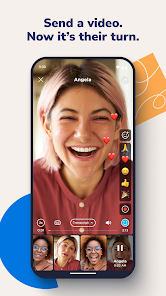
Add a fun twist to your video messages with various filters and effects available in Marco Polo. Whether you want to lighten the mood or add some flair to your chats, these creative tools make your conversations more enjoyable and allow for self-expression in a unique way.

Group Chats

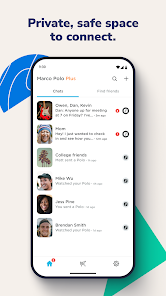
Connect with multiple friends in one conversation through group chats, where everyone can share their thoughts and experiences via video. It's a fantastic way to stay in touch with loved ones and keep up with group activities, allowing for an interactive experience that feels inclusive and dynamic.

Privacy Controls

Marco Polo prioritizes user privacy by offering robust privacy controls, ensuring that you can communicate securely. You can manage who sees your videos and limit access to your content, giving you peace of mind while you connect with others.

Video Messaging

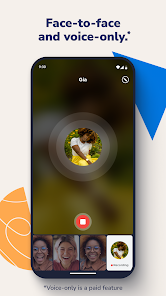
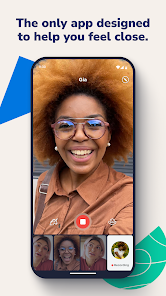
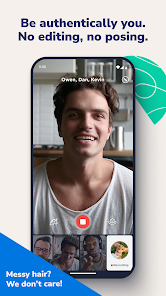
Marco Polo allows users to send and receive video messages effortlessly, making communication feel more personal and engaging. You can record messages at your convenience and share them with friends and family, who can watch and respond whenever they have time, bridging the gap of distance and time zones.

Pros & Cons

Pros
  • Enjoy seamless video messaging that feels personal and immediate.
  • Capture and share moments anytime, anywhere with ease.
  • Connect with friends and family using a simple, user-friendly interface.
  • Send messages at your convenience without needing to be online simultaneously.
  • Keep conversations dynamic with fun filters and effects to enhance your videos.
Cons
  • Limited real-time interaction can hinder spontaneous conversations.
  • Storage space for videos can quickly fill up.
  • Internet dependency may restrict usage in low-connectivity areas.

Real Experience Using Marco Polo - Video Messenger

Application Scenarios

Marco Polo shines in various communication scenarios, making it a versatile choice for users looking to stay connected. Families spread across different cities can use the app to share moments, ensuring that even the most distant relatives feel included in daily life. Friends can utilize it for catch-up sessions when schedules don’t align for real-time chats. Additionally, Marco Polo is an excellent tool for groups planning events, as users can exchange ideas and updates without the chaos of group texts. For professionals, it can serve as a dynamic way to communicate with teams, allowing for quick updates or brainstorming sessions in a more personal format than traditional emails. The ability to record messages and send them at one's convenience makes it ideal for users with busy lifestyles.

User Experience

The user experience in Marco Polo is intuitive and engaging. Upon downloading, users are greeted with a user-friendly interface that makes navigation simple. The app’s design focuses on ease of use, allowing users to quickly access their contacts and start video messaging. The video quality is generally high, providing clear visuals and sound, which enhances the overall communication experience. Users appreciate the option to save favorite videos and create personalized groups, making it easy to manage conversations. One standout feature is the ability to add filters and effects, adding a fun element to video messages. Notifications are timely and customizable, ensuring users are informed without feeling overwhelmed. Overall, the user experience in Marco Polo is designed to be enjoyable, fostering a sense of connection among users.

Pricing

Marco Polo offers a free version that provides access to core features, allowing users to send unlimited video messages to their contacts. However, for those seeking an enhanced experience, Marco Polo offers a premium subscription. The paid version unlocks additional features, such as extended video lengths, the ability to create custom reactions, and access to exclusive filters. The pricing is competitive when compared to other messaging apps, making it a worthwhile investment for users who value video communication. The free tier is robust enough to satisfy casual users, while the premium option caters to those who want a more enriched experience.

Updates & Support

The development team behind Marco Polo demonstrates a commitment to continuous improvement through regular updates that introduce new features and enhancements based on user feedback. This ensures that the app remains relevant in an ever-evolving digital landscape. Customer support is readily available, with a comprehensive help center and responsive support team to assist with any issues or questions users may encounter. Additionally, the app community is active, providing a platform for users to share tips and experiences. This combination of robust updates and accessible support contributes to a positive overall experience, making Marco Polo a reliable choice for video messaging.

verified Security & Privacy Review

Marco Polo - Video Messenger places a strong emphasis on user privacy and data security. The app employs end-to-end encryption for video messages, ensuring that only the intended recipients can access the content. This encryption mechanism helps protect user data from potential breaches and unauthorized access. In terms of permissions, Marco Polo requires access to the user's camera and microphone to facilitate video messaging. Users are prompted to grant these permissions upon first use, and they can revoke them at any time through their device settings. The app does not require users to share their location, which minimizes privacy concerns related to geolocation data. Marco Polo's privacy policy outlines that user data is not sold to third parties, and the app does not display ads, which further enhances the user experience without compromising privacy. However, users should remain aware that shared videos may be stored on the company’s servers temporarily. Overall, Marco Polo demonstrates a commitment to safeguarding user information while providing a user-friendly video messaging platform.

Reviews

4.6

“Easy to use and great for long-distance chats”

“Love the video quality and fun features”

“Perfect for keeping in touch with family”

“User-friendly interface makes messaging a breeze”

“Convenient way to share moments instantly”

FAQ

1

Can I submit suggestions or feedback to Marco Polo - Video Messenger?

Yes, users can submit suggestions or feedback through the app’s settings or by visiting the official Marco Polo website.

2

Does Marco Polo - Video Messenger collect my personal data?

Marco Polo does collect some personal data to enhance the user experience, but users can review the privacy policy for detailed information on data collection practices.

3

Does Marco Polo - Video Messenger support offline use?

Yes, users can record and save video messages offline, which will be sent when they reconnect to the internet.

4

How do I cancel my Marco Polo - Video Messenger subscription?

To cancel your subscription, you can go to your account settings within the app and follow the prompts to manage your subscription.

5

How much does a subscription to Marco Polo - Video Messenger cost?

The subscription to Marco Polo - Video Messenger typically costs around $5.99 per month or $59.99 per year, but pricing may vary based on promotions or changes by the company.

How to use Marco Polo - Video Messenger

1

Can I get help with my customer number over the phone?

Yes, you can contact customer service by phone for assistance with your customer number. Be ready to verify your identity.

2

How can I activate my account after signing up?

To activate your account, simply follow the link sent to your email during registration. If you need assistance, contact customer service.

3

How do I contact customer service if I have a problem logging in?

You can reach customer service through the app's support section or by visiting our website for further assistance.

4

How do I log in on a new device?

To log in on a new device, simply enter your credentials. If you encounter issues, ensure your account is active and contact customer service if needed.

5

How do I update my login information?

You can update your login information by accessing your account settings in the app. For more help, contact customer service.

Editor's Choice