This site uses cookies to enhance your user experience. By clicking any link on this site you are giving your consent to our cookie policy. Read more
Reject
Accept All
LINE: Calls & Messages

LINE: Calls & Messages

verified Verified App

Developer: LINE (LY Corporation)

  • category

    Category: Communication

  • price

    Price: 0

  • age rating

    Age Rating: Everyone

  • rating

    Rating: 3.6

  • download

    Downloads: /

  • version

    Version: 45609

Screenshot 1
Screenshot 2
Screenshot 3
Screenshot 4
Screenshot 5
Screenshot 6
Screenshot 7
Screenshot 8

Features & Highlights

Free Voice And Video Calls

Enjoy high-quality voice and video calls with friends and family, no matter where they are. LINE’s seamless connectivity ensures that you can stay in touch without worrying about call charges, making it perfect for both casual chats and important conversations.

Group Chats And Communities

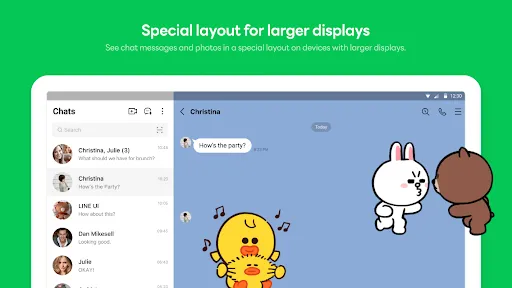
Create and manage group chats with ease, allowing you to connect with multiple friends at once. LINE also offers community features that let you share updates, photos, and events, making it easy to stay connected with larger groups and keep everyone in the loop.

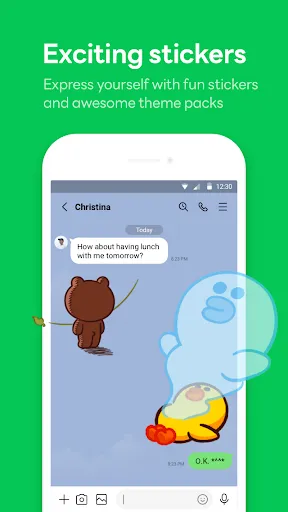
Interactive Stickers And Themes

Personalize your messaging experience with a vast selection of interactive stickers and customizable themes. This fun feature not only adds a unique touch to your conversations but also helps convey emotions better, making your chats more vibrant and enjoyable.

Rich Messaging Options

Express yourself with a variety of messaging features, including text, photos, stickers, and even voice messages. LINE’s diverse options allow you to communicate in a fun and creative way, ensuring your chats are lively and engaging with every interaction.

Pros & Cons

Pros
  • Free voice and video calls worldwide
  • Instant messaging with multimedia support
  • User-friendly interface for easy navigation
  • Group chats for convenient communication
  • Customizable stickers and themes for personalization
Cons
  • Limited international call quality can disrupt communication.
  • Privacy concerns may arise with data sharing practices.
  • User interface can be confusing for new users.
  • Frequent updates may lead to compatibility issues.

Real Experience Using LINE: Calls & Messages

Application Scenarios

LINE: Calls & Messages is a versatile communication app that caters to a variety of social interactions. Whether you’re connecting with family, collaborating with colleagues, or chatting with friends, LINE provides a seamless platform for voice calls, video chats, and instant messaging. It excels in group communication, allowing users to create chat rooms for up to 500 people, making it ideal for community groups or large families. The app also supports multimedia sharing, enabling users to send photos, videos, and files effortlessly. For business users, LINE offers a “LINE Official Account” feature, which helps brands engage with customers through broadcasts and promotions. Additionally, the integration of games and stickers adds a fun element to conversations, making it a popular choice among younger audiences.

User Experience

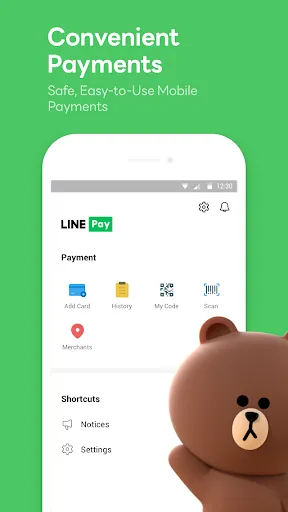
The user experience on LINE is generally smooth and intuitive. The interface is clean and user-friendly, making navigation easy even for those who may not be tech-savvy. Users appreciate the breadth of customization options available, such as personalized stickers and themes, which allow for a more unique communication style. Voice and video call quality is consistently high, even in areas with limited connectivity. However, some users have reported occasional lag during peak usage times. The app's notification system is efficient, keeping users updated on new messages and calls without being intrusive. Moreover, the built-in features such as “LINE Pay” for financial transactions and “LINE Music” for streaming add value, although they may not be needed by every user.

Pricing

LINE: Calls & Messages is free to download and use, making it accessible to a wide audience. Users can make free voice and video calls to other LINE users, which is a significant draw for international communication. However, for users who wish to call non-LINE numbers, the app offers a paid service known as LINE Out, which charges a fee based on the destination and duration of the call. Additionally, some premium features, such as special stickers, may require in-app purchases. Overall, the pricing structure is competitive compared to other messaging apps, providing a robust service without overwhelming users with costs.

Updates & Support

LINE is frequently updated to enhance functionality and security. The developers actively listen to user feedback, implementing new features and making improvements regularly. Users can expect updates that introduce new stickers, enhanced group chat capabilities, and even seasonal themes. In terms of support, LINE provides a comprehensive help center on their website, as well as a dedicated customer service team reachable through the app. Users can report issues or seek assistance easily, ensuring that most problems are addressed promptly. Overall, LINE strives to maintain a high standard of service through regular updates and responsive customer support.

verified Security & Privacy Review

LINE: Calls & Messages prioritizes user security and privacy through end-to-end encryption for calls and messages, ensuring that only the intended recipients can access shared content. The app employs advanced encryption protocols to safeguard user data during transmission, minimizing the risk of interception. In terms of privacy practices, LINE allows users to control who can contact them and view their profiles, offering customizable privacy settings. Users can also block unwanted contacts and report suspicious behavior, contributing to a safer environment. Regarding permissions, LINE requires access to certain device features such as contacts, camera, and microphone to facilitate its core functionalities. Users are prompted to grant these permissions, and they can manage them through their device settings at any time. LINE’s commitment to user data handling is reflected in its transparent privacy policy, which outlines how data is collected, used, and shared. By providing users with clear information and control over their data, LINE fosters trust and accountability in its operations.

Reviews

3.6

“Great for free international calls and messaging!”

“User-friendly interface, easy to navigate.”

“Stickers add fun to conversations!”

“Notification issues need fixing.”

“Overall, a reliable communication app.”

Editor's Choice