This site uses cookies to enhance your user experience. By clicking any link on this site you are giving your consent to our cookie policy. Read more
Reject
Accept All

Advertiser and Editorial Disclosures

KakaoTalk : Messenger

KakaoTalk : Messenger

verified Verified App

Developer: Kakao Corp.

  • category

    Category: Communication

  • price

    Price: free

  • age rating

    Age Rating: Teen

  • rating

    Rating: 2.7

  • download

    Downloads: 100,000,000+

  • version

    Version: /

Screenshot 1
Screenshot 2
Screenshot 3
Screenshot 4
Screenshot 5
Screenshot 6
Screenshot 7
Screenshot 8
Screenshot 9
Screenshot 10
Screenshot 11
Screenshot 12
Screenshot 13
Screenshot 14
Screenshot 15
Screenshot 16
Screenshot 17
Screenshot 18
Screenshot 19
Screenshot 20
Screenshot 21

Features & Highlights

Customizable Chat Themes

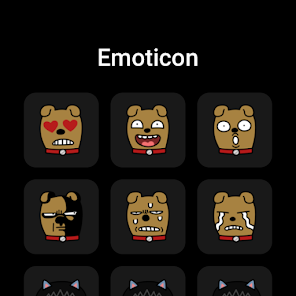
Make your chats uniquely yours with customizable themes and stickers that reflect your personality. KakaoTalk offers a wide range of themes and fun stickers, allowing you to express emotions and creativity in your conversations, making every chat feel special and personal.

Group Messaging Features

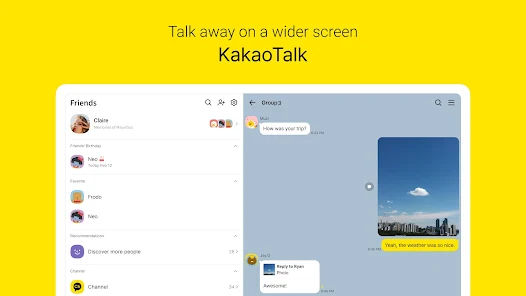
Easily connect with friends, family, or colleagues through group messaging capabilities that support up to 500 participants. You can create polls, share schedules, and discuss topics all in one place, making it perfect for both casual chats and organized discussions.

KakaoTalk Games Integration

Enjoy a fun twist in your messaging experience with integrated games that you can play with friends directly within the app. This feature encourages friendly competition and shared entertainment, enhancing your social interactions while keeping the fun alive.

Rich Multimedia Sharing

KakaoTalk allows users to seamlessly share a variety of multimedia files, including photos, videos, and voice messages, making conversations more vibrant and engaging. You can easily send large files without worrying about compression, ensuring that your memories and moments are shared in high quality.

Pros & Cons

Pros
  • KakaoTalk offers free messaging and calls for seamless communication.
  • Enjoy a user-friendly interface that simplifies navigation.
  • Access a variety of fun stickers and emoticons to express yourself.
  • Group chat features enhance collaboration and connection with friends.
  • Integrated services like games and banking provide convenience in one app.
Cons
  • Limited privacy features may expose user information.
  • Frequent ads can disrupt user experience.
  • Dependence on internet connectivity can hinder messaging in low-signal areas.

Real Experience Using KakaoTalk : Messenger

Application Scenarios

KakaoTalk has established itself as a versatile messaging platform that caters to a wide array of communication needs. Whether you're looking to chat with friends, participate in group discussions, or share multimedia files, KakaoTalk offers a seamless experience across various scenarios. For instance, users can create chat rooms for specific topics, allowing for organized conversations with multiple participants. This feature is particularly beneficial for study groups, project teams, or even family discussions. Additionally, KakaoTalk’s integration of voice and video calls enhances its usability, making it easy to connect with loved ones or colleagues remotely. Furthermore, the app’s ability to share stickers, images, and voice notes enriches the communication experience, allowing users to express themselves in creative ways.

User Experience

The user interface of KakaoTalk is intuitive and user-friendly, making it accessible for individuals of all ages. Upon opening the app, users are greeted with a clean layout that prioritizes ease of navigation. The chat interface is straightforward, with all essential features easily accessible. Users can quickly send messages, make calls, and share content without any unnecessary complications. One of the standout features is the vast library of customizable stickers and emoticons, which adds a fun element to conversations. Moreover, the app provides notifications that can be tailored to user preferences, ensuring that important messages are never missed. However, some users have noted that the app can occasionally be slow to load, particularly if many media files are being shared in a group chat.

Pricing

KakaoTalk is a free messaging application that operates on a freemium model. Users can download and use the app without any initial costs, which is a significant advantage in today's competitive messaging landscape. While the core functionalities are available for free, KakaoTalk also offers optional in-app purchases, such as premium stickers and themes. This allows users to enhance their experience while providing the option to personalize the app according to their preferences. Overall, the pricing model ensures that everyone can access basic messaging services without financial barriers, making it an attractive choice for a wide audience.

Updates & Support

KakaoTalk is committed to regular updates and improvements, ensuring the app remains relevant and functional. The developers frequently release updates that introduce new features, enhance security, and fix bugs, which is crucial for maintaining user satisfaction. Additionally, KakaoTalk provides comprehensive customer support options, including a dedicated help center and community forums. Users can easily find answers to common questions or report issues they encounter. The responsiveness of the support team further enhances the overall user experience, as concerns are typically addressed in a timely manner. Overall, the combination of regular updates and reliable support makes KakaoTalk a dependable choice for messaging needs.

verified Security & Privacy Review

KakaoTalk: Messenger prioritizes user security and privacy through a range of features and practices. The app employs end-to-end encryption for one-on-one chats, ensuring that messages are accessible only to the sender and recipient. Group chats also benefit from this encryption, providing a secure environment for conversations. In terms of permissions, KakaoTalk requires access to contacts, storage, and microphone for optimal functionality. However, users can manage these permissions within their device settings, allowing for greater control over personal information. The app also provides options for users to customize their privacy settings, such as limiting who can add them to groups and view their profile. KakaoTalk is committed to transparency regarding user data handling. The company outlines its data collection practices in its privacy policy, explaining how and why user data is collected, stored, and utilized. Users are encouraged to review these policies to stay informed about their data rights and the app's practices.

Reviews

2.7

“Easy to use and very reliable for messaging”

“Great stickers and customization options”

“Group chats are convenient for my friends”

“Notifications can be a bit delayed sometimes”

“Voice calls are high quality and clear”

FAQ

1

Can I submit suggestions or feedback to KakaoTalk : Messenger?

Yes, KakaoTalk encourages users to submit feedback and suggestions through the app or their official website to help improve the service.

2

Does KakaoTalk : Messenger collect my personal data?

Yes, KakaoTalk collects certain personal data to provide its services, but it has privacy policies in place to manage and protect user information.

3

Does KakaoTalk : Messenger support offline use?

KakaoTalk requires an internet connection to send and receive messages, but users can view previously received messages while offline.

4

How do I cancel my KakaoTalk : Messenger subscription?

Users can cancel their subscriptions through the app store settings on their device or by following the specific cancellation process outlined in the KakaoTalk help section.

5

How much does a subscription to KakaoTalk : Messenger cost?

KakaoTalk itself is free, but certain premium features or services may have associated costs, which can vary based on the feature.

How to use KakaoTalk : Messenger

1

Can I change my customer number after activation?

No, once your customer number is set during activation, it cannot be changed. For further inquiries, please contact customer service.

2

Can customer service help me with account activation issues?

Yes, customer service is available to assist you with any account activation issues you may encounter. Just reach out through the app or website.

3

How can I contact customer service for KakaoTalk?

You can reach KakaoTalk customer service through the app under Settings > Customer Service or visit the official website for more options.

4

How do I activate my KakaoTalk account?

To activate your KakaoTalk account, simply download the app, enter your phone number, and follow the verification steps sent via SMS.

5

How do I log in to KakaoTalk on a new device?

To log in on a new device, download the app, enter your customer number, and follow the verification process to access your account.

Editor's Choice