This site uses cookies to enhance your user experience. By clicking any link on this site you are giving your consent to our cookie policy. Read more
Reject
Accept All
Jitsi Meet

Jitsi Meet

verified Verified App

Developer: 8x8, Inc

  • category

    Category: Communication

  • price

    Price: free

  • age rating

    Age Rating: Everyone

  • rating

    Rating: 3.7

  • download

    Downloads: 10,000,000+

  • version

    Version: /

Screenshot 1
Screenshot 2
Screenshot 3
Screenshot 4
Screenshot 5
Screenshot 6
Screenshot 7

Features & Highlights

Customizable Interface

Jitsi Meet allows users to personalize their meeting experience with various customization options. From changing layouts to adding logos, users can tailor the interface to reflect their brand or preferences, enhancing both the aesthetic and functional aspects of their video calls.

High-Quality Video Calls

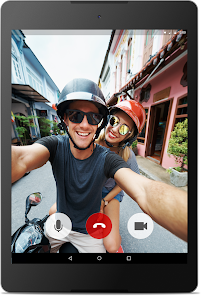
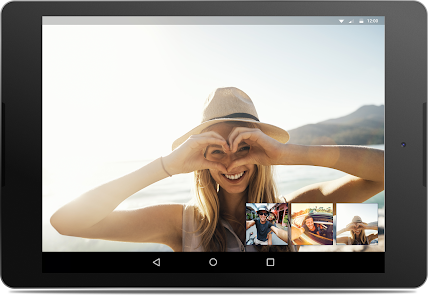
Jitsi Meet offers crystal-clear video conferencing with support for HD quality, ensuring that users can connect seamlessly with colleagues, friends, or family. The platform adapts to varying network conditions, providing a reliable experience even in less-than-ideal situations, making it perfect for both personal and professional meetings.

No Download Required

One of the standout features of Jitsi Meet is its browser-based functionality, which means you can join meetings directly from your web browser without needing to download any software. This makes it incredibly convenient for users who want to quickly connect with others without the hassle of installations or updates.

Secure and Private

With end-to-end encryption, Jitsi Meet prioritizes user privacy and security. This means that your conversations remain confidential, free from unwanted surveillance or interference, allowing you to communicate freely and confidently in any setting, whether it's a business meeting or a casual catch-up with friends.

Pros & Cons

Pros
  • Secure and private video conferencing solution
  • Easy to use with no software installation required
  • Supports large group calls for effective collaboration
  • Customizable and open-source for tailored experiences
  • Integration with various tools enhances productivity
Cons
  • Limited features compared to premium platforms
  • Performance may vary with network stability
  • User interface can feel outdated at times
  • Requires technical knowledge for self-hosting

Real Experience Using Jitsi Meet

Application Scenarios

Jitsi Meet is a versatile video conferencing solution that caters to a wide range of application scenarios. It is particularly well-suited for remote team meetings, virtual classrooms, and social gatherings. Organizations can utilize Jitsi Meet for project discussions, enabling seamless collaboration among team members, regardless of their geographical locations. Educators can leverage the platform to conduct online classes, offering interactive sessions that engage students through video, audio, and screen-sharing features. Additionally, social groups and families can connect through Jitsi Meet for virtual get-togethers, allowing them to maintain relationships despite physical distances. The platform's flexibility makes it an ideal choice for both professional and personal use.

User Experience

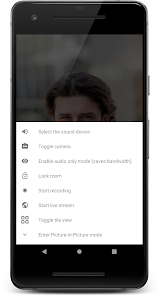
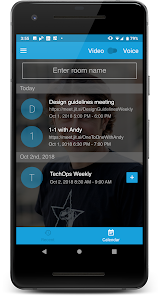
The user experience with Jitsi Meet is generally positive, characterized by its intuitive interface and ease of use. Users can join or host meetings without the need for extensive setup, as the application does not require any downloads or installations; it runs directly in the web browser. This accessibility is a significant advantage for users who may be less tech-savvy. The platform also supports multiple devices, allowing users to join meetings from smartphones, tablets, or desktops. Features such as screen sharing, chat functionality, and the ability to record sessions enhance the overall experience. However, some users have reported occasional connectivity issues and video quality fluctuations, particularly in low-bandwidth environments, which can affect the meeting experience.

Pricing

One of the standout features of Jitsi Meet is its pricing model. The application is completely free to use, making it an attractive option for individuals and organizations on a budget. There are no hidden costs, and users can host unlimited meetings with no time restrictions. For those seeking additional functionalities, such as enhanced security features or dedicated support, Jitsi offers paid options through Jitsi as a Service (JaaS). This tiered pricing structure provides flexibility for users who may require a more robust solution, while still maintaining a free option for casual users or small teams.

Updates & Support

Jitsi Meet is regularly updated with new features and improvements based on user feedback. The development team is active in addressing bugs and enhancing the platform's performance, ensuring that users have access to the latest technology. Support is primarily community-driven, with a wealth of resources available online, including forums and documentation. For users utilizing JaaS, dedicated support options are available, providing a more personalized experience. Overall, Jitsi Meet's commitment to continuous improvement and user support contributes to its growing popularity in the video conferencing landscape.

verified Security & Privacy Review

Jitsi Meet prioritizes user security and privacy, making it a reliable choice for online communications. The app employs end-to-end encryption for video and audio calls, ensuring that conversations remain private and secure from unauthorized access. Additionally, it operates on a decentralized model, which means that no central server stores user data, further enhancing privacy. Jitsi Meet does not require users to create an account, allowing for anonymous usage. This feature significantly reduces the amount of personal information that users need to share. However, users should be aware that some data, such as IP addresses, may still be collected for operational purposes. The app also offers customizable settings, allowing users to control their meeting experience and manage permissions effectively. In terms of permissions, Jitsi Meet requests access to the device's camera and microphone, which are essential for video conferencing. Users can grant or deny these permissions as needed, ensuring they maintain control over their privacy. Overall, Jitsi Meet demonstrates a strong commitment to user security and privacy, making it a favorable option for those concerned about their data safety.

Reviews

3.7

“Great video quality and easy to use!”

“User-friendly interface, perfect for remote meetings.”

“Reliable performance even with many participants.”

“Excellent privacy features, love the open-source nature.”

“Occasional connection issues, but overall a solid choice.”

Editor's Choice