This site uses cookies to enhance your user experience. By clicking any link on this site you are giving your consent to our cookie policy. Read more
Reject
Accept All

Advertiser and Editorial Disclosures

Everbridge

Everbridge

verified

Everbridge Inc.

2.6
Rating
1,000,000+ Downloads
25.8.2 Version
  • category

    Category: Communication

  • price

    Price: free

  • age rating

    Age Rating: Everyone

  • rating

    Rating: 2.6

  • available on

    Available on: /

  • updated on

    Updated on: Jul 2, 2026

Screenshot 1
Screenshot 2
Screenshot 3
Screenshot 4
Screenshot 5
Screenshot 6
Screenshot 7
Screenshot 8
Screenshot 9

Features & Highlights

Incident Management

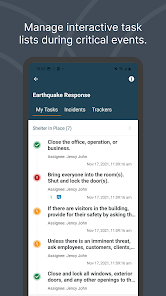
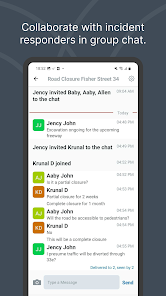
The Incident Management feature streamlines the response to emergencies by providing tools for real-time collaboration and coordination. Users can track the status of incidents, assign tasks, and share updates, helping teams work more effectively during crises for a timely and organized response.

Mass Notification System

Everbridge's Mass Notification System allows organizations to communicate critical information swiftly to large groups of people. With customizable messaging options, users can send alerts via multiple channels, ensuring that everyone receives important updates in real-time, whether through SMS, email, or voice calls.

Mobile App Accessibility

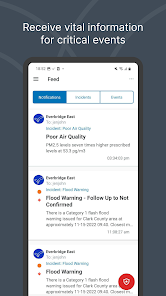
The Everbridge mobile app enhances accessibility, allowing users to manage notifications and monitor incidents from anywhere. This feature ensures that key personnel stay informed and can respond promptly, even when they're on the go, fostering a more agile and responsive organizational approach.

Risk Intelligence

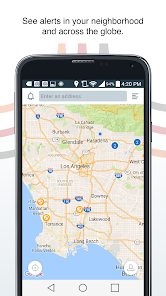
Everbridge offers advanced Risk Intelligence capabilities that leverage data analytics to assess potential threats and vulnerabilities. By integrating various data sources, users gain insights into risks affecting their operations, enabling proactive planning and quicker decision-making in the face of potential emergencies.

Pros & Cons

Pros
  • Enhances emergency communication and response times
  • Supports multi-channel messaging for wider reach
  • Facilitates real-time situational awareness and updates
  • Streamlines incident management for efficient resolutions
  • Integrates easily with existing systems and tools
Cons
  • High cost for small organizations
  • Complex interface may confuse users
  • Limited customization options for alerts
  • Reliability issues during peak usage times

Real Experience Using Everbridge

Application Scenarios

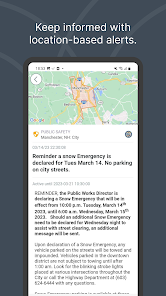
Everbridge is designed for a wide range of scenarios, primarily focusing on emergency management and communication. Organizations, schools, and communities utilize the app to ensure the safety of their members during crises. For instance, during natural disasters like hurricanes or earthquakes, Everbridge can swiftly disseminate alerts to keep people informed about evacuation routes or safety measures. In corporate settings, it enables businesses to notify employees about workplace incidents or emergencies, ensuring they receive timely information. Additionally, educational institutions leverage Everbridge to send alerts to students and parents about school closures or safety protocols, enhancing overall community safety and preparedness.

User Experience

The user experience with Everbridge is generally positive, marked by its intuitive interface and ease of use. Users appreciate the straightforward navigation, allowing them to quickly access features such as notifications, alerts, and incident reports. The app's real-time alerts are a standout feature, providing critical information promptly, which is crucial during emergencies. Users have noted that the customization options are beneficial, allowing organizations to tailor messages based on specific needs. However, some users have reported occasional glitches with notifications not being received, which can be a concern during urgent situations. Overall, the app effectively fulfills its purpose, providing users with essential tools to stay informed and safe.

Pricing

Everbridge operates on a subscription-based pricing model, which can vary based on the size of the organization and the features required. While the basic plan offers essential functionalities, larger organizations often opt for premium packages that include advanced features such as analytics and enhanced communication options. Users have noted that while the pricing may be on the higher side compared to other emergency notification systems, the value provided by Everbridge, particularly in critical situations, justifies the investment. Organizations looking for comprehensive safety solutions will find that Everbridge's pricing reflects its robust capabilities.

Updates & Support

Everbridge is committed to providing ongoing updates to enhance user experience and functionality. The development team regularly releases updates that address bugs, improve performance, and introduce new features based on user feedback. Support is accessible through multiple channels, including email, live chat, and a detailed knowledge base. Users have reported that the support team is responsive and helpful, providing quick resolutions to any issues encountered. This commitment to customer support ensures that organizations can rely on Everbridge during critical moments, making it a trusted partner in emergency management.

verified Security & Privacy Review

Everbridge prioritizes user security and privacy, implementing robust measures to protect sensitive information. The app utilizes encryption protocols for data transmission, ensuring that communications between users and the platform remain confidential. This commitment extends to data storage, where personal information is securely housed on servers with limited access. In terms of permissions, Everbridge requires users to grant access to location services, contacts, and notifications, which are essential for delivering timely alerts and updates. Users are informed about the necessity of these permissions during the setup process, promoting transparency. However, it’s essential for users to review these permissions regularly to maintain control over their data. Everbridge adheres to stringent privacy practices, including compliance with industry standards and regulations such as GDPR. The app provides users with clear privacy policies detailing how personal data is collected, used, and shared. Users can manage their data preferences and opt-out of certain data-sharing practices, ensuring they have a say in how their information is handled.

User Reviews

  • Kevin McKenzie
    2026/06/12

    Wed, June 10, I received 16 weather alerts between 2106 and 2244. 1 every 6.13 min. Just noticed those 16 text alerts were backed up with 17 emails for the same time period. Somebody needs to hear about the little boy that cried wolf. I have, so far, resisted opting out of the weather alerts but I'm seriously leaning that way now. This has been going on, to a lesser degree, for a long time and I've reached the point when i pretty much ignore the alerts for the most part.

  • Melody Seelye
    2023/03/28

    It no longer works. This used to be an ok app and worked correctly and I would get alerts. Now when I get one and try to read it the app freezes and closes so I never get to see the alerts. I tried uninstalling and reinstalling it and that didnt fix it either. I tried contacting support and sending in reports multiple times, but have heard nothing back.

  • A Google user
    2025/09/01

    Had to delete my account. My subscription notifications choices weren't being honored. I unselected all refinery notifications and all types of calls. I selected texts and emails only. I still received calls. And calls about the refinery. I don't want to know when Corpus Christi's refineries are spewing out extra pollution that day. Which is 4 or 5 times a week. So, no more reverse alerts for me. They are just not worth the hassle.

  • Don Watson
    2025/03/04

    I was inundated with notifications that were not emergency. I could not find any place to change the types of notifications I wanted. I was told I could, but couldn't find where. I reinstalled the app but apparently forgot my password and could not retrieve it. Currently unable to access the app without logging in as a new member. Oh well, never did anything but annoy me anyway. With only a 2.8 rating you would think the developers could simplify and make the app user friendly. But apparently th

  • Rebecca
    2026/01/25

    App and website don't integrate. Website wouldn't let me sign up with email because it said I already have an acct w phone # but the app only has email login but you can input phone # which then registers you for alerts to area code but I don't live there anymore. Switched to website bcuz app registration form doesn't allow copy paste. Fought w/ website registration for 30 min, finally signed up for alerts, but I can't see them in this app. Bafflingly bad.

Review Source: Google Play store public user reviews.

FAQ

1

Does Everbridge collect my personal data?

Everbridge may collect personal data, such as contact information, to facilitate communication and provide services; however, it adheres to privacy regulations and policies regarding data usage.

2

Does Everbridge offer a free trial or free version?

Everbridge typically does not offer a free version, but they may provide a free trial period for organizations to evaluate the platform before committing to a subscription.

3

Does Everbridge require an internet connection?

Yes, Everbridge requires an internet connection for full functionality, as it relies on cloud-based services to send notifications and manage communications.

4

How can I contact support or send feedback for Everbridge?

You can contact Everbridge support through their website, where you can find resources, submit a support ticket, or use their customer service phone number for immediate assistance.

5

How do I manage or cancel my Everbridge subscription?

You can manage or cancel your Everbridge subscription by logging into your account and accessing the subscription settings or by contacting customer support for assistance.

How to use Everbridge

1

How do I activate my Everbridge account?

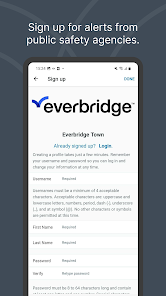
To activate your account, follow the link sent to your email upon registration. Click the link and set up your password to complete the activation process.

2

How do I contact Customer Service for the Everbridge app?

You can reach Everbridge Customer Service by calling their support number available on the official website or through the app's help section.

3

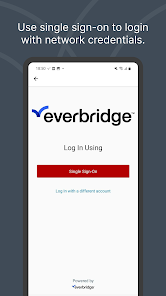
How do I log in to the Everbridge app?

To log in, open the app and enter your registered email and password. If you forget your password, use the "Forgot Password" link for recovery.

4

What is the Customer Number for Everbridge?

The Customer Number for Everbridge is typically provided during your account setup or can be obtained from your account manager. Check your account details for more information.

What's New

Improved the migration feature to make transferring data to the new Everbridge 360 app easier and more reliable.

Editor's Choice