This site uses cookies to enhance your user experience. By clicking any link on this site you are giving your consent to our cookie policy. Read more
Reject
Accept All

Advertiser and Editorial Disclosures

EchoLink

EchoLink

verified Verified App

Developer: Synergenics, LLC

  • category

    Category: Communication

  • price

    Price: free

  • age rating

    Age Rating: Everyone

  • rating

    Rating: 4.2

  • download

    Downloads: 500,000+

  • version

    Version: 1.8.8

Screenshot 1
Screenshot 2
Screenshot 3
Screenshot 4
Screenshot 5
Screenshot 6

Features & Highlights

Easy Communication

EchoLink simplifies communication by allowing users to connect seamlessly with other amateur radio operators across the globe. Whether you're at home or on the go, you can engage in real-time conversations through voice or text, fostering connections with like-minded enthusiasts.

Flexible Connection Options

EchoLink offers multiple ways to connect, whether through a computer, smartphone, or a traditional radio. This flexibility ensures that you can stay connected and enjoy the benefits of amateur radio, no matter your location or preferred device.

Global Network Access

With EchoLink, users can tap into a vast network of amateur radio operators worldwide. This global reach not only enhances your communication options but also opens the door to diverse conversations and experiences with people from various cultures and backgrounds.

User-Friendly Interface

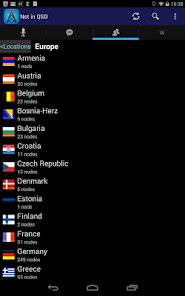
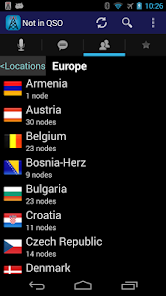
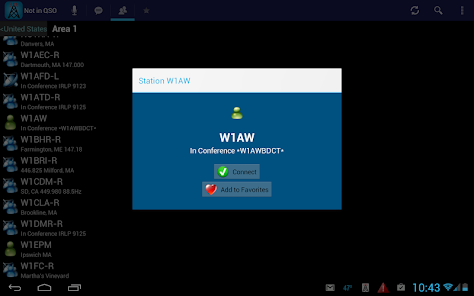
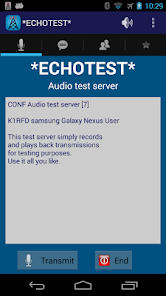
Designed with simplicity in mind, EchoLink features an intuitive interface that makes it easy for both beginners and seasoned users to navigate. With straightforward controls and clear icons, users can quickly access their favorite features without feeling overwhelmed.

Pros & Cons

Pros
  • Easy access to global ham radio networks
  • User-friendly interface for all skill levels
  • Connect with fellow enthusiasts anytime, anywhere
  • Supports both voice and text communications
  • Enhances emergency communication capabilities
Cons
  • Limited to internet-connected users only
  • Audio quality can be inconsistent
  • May experience latency issues during conversations
  • Vulnerable to unauthorized access or misuse

Real Experience Using EchoLink

Application Scenarios

EchoLink is designed for a variety of communication needs, making it a versatile tool for users across different contexts. Whether you are a student collaborating on a group project, a professional conducting remote meetings, or a family member staying connected with loved ones, EchoLink caters to all. The app supports high-quality voice and video calls, enabling seamless communication. Users can easily create or join channels for group discussions, making it ideal for educational settings or team projects. Additionally, EchoLink's ability to share files and screen makes it particularly useful for presentations, allowing users to illustrate their points effectively. The app's flexibility ensures that it can be integrated into both casual and formal environments, enhancing productivity and social interactions.

User Experience

The user experience on EchoLink is notably intuitive and user-friendly. Upon launching the app, users are greeted with a clean interface that simplifies navigation. The onboarding process is straightforward, allowing new users to get started quickly. The call quality is impressive, with minimal lag and clear audio, which is essential for effective communication. Users appreciate the ability to customize their profiles and set up notifications according to their preferences. The chat feature is robust, supporting text, voice messages, images, and even emojis, which adds a layer of fun to interactions. Furthermore, features such as call recording and the option to create private rooms enhance the app's functionality, making it a favorite among users looking for both casual and serious communication tools.

Pricing

EchoLink offers a competitive pricing model that caters to different user needs. The app is free to download and provides a comprehensive range of features without any initial cost. However, for users seeking enhanced functionalities, such as higher quality video calls or advanced administrative controls for larger groups, a premium subscription is available. This subscription is reasonably priced, offering good value considering the quality and range of services provided. Users often find this tier beneficial, especially in professional settings where they require additional features to manage meetings and collaborations effectively.

Updates & Support

Regular updates keep EchoLink at the forefront of communication technology. The development team actively listens to user feedback, implementing new features and improvements based on community suggestions. Users can expect periodic updates that address bugs, enhance performance, and introduce innovative functionalities. Customer support is also commendable, with a responsive team available through in-app messaging and email. The support resources, including FAQs and tutorial videos, are easily accessible, making it simple for users to resolve issues or learn about new features. Overall, the combination of regular updates and strong customer support reinforces EchoLink's commitment to providing a high-quality user experience.

verified Security & Privacy Review

EchoLink prioritizes user security and privacy through its robust data protection measures. The app employs end-to-end encryption for voice and video communications, ensuring that user conversations remain confidential and secure from unauthorized access. User data is stored on secure servers with advanced security protocols, minimizing the risk of data breaches. In terms of permissions, EchoLink requires access to the device's microphone and camera for its core functionalities. However, the app clearly outlines these permissions during the installation process, allowing users to make informed decisions. Additionally, users have the option to revoke permissions at any time through their device settings. EchoLink adheres to strict privacy practices, limiting data collection to what is necessary for app functionality. Personal information is not shared with third parties without user consent, and the app provides transparent privacy policies detailing data handling procedures. Overall, EchoLink demonstrates a strong commitment to protecting user privacy and ensuring a secure communication environment.

Reviews

4.2

“Easy to use and connect with others!”

“Great for ham radio communication on the go.”

“User-friendly interface makes it enjoyable to use.”

“Occasional connectivity issues, but overall a solid app.”

“Love the ability to chat with hams worldwide!”

FAQ

1

Does EchoLink collect my personal data?

EchoLink may collect minimal personal data necessary for the app's functionality, such as your call sign and registration information, but it does not share this data with third parties without consent.

2

Does EchoLink offer a free trial or free version?

Yes, EchoLink is available for free, allowing users to access its core features without a paid subscription.

3

Does EchoLink require an internet connection?

Yes, EchoLink requires a stable internet connection to function, as it operates over the internet to facilitate communication.

4

How can I contact support or send feedback for EchoLink?

You can contact EchoLink support or send feedback through their official website, where you can find a support section with contact details and a feedback form.

5

How do I manage or cancel my EchoLink subscription?

You can manage or cancel your EchoLink subscription through the app's settings or the app store through which you downloaded it, following the provided instructions for subscription management.

How to use EchoLink

1

How can I contact EchoLink customer service?

You can reach EchoLink customer service through their official website or support email for inquiries and assistance.

2

How do I find the customer number for EchoLink?

The customer number can typically be found in your account settings or welcome email after registration.

3

How do I log in to the EchoLink app?

Open the app, enter your username and password, and click on the login button to access your account.

4

Is there a process to activate the EchoLink app?

After downloading, create an account or log in with your existing credentials to activate the app.

Editor's Choice