This site uses cookies to enhance your user experience. By clicking any link on this site you are giving your consent to our cookie policy. Read more
Reject
Accept All
Dialpad

Dialpad

verified Verified App

Developer: Dialpad, Inc

  • category

    Category: Communication

  • price

    Price: free

  • age rating

    Age Rating: Everyone

  • rating

    Rating: 4.5

  • download

    Downloads: 500,000+

  • version

    Version: 48.0.0.7

Screenshot 1
Screenshot 2
Screenshot 3
Screenshot 4
Screenshot 5
Screenshot 6
Screenshot 7
Screenshot 8

Features & Highlights

AI-Powered Transcriptions

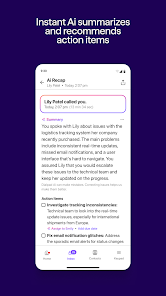
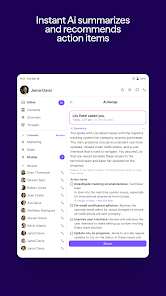
Dialpad offers AI-powered transcriptions that automatically convert your calls into written text, making it easier to capture important details without manual note-taking. This feature enhances accessibility and allows you to focus on the conversation rather than worrying about missing key points.

Analytics Dashboard

The analytics dashboard provides insightful metrics and performance data, helping teams understand call patterns and customer interactions. By visualizing trends and key performance indicators, you can make informed decisions to improve service quality and boost overall team efficiency.

Integrated Messaging

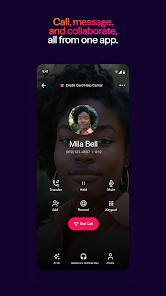
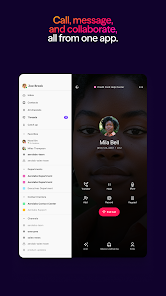
With integrated messaging capabilities, Dialpad allows seamless communication across voice, video, and chat. This means you can collaborate with your team in real-time, share files, or send quick messages, all within the same platform, streamlining your workflow and enhancing productivity.

Smart Call Routing

Dialpad's smart call routing ensures that every incoming call is directed to the right team member, reducing wait times and improving customer satisfaction. By leveraging AI technology, it learns from previous interactions to make intelligent routing decisions for optimal communication flow.

Pros & Cons

Pros
  • Seamless integration with popular business tools
  • User-friendly interface enhances productivity
  • Supports voice, video, and messaging in one platform
  • AI-driven insights improve team performance
  • Cloud-based access ensures flexibility and mobility
Cons
  • Limited features in lower-tier plans can hinder functionality
  • Integration with some apps may be challenging
  • Customer support response times can be slow
  • Learning curve for new users can be steep

Real Experience Using Dialpad

Application Scenarios

Dialpad is a versatile communication platform designed to enhance the way individuals and businesses connect. Whether you are a freelancer managing client calls, a small business owner coordinating team meetings, or part of a large enterprise handling customer interactions, Dialpad offers a feature set that caters to various scenarios. Its cloud-based VoIP services allow users to make and receive calls from any device, making it an ideal solution for remote work. Moreover, the integration with popular CRM systems enables sales teams to track customer interactions seamlessly, ensuring that no lead is left behind. Additionally, the platform’s video conferencing capabilities are perfect for virtual meetings, providing high-quality audio and video to facilitate clear communication.

User Experience

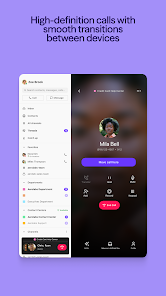
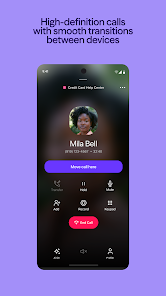
The user experience on Dialpad is generally smooth and intuitive. Upon first use, the interface is user-friendly, allowing even those with minimal tech knowledge to navigate with ease. The app’s design is clean and modern, with features organized logically, which helps users quickly access what they need. Users often praise the call quality, which is crisp and reliable, thanks to the app's advanced technology. Features like call recording, real-time transcription, and voicemail-to-text are particularly appreciated, as they enhance productivity and ensure important information is never missed. Furthermore, the mobile app mirrors the functionality of the desktop version, making it easy for users to switch between devices without losing context.

Pricing

Dialpad offers a range of pricing plans tailored to different user needs, which makes it accessible for both individuals and larger organizations. The basic plan is competitively priced, providing essential features suitable for freelancers and small teams. As businesses grow, they can opt for more advanced tiers that unlock additional functionalities such as advanced analytics, integration options, and enhanced security features. This tiered pricing strategy allows users to scale their communication tools as their demands evolve, ensuring that they only pay for the features they actually use.

Updates & Support

Dialpad is committed to continuous improvement and regularly rolls out updates to enhance the user experience. These updates often introduce new features, improve existing functionalities, and address any bugs reported by users. The support team is responsive and provides extensive resources, including a comprehensive knowledge base, FAQs, and live chat options. Many users have reported that the customer support is not only knowledgeable but also quick in resolving issues, which adds to the overall positive experience with the app. This commitment to support helps users feel confident in their investment, knowing assistance is readily available when needed.

verified Security & Privacy Review

Dialpad takes security and privacy seriously, employing robust measures to protect user data. The app utilizes end-to-end encryption for voice calls and messages, ensuring that conversations remain confidential. Additionally, Dialpad adheres to industry-standard security protocols, including secure socket layer (SSL) encryption for data transmission, safeguarding against unauthorized access. In terms of privacy practices, Dialpad is transparent about its data handling policies. Users can review the app's privacy policy, which outlines the types of data collected, usage, and sharing practices. The app requests permissions that are relevant to its core functionalities, such as accessing contacts and microphone, but it ensures that users are informed about these requests. Dialpad also offers options for users to manage their privacy settings, allowing for control over data sharing and notifications. Overall, Dialpad demonstrates a commitment to protecting user information while providing a functional communication platform, making it a reliable choice for professionals and businesses alike.

Reviews

4.5

“Great call quality and reliable connectivity.”

“User-friendly interface, easy to navigate.”

“Excellent customer support, quick response times.”

“Seamless integration with other tools and apps.”

“Affordable pricing for small businesses.”

Editor's Choice