This site uses cookies to enhance your user experience. By clicking any link on this site you are giving your consent to our cookie policy. Read more
Reject
Accept All
Boost Visual Voicemail

Boost Visual Voicemail

verified Verified App

Developer: DISH Wireless L.L.C.

  • category

    Category: Communication

  • price

    Price: free

  • age rating

    Age Rating: Everyone

  • rating

    Rating: 4.7

  • download

    Downloads: 10,000,000+

  • version

    Version: T.11.2.0.3

Screenshot 1
Screenshot 2
Screenshot 3
Screenshot 4
Screenshot 5
Screenshot 6
Screenshot 7

Features & Highlights

Custom Greeting Options

Personalize your voicemail experience with customizable greeting options. You can record a unique greeting for callers, allowing you to convey your personality and preferences, while also setting the right tone for your messages.

Enhanced Message Management

Boost Visual Voicemail allows you to easily manage your voicemail messages with a user-friendly interface. You can quickly listen to, delete, or save messages, making it simple to keep your inbox organized without the hassle of dialing in to listen to each one.

Transcription Services

With Boost Visual Voicemail, you can receive text transcriptions of your voicemail messages, making it easier to read through them at a glance. This feature is particularly useful for busy individuals who prefer to skim messages instead of listening to them, ensuring you never miss important information.

Visual Interface

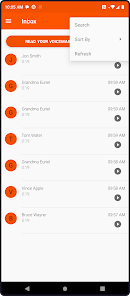
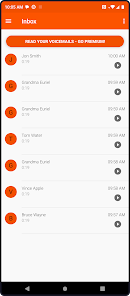
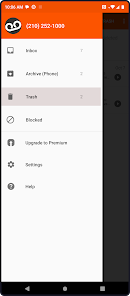
The app features an intuitive visual interface that displays all your voicemail messages in a list format. You can see who called, the time of the message, and even play them back with just a tap, enhancing your overall voicemail experience.

Pros & Cons

Pros
  • Access messages without dialing voicemail
  • View transcripts for quick message review
  • Easily manage messages with a simple interface
  • Receive notifications for new messages instantly
  • Customize greetings for a personal touch
Cons
  • Limited functionality compared to traditional voicemail systems
  • May experience delays in message notifications
  • Requires a stable internet connection to function
  • Not available on all devices or plans

Real Experience Using Boost Visual Voicemail

Application Scenarios

The Boost Visual Voicemail app is designed to enhance the way users manage their voicemail messages. Ideal for busy professionals, this app allows users to quickly access, listen to, and manage their voicemails without the need to dial into a traditional voicemail system. Whether you're in a meeting, commuting, or simply prefer a more streamlined approach to your messages, Boost Visual Voicemail provides an efficient solution. Users can read transcriptions of their voicemails, enabling them to prioritize their responses accordingly. Additionally, the app supports multiple accounts, making it suitable for individuals juggling personal and professional communications.

User Experience

The user experience with Boost Visual Voicemail is largely positive, characterized by an intuitive interface that simplifies navigation. Upon opening the app, users are greeted with a clean layout that displays their voicemails in chronological order. The ability to swipe and delete messages or mark them as read enhances usability. Users appreciate the transcription feature, which converts voice messages into text, making it easy to skim through messages without having to listen to each one. Furthermore, the app allows for easy sharing of voicemails via email or messaging platforms, which is a valuable feature for those who need to forward important messages. However, some users have reported occasional inaccuracies in transcription, particularly with names or industry jargon, which can lead to confusion.

Pricing

Boost Visual Voicemail operates on a freemium model. The base features of the app are available for free, which includes access to voicemail management and basic transcription services. However, users looking for advanced features, such as enhanced transcription accuracy and customization options, can opt for a premium subscription. The pricing is competitive, offering monthly and annual plans that cater to different user needs. Many users find the subscription worthwhile, given the time saved and the convenience offered by the app. Overall, the pricing structure is transparent, with no hidden fees, making it accessible for a wide range of users.

Updates & Support

The developers of Boost Visual Voicemail are proactive in rolling out updates that improve functionality and user experience. Regular updates often include bug fixes, performance enhancements, and new features based on user feedback. The app also boasts a dedicated support team, available through various channels, including email and in-app messaging. Users have reported responsive and helpful support when encountering issues or seeking assistance with the app's features. Additionally, an online FAQ section addresses common questions, reducing the need for direct support in many cases. Overall, the commitment to maintaining and improving the app contributes to a positive long-term user experience.

verified Security & Privacy Review

The Boost Visual Voicemail app prioritizes user security and privacy through a series of robust practices. All voice messages and associated data are encrypted during transmission, ensuring that sensitive information is shielded from unauthorized access. The app maintains a strict policy on data storage, retaining only necessary information to provide voicemail services while minimizing the collection of personal data. When users install the app, it requests permissions that are essential for its functionality, such as access to contacts and notifications. Users are encouraged to review these permissions carefully, as the app does not require unnecessary access to other personal data. Additionally, the app provides transparency regarding its data handling practices in its privacy policy, allowing users to understand how their information is used and managed. Boost Visual Voicemail also offers users the ability to delete messages and manage their stored data actively, giving them control over their information. Overall, the app demonstrates a commitment to safeguarding user privacy while delivering a seamless voicemail experience.

Reviews

4.7

“Easy to use and reliable voicemail management tool”

“Great for organizing and accessing messages quickly”

“Occasional glitches, but overall a solid app”

“Love the visual layout and features”

“Notifications could be more timely and accurate”

Editor's Choice