This site uses cookies to enhance your user experience. By clicking any link on this site you are giving your consent to our cookie policy. Read more
Reject
Accept All
Bluetooth File Transfer

Bluetooth File Transfer

verified Verified App

Developer: Medieval Software

  • category

    Category: Communication

  • price

    Price: free

  • age rating

    Age Rating: Everyone

  • rating

    Rating: 3.6

  • download

    Downloads: 10,000,000+

  • version

    Version: 5.67

Screenshot 1
Screenshot 2
Screenshot 3
Screenshot 4
Screenshot 5
Screenshot 6
Screenshot 7
Screenshot 8

Features & Highlights

Device Compatibility

This app supports a wide range of devices, ensuring that you can connect with smartphones, tablets, and laptops regardless of their brand. Its versatility means you won't be limited by device types, making it an essential tool for anyone needing to exchange files across platforms.

Easy File Sharing

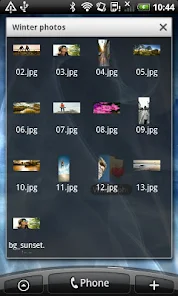
Bluetooth File Transfer makes sharing files a breeze with its straightforward interface. You can quickly send photos, documents, and other files to nearby devices without the hassle of cables or complicated setups, making it perfect for on-the-go sharing with friends or colleagues.

Multi-File Transfer

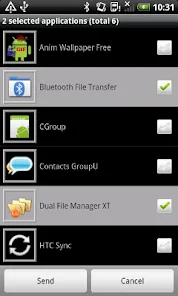
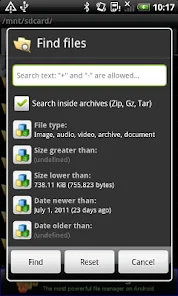
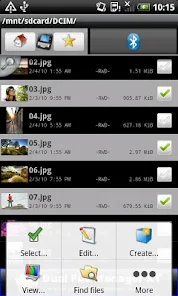
With Bluetooth File Transfer, you can send multiple files at once, saving you time and effort. Instead of sending items one by one, select a batch of files and share them in a single go, ensuring a smooth and efficient transfer experience.

User-Friendly Interface

The app features a clean and intuitive design that makes navigation simple for users of all tech levels. Even if you're not tech-savvy, you'll find it easy to locate files and initiate transfers, making the experience enjoyable and stress-free.

Pros & Cons

Pros
  • Wireless connection eliminates the need for cables
  • Convenient for transferring files between different devices
  • Quick sharing of photos and documents on-the-go
  • User-friendly interface simplifies the transfer process
  • Secure data transfer protects your files from interception
Cons
  • Limited range affects transfer reliability
  • Slower speeds compared to Wi-Fi
  • Prone to interference from other devices
  • Security risks with unauthorized access

Real Experience Using Bluetooth File Transfer

Application Scenarios

Bluetooth File Transfer is an essential tool for anyone who regularly shares files between devices without relying on internet access. Whether you're in a remote area or simply want to avoid data charges, this app shines in facilitating quick transfers. Common scenarios include sharing photos and videos during family gatherings, exchanging important documents with colleagues on the go, or sending music files between smartphones at a party. It can also be invaluable for transferring files between devices of different operating systems, making it an ideal solution for users with mixed-device environments. The ability to send multiple files at once, as well as folders, enhances its utility for users who need to transfer large amounts of data swiftly.

User Experience

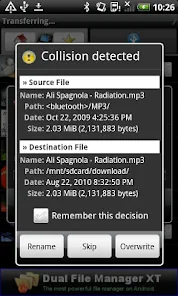
The user experience of Bluetooth File Transfer is generally straightforward and intuitive. Upon launching the app, users are greeted with a clean interface that allows for easy navigation. The app supports a wide range of file types, and the transfer speed is commendably quick, depending on the devices involved. Users appreciate the simplicity of pairing devices, which typically involves just a few taps. One standout feature is the ability to resume interrupted transfers, ensuring that users do not lose progress in case of connectivity issues. However, some users have reported occasional connectivity glitches, particularly when transferring larger files, which can be a minor inconvenience. Overall, the app is well-received, especially for its reliability and efficiency in handling file transfers.

Pricing

Bluetooth File Transfer is available for free, which makes it accessible to a wide range of users. While basic features are fully functional in the free version, there may be optional in-app purchases or premium features that enhance the user experience. Users can unlock additional functionalities, such as enhanced transfer speeds or ad-free usage, at a reasonable price. This pricing model is appealing, as it allows users to try the app without any financial commitment, ensuring they can evaluate its performance before deciding whether to invest in premium offerings.

Updates & Support

The developers of Bluetooth File Transfer are committed to providing regular updates to enhance functionality and address any bugs. Users have noted that updates often include new features that improve usability, such as support for additional file formats and better transfer protocols. Customer support is generally responsive, with a dedicated help section within the app that provides guidance and troubleshooting tips. Users can also access an online community for tips and shared experiences, which adds an extra layer of support. Overall, the ongoing commitment to updates and user support contributes positively to the app's reputation and reliability in the market.

verified Security & Privacy Review

The Bluetooth File Transfer app prioritizes user security and privacy, implementing several measures to safeguard sensitive data during file sharing. The app employs Bluetooth technology, which inherently limits exposure to external threats compared to internet-based file transfer methods. However, users should be cautious when enabling Bluetooth, as this can make devices discoverable to others nearby. The app requires specific permissions to function effectively, including access to Bluetooth and storage. Users are advised to review and manage these permissions to ensure that they align with their privacy preferences. The app does not request unnecessary permissions, focusing solely on what is vital for its operations. Importantly, the Bluetooth File Transfer app does not track or store personal user data, reinforcing its commitment to user privacy. All transferred files remain on the devices involved, and no information is sent to external servers. This approach minimizes the risk of data breaches and ensures that users maintain control over their files throughout the transfer process.

Reviews

3.6

“Fast transfers and easy to use!”

“Reliable app for sharing files.”

“User-friendly interface and quick setup.”

“Works flawlessly with multiple devices.”

“Great for transferring large files quickly.”

Editor's Choice