This site uses cookies to enhance your user experience. By clicking any link on this site you are giving your consent to our cookie policy. Read more
Reject
Accept All
AT&T Visual Voicemail

AT&T Visual Voicemail

verified Verified App

Developer: AT&T Services, Inc.

  • category

    Category: Communication

  • price

    Price: free

  • age rating

    Age Rating: Everyone

  • rating

    Rating: 3.1

  • download

    Downloads: 10,000,000+

  • version

    Version: 4.19.0.10243

Screenshot 1
Screenshot 2
Screenshot 3
Screenshot 4
Screenshot 5
Screenshot 6

Features & Highlights

Cloud Backup Integration

Enjoy peace of mind with cloud backup integration that automatically saves your voicemails for easy retrieval. This feature ensures that even if you lose your device or switch phones, your important messages are securely stored in the cloud, making it simple to access them whenever you need.

Customizable Notifications

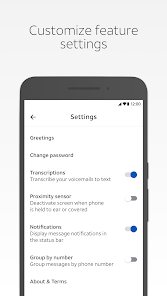
Stay informed with customizable notification settings that let you choose how and when you receive alerts for new voicemails. Whether you prefer silent notifications or distinct ringtones, you can tailor your voicemail alerts to fit your personal preferences, ensuring you never miss an important message.

User-Friendly Interface

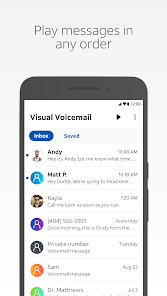
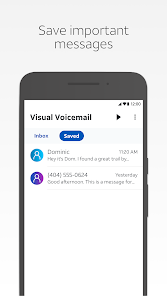
AT&T Visual Voicemail boasts a sleek and intuitive interface, making it easy for users to navigate their messages. With just a few taps, you can listen to, delete, or save voicemails, allowing for a hassle-free experience that keeps your voicemail organized and accessible at all times.

Visual Message Management

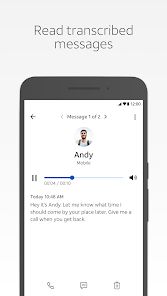
With AT&T Visual Voicemail, you can view a list of all your messages at a glance, complete with transcriptions for quick reading. This feature allows you to prioritize which messages to listen to first, helping you manage your time more effectively and ensuring you stay on top of your communications.

Pros & Cons

Pros
  • Easily view and manage messages in one place
  • Listen to messages in any order you choose
  • Receive visual notifications for new voicemails
  • Supports personalized greeting options for callers
  • Intuitive interface for quick and easy navigation
Cons
  • Limited compatibility with non-AT&T devices
  • High data usage for downloads
  • Voice-to-text accuracy can be poor
  • Lack of advanced features compared to competitors

Real Experience Using AT&T Visual Voicemail

Application Scenarios

AT&T Visual Voicemail serves as an essential tool for users who prefer a streamlined method of managing their voice messages. Whether you’re a busy professional juggling multiple tasks or a casual user wanting to keep track of personal messages, this app fits seamlessly into daily routines. Imagine you’re in a meeting and can’t pick up the phone; Visual Voicemail allows you to sift through messages at your convenience, giving priority to important calls while bypassing irrelevant ones. Additionally, travelers will appreciate the ability to access messages without having to dial into a voicemail system, making it easier to stay connected while on the go. In essence, this app is ideal for anyone seeking efficiency and ease in voicemail management.

User Experience

The user interface of AT&T Visual Voicemail is intuitive and user-friendly, making it accessible even for those less tech-savvy. Upon launching the app, users are greeted with a clean layout that displays all their voicemails in a list format, complete with caller IDs and timestamps. Playback controls are straightforward, allowing for easy navigation through messages. One standout feature is the ability to read transcriptions of voicemails, which can be a game-changer for quickly assessing messages without needing to listen to them. However, some users have reported occasional inaccuracies in transcription, which can lead to misunderstandings. Overall, the app enhances the voicemail experience, but there is room for improvement in transcription quality.

Pricing

AT&T Visual Voicemail is included for free with eligible AT&T plans, making it a cost-effective solution for existing customers. However, users should be aware that some features may require a specific plan or additional fees. For those who are not AT&T customers, the app is not available separately, which may limit its accessibility. For users seeking advanced features, such as enhanced transcription or additional storage, AT&T offers premium options at an extra cost. It is advisable for potential users to review their current plans and assess whether the app’s offerings align with their needs before committing.

Updates & Support

Regular updates to AT&T Visual Voicemail ensure that users benefit from the latest features and improvements. The app often receives enhancements that address bugs and performance issues, contributing to a more reliable experience. AT&T also provides robust customer support, with resources available through their website, including FAQs, troubleshooting guides, and live chat options. Users can reach out directly for assistance with specific issues, making it easier to resolve any concerns quickly. Overall, the combination of consistent updates and accessible support makes AT&T Visual Voicemail a dependable choice for managing voicemail effectively.

verified Security & Privacy Review

The AT&T Visual Voicemail app prioritizes user security and privacy by implementing several robust measures to protect sensitive information. The app requires permission to access the device's microphone and storage, essential for recording and storing voicemail messages securely. Users should be aware that granting these permissions is necessary for full functionality. Data transmitted through the app is encrypted, ensuring that voicemails remain confidential during transmission between the user’s device and AT&T’s servers. Furthermore, AT&T adheres to strict privacy practices, clearly outlining how user data is collected, used, and shared in their privacy policy. Users can manage their privacy settings directly within the app, allowing them to control what information is shared. However, as with any app handling personal data, users should remain vigilant and regularly review their privacy settings. Overall, AT&T Visual Voicemail demonstrates a strong commitment to safeguarding user data while providing an efficient voicemail management solution.

Reviews

3.1

“Easy to use and navigate!”

“Great features, love the transcription.”

“Occasionally glitches, needs improvement.”

“Fast access to messages, very convenient.”

“Notifications can be delayed sometimes.”

Editor's Choice