This site uses cookies to enhance your user experience. By clicking any link on this site you are giving your consent to our cookie policy. Read more
Reject
Accept All

Advertiser and Editorial Disclosures

Yoosee

Yoosee

verified Verified App

Developer: Gwell

Screenshot 1
Screenshot 2
Screenshot 3
Screenshot 4
Screenshot 5
Screenshot 6

Features & Highlights

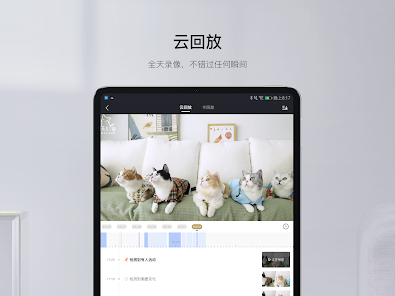
Cloud Storage Options

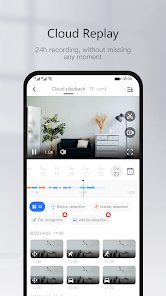
Yoosee offers flexible cloud storage options for your recorded footage, ensuring that important moments are captured and saved securely. With this feature, you can easily access your videos from anywhere, providing both convenience and peace of mind regarding your security needs.

Motion Detection Alerts

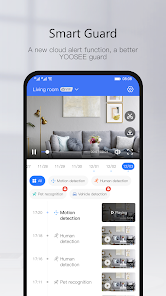
Stay informed with Yoosee's advanced motion detection alerts, which notify you instantly when movement is detected. This feature adds an extra layer of security, allowing you to respond quickly to any unusual activity, whether you’re at work or on vacation.

Real-Time Monitoring

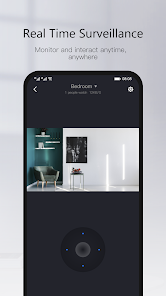
Yoosee provides seamless real-time monitoring, allowing users to keep an eye on their surroundings anytime, anywhere. With high-definition video streaming, you can easily check in on your home or office through your smartphone, ensuring peace of mind whether you’re near or far.

Two-Way Audio

One of the standout features of Yoosee is its two-way audio capability. This allows you to communicate directly through the camera, making it easy to interact with family members or pets while you’re away. It’s like being right there, even when you’re not.

Pros & Cons

Pros
  • Yoosee offers real-time video streaming for enhanced security monitoring.
  • The app provides easy remote access from anywhere, anytime.
  • Users enjoy simple installation with no complicated setup required.
  • High-definition video quality ensures clear and detailed surveillance footage.
  • Smart motion detection alerts keep you informed of any activity.
Cons
  • Limited technical support can frustrate users when issues arise.
  • The app's user interface may feel unintuitive for some.
  • Occasional connectivity problems disrupt real-time monitoring and notifications.

Real Experience Using Yoosee

Application Scenarios

Yoosee is a versatile application designed primarily for monitoring and security purposes, making it ideal for both personal and professional environments. Users can connect the app to various security cameras, enabling real-time surveillance and remote monitoring. This is particularly useful for homeowners looking to keep an eye on their property while away or for businesses needing to secure their premises. The app can also be employed in childcare settings, allowing parents to monitor their children's activities through smart cameras. Additionally, the ability to view multiple camera feeds simultaneously makes it a robust tool for those managing larger spaces or multiple locations.

User Experience

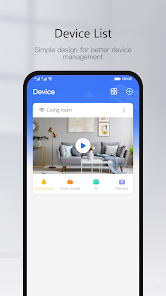
The overall user experience with Yoosee is commendable, thanks to its intuitive interface and straightforward navigation. Upon launching the app, users are greeted with a clean layout that makes accessing camera feeds simple and efficient. The video quality is generally high, with clear images and smooth streaming, which is crucial for effective surveillance. Users appreciate the app's motion detection feature, which sends notifications to their devices whenever movement is detected, enhancing security. Customization options allow users to adjust settings according to their preferences, such as setting up specific zones for motion alerts. However, some users have reported occasional connectivity issues, particularly when the internet signal is weak, which can disrupt the viewing experience.

Pricing

Yoosee is free to download and offers a variety of features at no cost, making it accessible to a wide audience. The app does include optional in-app purchases for premium features, such as cloud storage for recorded footage, enabling users to access their video history without needing physical storage solutions. This pricing model allows users to choose the functionalities they need without committing to a subscription plan. Overall, the app provides excellent value for those seeking a cost-effective surveillance solution.

Updates & Support

Yoosee is regularly updated to improve functionality and user experience. Developers actively listen to user feedback and incorporate suggestions into updates, ensuring that the app remains relevant and user-friendly. The support system is robust, with a dedicated FAQ section and responsive customer service, helping users troubleshoot any issues efficiently. Additionally, the community forums provide a platform for users to share experiences and solutions, fostering a sense of support among users. Overall, the commitment to regular updates and effective support enhances the overall reliability of the Yoosee app.

verified Security & Privacy Review

The Yoosee app prioritizes user data security and privacy, employing encryption protocols to safeguard video feeds and personal information. However, users should be aware of the permissions the app requests upon installation, which include access to the camera, microphone, and location services. While these permissions are essential for the app's functionality, they may raise privacy concerns for some users. Additionally, Yoosee’s privacy policy outlines how user data is collected, stored, and utilized. The app does not share personal information with third parties without user consent, but it is crucial for users to regularly review privacy settings and permissions to ensure their data remains protected. Users are encouraged to use strong, unique passwords and enable two-factor authentication where available to further enhance account security. Overall, while Yoosee implements adequate security measures, users must remain vigilant about their privacy settings and permissions to maintain control over their personal data.

Reviews

3.8

“User-friendly interface with great live streaming quality”

“Reliable security camera for home monitoring”

“Easy setup process and good app performance”

“Excellent customer support and quick response times”

“Affordable price with solid features for its class”

FAQ

1

Can I submit suggestions or feedback to Yoosee?

Yes, Yoosee encourages users to submit suggestions or feedback through their support channels, which can usually be found in the app's settings or on their official website.

2

Does Yoosee collect my personal data?

Yes, Yoosee may collect certain personal data, such as your account information and device data, to provide its services and improve user experience.

3

Does Yoosee support offline use?

Yoosee requires an internet connection to function effectively, as it relies on real-time data streaming from connected devices.

4

How do I cancel my Yoosee subscription?

To cancel your Yoosee subscription, you can go to your account settings within the app or the app store from which you purchased the subscription and follow the cancellation instructions.

5

How much does a subscription to Yoosee cost?

Subscription costs for Yoosee may vary depending on the features you choose, but generally, it offers competitive pricing for its premium services.

How to use Yoosee

1

Can I activate my account using my customer number?

Yes, you can activate your account using your customer number during the registration process.

2

Can I change my customer number after activation?

Unfortunately, customer numbers cannot be changed after activation; please contact customer service for further options.

3

How can I contact customer service if my account isn't activating?

For activation issues, reach out to customer service via the app or their website for prompt help.

4

How can I reach customer service for Yoosee?

You can contact Yoosee customer service through the app or their official website's support section.

5

How do I log in if I haven't activated my account yet?

You must activate your account first using the provided activation link before you can log in.

Editor's Choice