This site uses cookies to enhance your user experience. By clicking any link on this site you are giving your consent to our cookie policy. Read more
Reject
Accept All
Screen Recorder - AZ Recorder

Screen Recorder - AZ Recorder

verified Verified App

Developer: AZ Screen Recorder

Screenshot 1
Screenshot 2
Screenshot 3
Screenshot 4
Screenshot 5
Screenshot 6

Features & Highlights

Easy Editing Tools

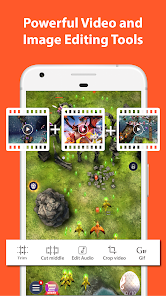
After recording, you can use AZ Recorder's built-in editing features to trim, cut, and merge your videos effortlessly. This user-friendly functionality lets you enhance your recordings directly within the app, saving you time and hassle by eliminating the need for separate editing software.

High-Quality Recording

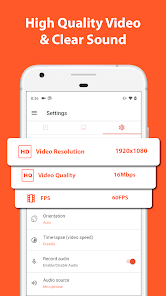
Capture your screen in stunning high definition with AZ Recorder, ensuring that every detail is crystal clear. Whether you're creating tutorials, gameplay videos, or presentations, this feature guarantees that your content looks professional and polished, making it perfect for sharing with friends or followers.

Live Streaming Capability

AZ Recorder allows you to broadcast your screen live to platforms like YouTube and Facebook, making it perfect for gamers, educators, or anyone wanting to engage with an audience in real time. This feature enhances your streaming experience by providing a seamless connection to your followers, allowing for instant interaction.

No Time Limit

Unlike many other screen recording apps, AZ Recorder offers unlimited recording time, allowing you to capture long sessions without interruptions. This is especially beneficial for gamers and educators who need to record extensive gameplay or detailed instructional videos without worrying about cutting off important content.

Pros & Cons

Pros
  • High-quality screen recording for clear visuals
  • No time limit for extended recordings
  • User-friendly interface for easy navigation
  • Supports multiple formats for versatile sharing
  • Built-in editing tools for quick post-production
Cons
  • Limited editing features for recorded videos
  • Watermark on free version can be distracting
  • Performance issues on older devices
  • Ads may interrupt user experience

Real Experience Using Screen Recorder - AZ Recorder

Application Scenarios

Screen Recorder - AZ Recorder is a versatile application that caters to a wide range of recording needs. Whether you're a gamer looking to capture your gameplay, a teacher wanting to create instructional videos, or simply someone who wants to record a video call, this app has you covered. Its intuitive interface allows users to start recording instantly, making it ideal for spontaneous situations. Additionally, the app supports various resolutions and frame rates, enabling users to tailor their recordings to suit their specific requirements. This flexibility makes it suitable for both casual users and professionals alike, allowing for high-quality content creation on the go.

User Experience

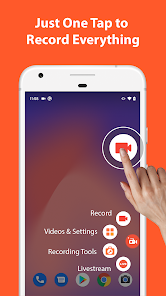
The user experience of AZ Recorder is commendable, characterized by its straightforward navigation and responsive controls. Upon launching the app, users are greeted with a clean and uncluttered interface, making it easy to access all features. Recording can be initiated with just a tap, and there are options to include audio from the microphone or system sound, depending on the user's needs. The editing tools integrated into the app also stand out, allowing users to trim recordings, add music, and incorporate text overlays seamlessly. Furthermore, the app performs well in terms of stability, with minimal lag during recording sessions. Overall, the experience is smooth, providing users with the confidence to produce high-quality recordings without a steep learning curve.

Pricing

AZ Recorder offers a free version that provides essential recording features, making it accessible to a wide audience. However, for users seeking more advanced functionalities, such as removing ads or accessing premium editing tools, the app offers a subscription model. The pricing is competitive, and many users find that the investment is justified given the quality and range of features available. The app also occasionally runs promotional offers, allowing users to explore premium features at a reduced cost, which enhances its appeal.

Updates & Support

The developers of AZ Recorder are proactive in providing updates and support, ensuring that users have access to the latest features and improvements. Regular updates introduce new functionalities and address any bugs, enhancing overall app performance. The support team is responsive, with various channels available for users to seek assistance, including in-app FAQs and direct customer support options. This commitment to user satisfaction has helped foster a loyal community of users who appreciate the ongoing enhancements to the application.

verified Security & Privacy Review

The Screen Recorder - AZ Recorder app prioritizes user privacy and data security while providing its screen recording features. The app is designed to operate without requiring rooting or additional modifications to your device, which enhances its security profile. However, it does request several permissions to function effectively, such as access to your microphone, storage, and screen overlay. Users should be mindful when granting these permissions, as they can potentially lead to unauthorized access to personal data. AZ Recorder’s privacy policy outlines its commitment to user data protection, stating that it does not collect or store any personal information without consent. The app processes recordings locally on the device, minimizing the risk of data breaches associated with cloud storage. Furthermore, users have the option to manage their recordings and delete them at any time, providing additional control over their content. Overall, while the app is generally secure and respects user privacy, it is essential for users to remain vigilant about the permissions they grant and to stay informed about updates to the app's privacy practices.

Reviews

4.8

“Easy to use and reliable for recording!”

“High-quality recordings with no watermarks.”

“Great features, but ads can be intrusive.”

“Excellent for gaming tutorials and presentations.”

“User-friendly interface with helpful editing tools.”

Editor's Choice