This site uses cookies to enhance your user experience. By clicking any link on this site you are giving your consent to our cookie policy. Read more
Reject
Accept All

Advertiser and Editorial Disclosures

YouTube

YouTube

verified Verified App

Developer: Google LLC

Screenshot 1
Screenshot 2
Screenshot 3
Screenshot 4
Screenshot 5
Screenshot 6

Features & Highlights

Live Streaming

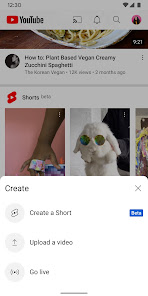
YouTube offers an engaging live streaming feature that allows creators to connect with their audience in real-time. Whether for gaming, Q&A sessions, or live events, this capability fosters community interaction and allows viewers to participate actively through live chats.

Offline Viewing

With YouTube's offline viewing option, you can download videos to watch later without an internet connection. This is perfect for trips or areas with limited access, ensuring you never miss out on your favorite content, no matter where you are.

Playlists and Libraries

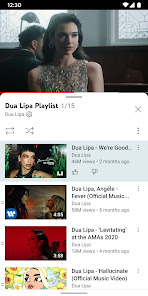
Organizing your favorite videos has never been easier with YouTube's playlist feature. You can create custom playlists to group your top picks, making it simple to revisit them or share with friends, while also exploring other users' playlists for new discoveries.

Video Recommendations

YouTube's intelligent algorithm curates personalized video suggestions based on your viewing history and preferences, ensuring that you discover content that resonates with your interests. This feature enhances your experience by making it easier to find new creators and topics that you might love.

Pros & Cons

Pros
  • Access a vast library of videos on countless topics and interests.
  • Enjoy personalized recommendations tailored to your viewing habits.
  • Easily create and share your own videos with a global audience.
  • Watch offline by downloading videos for later viewing.
  • Engage with communities through comments and live streams for real-time interaction.
Cons
  • Limited offline viewing options can hinder access to content.
  • Frequent ads disrupt the viewing experience and annoy users.
  • Algorithm-driven recommendations often lead to repetitive content suggestions.

Real Experience Using YouTube

Application Scenarios

YouTube serves as a versatile platform catering to a plethora of scenarios. Whether you’re looking to unwind after a long day with entertaining videos, seeking educational content to enhance your knowledge, or wanting to promote your own creations, YouTube accommodates all. Students can utilize the app for study aids, watching tutorials on complex subjects, while professionals often turn to it for industry insights and trends. The app is also a haven for content creators, offering tools for video editing and audience engagement. Whether you’re commuting, exercising, or relaxing at home, YouTube provides endless options to fit your lifestyle.

User Experience

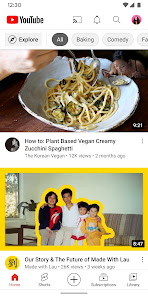
The user experience on YouTube is largely intuitive, designed to keep users engaged. The interface is clean and straightforward, allowing easy navigation through various categories such as trending, subscriptions, and personalized recommendations based on viewing history. Videos load quickly and can be watched in various resolutions, accommodating different internet speeds and device capabilities. The comment section fosters community interaction, enabling users to share their thoughts and connect with like-minded individuals. The ability to create playlists and save videos for future viewing enhances the user experience, making it easy to curate content according to individual preferences. Overall, YouTube excels in creating a user-friendly environment that encourages exploration and discovery.

Pricing

YouTube offers a free version, which is ad-supported, allowing users to access a vast library of content without any upfront costs. For those seeking an uninterrupted experience, YouTube Premium is available at a monthly subscription fee. This premium service not only removes ads but also allows offline viewing and access to YouTube Music, providing a comprehensive audio-visual experience. The pricing is competitive, and the added benefits of premium membership make it an appealing option for avid users who wish to enhance their viewing experience without distractions.

Updates & Support

YouTube consistently rolls out updates to improve functionality and enhance user experience. These updates often include new features, bug fixes, and performance improvements. The platform is also proactive in addressing user feedback, frequently implementing changes based on community suggestions. For support, YouTube offers a dedicated help center with articles and tutorials to assist users in navigating the app’s features. Additionally, users can report issues or seek assistance through community forums and social media channels, ensuring that help is readily available. Overall, YouTube’s commitment to ongoing improvements and robust support mechanisms contribute significantly to its lasting popularity and user satisfaction.

verified Security & Privacy Review

The YouTube app prioritizes user security and privacy through a combination of robust data protection measures and transparent privacy practices. Users are informed about the types of data collected, which include viewing history, search queries, and interaction metrics, allowing for a personalized experience. This data is typically used to enhance content recommendations and improve the overall user experience. YouTube employs encryption protocols to safeguard user data during transmission, ensuring that sensitive information remains protected from unauthorized access. However, the app requires several permissions, including access to the device's camera and microphone, which may raise privacy concerns for some users. It is crucial for users to review these permissions and adjust them according to their comfort levels. The platform also provides users with options to manage their privacy settings, including the ability to delete watch history and control ad personalization. Although YouTube is committed to protecting user data, it is advisable for users to stay vigilant and regularly review their privacy settings to maintain control over their information.

Reviews

3.9

“Great content variety and endless entertainment options!”

“User-friendly interface makes navigation easy.”

“Video quality is consistently high and reliable.”

“Fantastic platform for learning and discovery.”

“Community features enhance viewer engagement significantly.”

FAQ

1

Can I submit suggestions or feedback to YouTube App?

Yes, users can submit suggestions or feedback through the app's feedback feature or by visiting the YouTube Help Center online.

2

Does YouTube App collect my personal data?

Yes, YouTube App collects personal data to enhance user experience, provide personalized content, and support advertising; users can manage their privacy settings in the app.

3

Does YouTube App support offline use?

Yes, YouTube App allows users to download videos for offline viewing, but this feature may require a YouTube Premium subscription.

4

How do I cancel my YouTube App subscription?

To cancel your YouTube App subscription, go to your account settings, select "Billing," and follow the prompts to cancel your subscription.

5

How much does a subscription to YouTube App cost?

A subscription to YouTube Premium typically costs around $11.99 per month, but pricing may vary based on location and any ongoing promotions.

How to use YouTube

1

How can I deactivate my YouTube account?

To deactivate, go to your Google Account settings, select "Data & personalization," then "Delete a service" and choose YouTube. Follow the prompts to deactivate.

2

How do I activate my YouTube Premium subscription?

To activate YouTube Premium, go to the YouTube app, tap on your profile, select "Get YouTube Premium," and follow the on-screen instructions to subscribe.

3

How do I change my YouTube account settings?

Open the YouTube app, tap on your profile icon, and select "Settings" to modify your account preferences and privacy settings.

4

How do I contact YouTube customer service?

You can reach YouTube customer service through the Help Center on their website or by using the support options in the app. Look for the "Help" section for assistance.

5

How do I find my YouTube customer number?

YouTube does not use a traditional customer number. Instead, support is linked to your Google account, which you can access through your account settings.

Editor's Choice