This site uses cookies to enhance your user experience. By clicking any link on this site you are giving your consent to our cookie policy. Read more
Reject
Accept All
GOM Player

GOM Player

verified Verified App

Developer: GOM & COMPANY

Screenshot 1
Screenshot 2
Screenshot 3
Screenshot 4
Screenshot 5
Screenshot 6

Features & Highlights

Built-In Codec Finder

GOM Player includes a handy built-in codec finder that automatically searches for missing codecs. If you encounter a file that won't play, the player will guide you to the necessary download, making it a breeze to enjoy your favorite content without technical hassles.

Customizable Interface

GOM Player offers a highly customizable interface that allows users to personalize their viewing experience. You can adjust the layout, choose different skins, and modify controls to suit your preferences, making it easy to create a player that feels just right for you.

Screen Capture Functionality

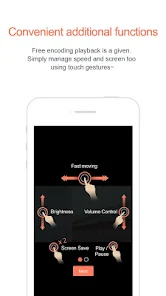
With GOM Player's screen capture feature, you can easily take snapshots of your favorite scenes. This handy tool allows you to save memorable moments from videos as images, perfect for sharing or for your personal collection.

Wide Format Support

This player boasts impressive support for a vast array of video and audio formats. Whether you're watching a classic film or a modern web series, GOM Player ensures compatibility with everything from AVI to MKV, so you can enjoy your media without worrying about file types.

Pros & Cons

Pros
  • Supports a wide range of video formats
  • User-friendly interface for easy navigation
  • Advanced playback options enhance viewing experience
  • Customizable settings for personalized performance
  • Lightweight and fast, saving system resources
Cons
  • Limited support for certain video formats
  • User interface can feel cluttered and confusing
  • Occasional stability issues during playback
  • Frequent ads in the free version

Real Experience Using GOM Player

Application Scenarios

GOM Player shines in a variety of application scenarios, catering to both casual users and multimedia enthusiasts. Whether you're watching movies, streaming online content, or viewing home videos, GOM Player provides a versatile platform to meet your needs. Its support for a wide range of video formats—including AVI, MP4, MKV, and more—ensures that users can play virtually any file without the need for additional codecs. The application is also handy for educational purposes, allowing students to watch lectures or tutorials with ease. Additionally, the built-in subtitle search feature enhances the viewing experience for non-native speakers, as it automatically finds and syncs subtitles for movies and shows. Whether you are using it on a PC or mobile device, GOM Player adapts seamlessly to various contexts, making it a reliable choice for all your media playback needs.

User Experience

The user experience offered by GOM Player is a standout feature that sets it apart from other media players. The interface is sleek, modern, and intuitive, making it easy for users of all skill levels to navigate through its options. Customizable skins and themes allow users to personalize their viewing experience, while the advanced playback features—such as speed control, video effects, and audio adjustments—give users complete control over their media. Additionally, the player’s ability to play damaged or incomplete files is a significant advantage, as it ensures that users can still enjoy their content without hassle. With a responsive design and minimal buffering, GOM Player provides a smooth playback experience that keeps users engaged. However, some users may find the initial setup slightly overwhelming due to the wealth of features available, but the overall functionality makes it worthwhile.

Pricing

GOM Player is free to download and use, which is a major draw for many users. The base version provides an extensive array of features without any cost, making it accessible to a broad audience. However, for those seeking an ad-free experience and additional premium features, GOM Player offers a subscription model. This premium version includes benefits such as advanced video editing tools, enhanced playback options, and priority customer support. The pricing is competitive within the media player market, making it a worthwhile investment for users who wish to elevate their viewing experience and eliminate interruptions caused by ads.

Updates & Support

GOM Player is regularly updated to ensure compatibility with the latest video formats and to enhance overall functionality. The developers are proactive in addressing user feedback and resolving bugs, which contributes to the application’s reliability. Users can expect regular improvements that keep the player running smoothly and efficiently. Customer support is readily available through the official website, where users can access FAQs, troubleshooting guides, and community forums. The active community surrounding GOM Player also serves as a valuable resource, allowing users to share tips and solutions. Overall, the commitment to updates and user support enhances the GOM Player experience, making it a dependable choice for media playback.

verified Security & Privacy Review

GOM Player places a strong emphasis on user security and privacy, implementing various measures to protect personal information. The app does not require excessive permissions, which minimizes the risk of exposing sensitive data. Users can enjoy their media content without needing to grant unnecessary access to their device’s storage, camera, or microphone. The developers have established a transparent privacy policy, detailing how user data is collected, used, and shared. GOM Player primarily collects data to enhance user experience and improve app functionality. This data is anonymized and aggregated, ensuring that individual identities remain protected. Additionally, GOM Player supports encrypted connections, safeguarding user data during transmission. The app also allows users to manage their data preferences easily, providing options for opting out of data collection practices. Overall, GOM Player demonstrates a commitment to maintaining user privacy and security, making it a reliable choice for those concerned about data protection while enjoying their multimedia experiences.

Reviews

3.5

“Great playback quality and versatile format support!”

“User-friendly interface with customizable features.”

“Lightweight and efficient, perfect for older devices.”

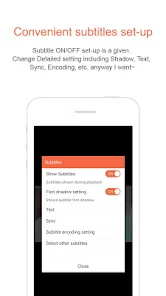
“Excellent subtitle support, easy to sync.”

“Frequent updates enhance performance and stability.”

Editor's Choice