This site uses cookies to enhance your user experience. By clicking any link on this site you are giving your consent to our cookie policy. Read more
Reject
Accept All

Advertiser and Editorial Disclosures

Foscam

Foscam

verified

Foscam.Inc

2.6
Rating
1,000,000+ Downloads
5.3.19 Version
Screenshot 1
Screenshot 2
Screenshot 3
Screenshot 4
Screenshot 5
Screenshot 6

Features & Highlights

Cloud Storage Options

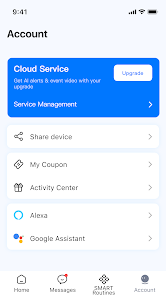
With flexible cloud storage options, Foscam makes it easy to save and access your recordings securely. Choose the plan that fits your needs and enjoy peace of mind knowing that your footage is safely stored and retrievable from anywhere.

HD Video Quality

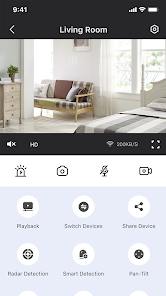
Foscam delivers stunning HD video quality, ensuring you can see every detail with clarity. Whether it's day or night, the advanced image sensor provides crisp visuals, making it easy to monitor your home or business from anywhere at any time.

Smart Motion Detection

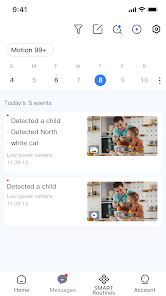
Foscam's smart motion detection technology sends instant alerts to your device, keeping you informed of any unusual activity. Customize detection zones and sensitivity settings to reduce false alarms, ensuring you only receive notifications when it truly matters.

Two-Way Audio

Stay connected with the built-in two-way audio feature, which allows you to communicate directly through the camera. Whether you're checking in on your pets or talking to family members, this feature brings a sense of presence to your monitoring experience.

Pros & Cons

Pros
  • High-definition video quality for clear monitoring
  • User-friendly interface for easy setup and control
  • Reliable remote access from any device anytime
  • Robust night vision for 24/7 surveillance
  • Wide range of models for diverse needs
Cons
  • Limited customer support options available
  • Connectivity issues reported by users
  • Software updates can be inconsistent
  • Privacy concerns with data handling practices

Real Experience Using Foscam

Application Scenarios

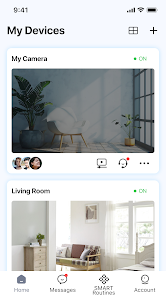
The Foscam app is versatile, catering to various surveillance needs, making it ideal for both residential and commercial use. Users can seamlessly monitor their homes, offices, or retail spaces, ensuring safety and security at all times. With the ability to connect to multiple cameras, the app is perfect for those who wish to keep an eye on different areas simultaneously. For families, the app provides peace of mind by allowing parents to monitor children or pets, and for businesses, it offers robust oversight of premises to deter theft and ensure employee safety. Moreover, the app's remote access feature enables users to check live feeds from anywhere in the world, making it an essential tool for frequent travelers or those managing properties from afar.

User Experience

The user experience of the Foscam app is generally smooth and intuitive. Upon installation, users are greeted with a simple interface that makes navigating through features easy, even for those who may not be tech-savvy. Setting up the cameras is straightforward, with guided prompts to connect devices quickly. Live streaming quality is commendable, offering clear video feeds, and the added night vision functionality enhances usability in low-light conditions. Users appreciate the ability to receive motion alerts and customize settings according to their preferences. However, some users have reported occasional connectivity issues, which can be frustrating, especially during critical monitoring times. Overall, the Foscam app delivers a satisfactory user experience with its comprehensive features and user-friendly layout.

Pricing

The Foscam app itself is free to download, which is a significant advantage for users looking for budget-friendly surveillance solutions. However, users should be aware that while the app is free, some premium features may require additional purchases or subscriptions. Foscam offers various camera models at different price points, allowing users to choose according to their specific needs and budget. Overall, the pricing structure is competitive within the home security market, providing value for those looking to implement effective monitoring without breaking the bank.

Updates & Support

Foscam is committed to improving its app, regularly releasing updates that enhance functionality and security. Users can expect periodic enhancements that address bugs or introduce new features, ensuring the app remains relevant and user-friendly. The support team is also proactive, offering assistance through various channels, including email and online forums. Users have noted that response times are generally quick, and the support staff is knowledgeable, helping resolve issues efficiently. Overall, Foscam's dedication to updates and support contributes to a positive user experience, reassuring customers that they are investing in a reliable product.

verified Security & Privacy Review

The Foscam app prioritizes user security and privacy, implementing several measures to safeguard personal data. It employs encryption protocols for data transmission, ensuring that video feeds and user credentials are protected from unauthorized access. However, users should remain vigilant about the security of their Wi-Fi networks, as vulnerabilities in home networks can compromise security. Regarding permissions, the app requires access to the camera, microphone, and storage, which are essential for its functionality. Users are advised to review these permissions carefully and only grant access to features that are necessary for their use of the app. It is also crucial to regularly update the app to benefit from the latest security patches and enhancements. Foscam has a privacy policy in place that outlines data collection practices, stating that user information is not sold to third parties. However, users should be aware of the potential risks associated with cloud services and consider local storage options if privacy is a major concern. Overall, while Foscam takes steps to protect user data, individuals should remain proactive in managing their security settings.

User Reviews

  • affordable lawn care and repair buy/sell/ trade
    2021/03/21

    Update no I will not contact your support team! You took away the free cloud saving that was part of the reason I bought the camera! Yea it was only 3 day saving but still it was part of the purchase of the camera. I have very little free time and what I do have worth of free time I sure don't want to spend emailing a bunch of people that won't have a clue on how to resolve the issue as they are improperly trained and reply back with generic responses! I know as I deal with it all the time!

  • Dana
    2022/02/05

    Worse than ever. I've had nothing but issues lately that never had happened prior. Camera take too long to load. I've paid for cloud services and it still will not record or let me go back and view. I've put in multiple ticket requests. They just tell me to restart and reset everything over and over and nothing fixes it. Ever had these issues in the beginning. My internet and router have not changed.

  • S C
    2022/01/26

    It does the job, but I have huge issues getting the feed to load. I have to either reset my phone, or shut down and open the app many times every time I want to see the feed. Also, it will randomly freeze, and unless I check the small timer in the corner, I won't realize. Using this as a puppy cam, it's stressful to know I could think my dog is sleeping, but really she's causing trouble. The audio quality is also very poor. It picks up on ambient noise, like the heating, more than voices.

  • Lakiesha Williams
    2021/04/04

    So my camera was taking forever to load and was only showing the same screen from 3 days ago with no change of time, date, ect....updated: sop couldn't find the problem and finally just webby home and unplugged everything, and plugged it back in --Result-- still loads slow, but it's up to date and running ;) and speed is a "little" faster at getting to the live screen than before. Haven't had any of problems other than that so far

  • A Google user
    2019/07/14

    It is almost one year that i got this app and the camera. Still i cannot make it work consistently. I called the company 4 times somewhere in China, they are hard to reach and when you finally reach someone, they are very hard to understand. they have not resolve the problem yet, after one year... My camera keep going off and i cannot have a live feeding/connection consistently. 50 or 60 % of the time the camera is off. Don't waste your time with this. The app ALFRED is a better alternative.

Review Source: Google Play store public user reviews.

FAQ

1

Does Foscam collect my personal data?

Foscam may collect certain personal data as outlined in their privacy policy, primarily for app functionality and service improvements. Users are encouraged to review the policy for specific details on data collection and usage.

2

Does Foscam offer a free trial or free version?

Foscam does not typically offer a free trial or free version of the app; however, basic features may be available without a subscription for certain camera functionalities.

3

Does Foscam require an internet connection?

While you can access some features of Foscam over a local network without an internet connection, a stable internet connection is required for remote access, cloud services, and firmware updates.

4

How can I contact support or send feedback for Foscam?

You can contact Foscam support through their official website, where you’ll find options for live chat, email, or a support ticket system. Feedback can also be submitted through the app or their website.

5

How do I manage or cancel my Foscam subscription?

You can manage or cancel your Foscam subscription through the app settings or account management section. Detailed instructions are typically provided in the app or on the Foscam website.

How to use Foscam

1

How can I contact Foscam customer service?

You can reach Foscam customer service via their official website or by calling their support number listed in the contact section.

2

How do I activate my Foscam camera?

To activate your Foscam camera, connect it to your network, open the app, and follow the on-screen instructions to add the camera.

3

How do I find the customer service number for Foscam?

The customer service number can be found on the Foscam official website under the support or contact section.

4

How do I log in to the Foscam app?

Open the Foscam app, enter your username and password, then tap 'Login' to access your camera feeds.

5

Is activation necessary for the Foscam app?

Yes, activation is necessary to connect and manage your camera through the Foscam app.

What's New

Optimized the interactive experience and fixed bugs

Editor's Choice