This site uses cookies to enhance your user experience. By clicking any link on this site you are giving your consent to our cookie policy. Read more
Reject
Accept All

Advertiser and Editorial Disclosures

EZVIZ

EZVIZ

verified

EZVIZ Inc.

4.6
Rating
10,000,000+ Downloads
7.2.1.0109 Version
Screenshot 1
Screenshot 2
Screenshot 3
Screenshot 4
Screenshot 5
Screenshot 6
Screenshot 7
Screenshot 8
Screenshot 9
Screenshot 10
Screenshot 11
Screenshot 12
Screenshot 13
Screenshot 14
Screenshot 15

Features & Highlights

Cloud Storage Options

EZVIZ offers flexible cloud storage solutions, giving you peace of mind by securely saving your recordings. This feature ensures that important footage is easily accessible whenever you need it, without the worry of losing critical data.

High-Definition Video Quality

Experience crystal-clear visuals with EZVIZ's high-definition video capture. The cameras deliver sharp and vibrant images, day or night, ensuring you never miss a moment. This feature is perfect for monitoring your home or business with the clarity you deserve.

Smart Home Integration

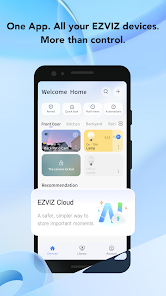
EZVIZ seamlessly integrates with various smart home platforms, allowing users to control their devices with ease. Whether through voice commands or mobile apps, managing your security has never been simpler, making it an ideal choice for tech-savvy homeowners looking to enhance their living spaces.

Two-Way Audio

Stay connected with the two-way audio feature, which allows you to communicate directly through the camera. Whether you want to greet visitors or check in on pets, this capability adds an extra layer of convenience and security to your surveillance system.

Pros & Cons

Pros
  • High-definition video quality for clear monitoring.
  • User-friendly app for remote access and control.
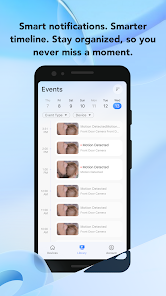
  • Smart motion detection alerts for enhanced security.
  • Flexible installation options suit various environments.
  • Affordable pricing without compromising on features.
Cons
  • Limited integration with third-party smart home devices
  • Privacy concerns over data security
  • Occasional connectivity issues in remote areas
  • Customer support can be slow to respond

Real Experience Using EZVIZ

Application Scenarios

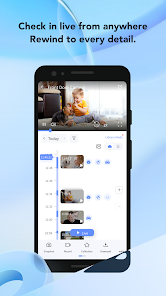
The EZVIZ app is designed to enhance the functionality of EZVIZ smart security cameras and devices, making it ideal for a variety of scenarios. Homeowners can use the app to monitor their properties in real-time, receiving instant alerts for any unusual activity. This capability is particularly beneficial for families with children or elderly members, as users can ensure their safety with ease. Additionally, small business owners can leverage the app to keep an eye on their establishments, reducing the risk of theft or vandalism. Furthermore, the app’s two-way audio feature allows users to communicate with visitors or delivery personnel directly through the camera, adding another layer of convenience. Whether it’s for home security, pet monitoring, or managing a small business, the EZVIZ app caters to diverse needs efficiently.

User Experience

Users generally commend the EZVIZ app for its intuitive interface and seamless navigation. The setup process is straightforward, enabling users to connect their devices with minimal hassle. The app boasts a clean design, with clearly labeled sections for live view, recordings, and settings, making it user-friendly even for those who are not tech-savvy. Notifications are timely and customizable, allowing users to adjust alert settings according to their preferences. However, some users have reported occasional connectivity issues, which may affect real-time monitoring. Overall, the user experience is enhanced by the app’s reliable performance and the ability to access multiple devices from a single account, streamlining the management of various security systems.

Pricing

The EZVIZ app is free to download and use, which is a significant advantage for users looking to enhance their security without incurring additional costs. While the app itself is free, users may need to purchase compatible EZVIZ cameras or devices to fully utilize its features. The pricing for these devices varies, offering options for different budgets and security needs. Additionally, EZVIZ often provides promotional bundles that include multiple cameras at a discounted rate, making it an appealing choice for users who wish to expand their security setup without breaking the bank.

Updates & Support

EZVIZ regularly updates its app to enhance functionality and improve user experience. These updates often include bug fixes, performance enhancements, and new features, ensuring that users have access to the latest technology. The company also provides robust customer support through various channels, including a comprehensive FAQ section on their website, email support, and a community forum where users can share experiences and troubleshoot issues. Overall, the commitment to regular updates and responsive support plays a crucial role in maintaining user satisfaction and trust in the EZVIZ brand.

verified Security & Privacy Review

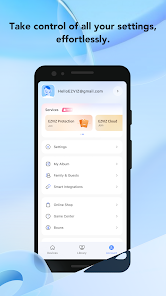
The EZVIZ app demonstrates a strong commitment to user security and privacy, implementing robust measures to protect sensitive information. The app employs end-to-end encryption for data transmission, ensuring that video feeds and user data remain secure from unauthorized access. Additionally, EZVIZ's privacy policy is transparent, detailing the types of data collected and the purposes for which it is used. When installing the app, users are prompted for permissions, including access to the camera, microphone, and location services. While these permissions are necessary for optimal functionality, users should exercise caution and only grant permissions that align with their comfort level. EZVIZ allows users to manage their privacy settings within the app, providing options to limit data sharing and control notifications. Furthermore, EZVIZ is compliant with relevant data protection regulations, ensuring that user data is handled responsibly. Regular updates and security patches are released to address potential vulnerabilities, reinforcing the app's dedication to maintaining a secure user experience. Overall, EZVIZ prioritizes user security and privacy, making it a reliable choice for those seeking a secure surveillance solution.

User Reviews

  • Hampton Kaine
    2026/02/12

    User feedback regarding the EZVIZ Studio PC viewer is predominantly negative, with many users describing the software as buggy, slow, and unreliable. Reports indicate that newer versions (such as v2.8.0) can fail to load cameras, freeze, and perform worse than older, unsupported versions. This hits the mark spot on.

  • The Marked
    2023/01/20

    This update has kicked me offline altogether. I had to reset password, reinstall software, and my wired cameras now are not recognized at all. All I did was turn the motion off like I do every day. Nothing but problems with the app since 2016. When these cameras stop, I'll shop for a different brand. These programmers just can't get it right. Update: I'll add a star. Customer service got me going with a new password. She could've been at least a little nicer.

  • A Google user
    2018/10/06

    The app worked well until a couple months ago. I really liked that I could watch video from my home and simply hit the record button and upload it directly to YouTube. Ever since a couple months ago the YouTube feature will no longer work. Also, since the update cameras that are on motion record will only play back until that motion has stopped, it will not skip forward to the next motion recording on its own. As other people have mentioned, it would be nice to have a fast forward and slow motion ability as well.

  • A Google user
    2019/12/18

    Could be way better. No option to view feed at different speeds. No fast forward or rewind. Just one hard to control scroll bar. Also motion detection could be better. I get an alert everytime the shadow of a leaf from my tree moves. I have to turn off notifications of a windy day. Then it doesn't go off when there is movement that it should have detected.

  • Duane Coon
    2022/12/01

    My cameras work well, but neither the motion detection nor the alerts nor the app work very well. I am very disappointed. I've experimented with every possible setting change, but the motion detection either triggers with every bug, leaf and bird or not at all. Also, the alerts have stopped sounding on my phone even though the settings should have them sounding. The app is inconsistent. Sometimes the camera images are not clear. Not very impressed with customer service either. They are slow.

Review Source: Google Play store public user reviews.

FAQ

1

Does EZVIZ collect my personal data?

EZVIZ may collect personal data to enhance user experience and provide services, but it adheres to privacy policies to protect user information. Always review their privacy policy for detailed information.

2

Does EZVIZ offer a free trial or free version?

EZVIZ provides a free version of the app that allows basic features, but some advanced features may require a subscription or payment.

3

Does EZVIZ require an internet connection?

Yes, EZVIZ requires an internet connection to access live feeds, receive updates, and manage devices remotely through the app.

4

How can I contact support or send feedback for EZVIZ?

You can contact EZVIZ support through the app's help section, visit their official website for customer service options, or reach out via their social media channels for feedback or assistance.

5

How do I manage or cancel my EZVIZ subscription?

You can manage or cancel your EZVIZ subscription directly through the app or by visiting the EZVIZ website, where you can find account settings related to your subscription.

How to use EZVIZ

1

How do I contact customer service for the EZVIZ app?

You can reach EZVIZ customer service through the app's support section or visit their official website for contact details.

2

How do I log in to the EZVIZ app?

Open the app, enter your registered email and password, then tap "Log In" to access your account.

3

Is there a way to activate my EZVIZ account?

To activate your account, follow the link sent to your email during registration and complete the verification process.

4

What is the customer service number for EZVIZ?

The customer service number can vary by region; please check the EZVIZ website for the specific number for your area.

What's New

Regular app updates. Bug fixes and user experience improvements.1. New AI feature: get notified based on your own conditions2. Add support for multiple new devices with refined experience

Editor's Choice