This site uses cookies to enhance your user experience. By clicking any link on this site you are giving your consent to our cookie policy. Read more
Reject
Accept All

Advertiser and Editorial Disclosures

blurams

blurams

verified

Hangzhou Vision Insight Technology Co.,Ltd.

4.5
Rating
500,000+ Downloads
5.1049.4.816 Version
Screenshot 1
Screenshot 2
Screenshot 3
Screenshot 4
Screenshot 5
Screenshot 6

Features & Highlights

Cloud Storage Options

Blurams offers flexible cloud storage solutions for your video footage, ensuring that your recordings are safe and easily accessible. With options for continuous recording and review, you can always keep track of your home’s activity without worrying about storage limits.

HD Video Quality

Experience crystal-clear visuals with blurams' high-definition video quality. With 1080p resolution, you can monitor your surroundings in detail, ensuring that every important moment is captured clearly, whether during the day or at night, thanks to night vision capabilities.

Smart AI Detection

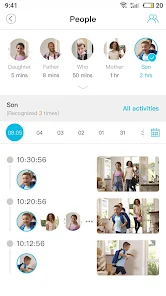
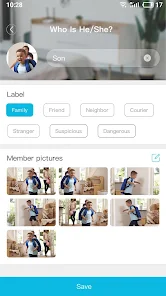
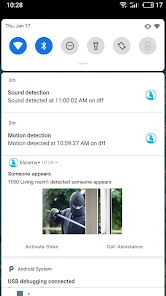
Blurams utilizes advanced AI technology to distinguish between people, pets, and objects, ensuring that you receive relevant alerts without unnecessary distractions. This intelligent detection capability helps you stay informed about what really matters in your home, making security management simpler and more efficient.

Two-Way Audio

Stay connected with your loved ones through the built-in two-way audio feature. Whether you're checking in on pets or having a quick chat with family, this functionality allows for clear communication from anywhere, adding a personal touch to your home surveillance experience.

Pros & Cons

Pros
  • High-resolution video for clear, detailed monitoring
  • Smart motion detection alerts you instantly
  • Two-way audio for seamless communication
  • Easy setup with user-friendly app interface
  • Cloud storage options for secure footage backup
Cons
  • Limited cloud storage options available for users
  • Occasional connectivity issues reported by users
  • User interface can be confusing for newcomers
  • Customer support response times may be slow

Real Experience Using blurams

Application Scenarios

The blurams app serves as an innovative solution for various surveillance needs, making it an ideal choice for both personal and business scenarios. Users can set up the app to monitor their homes, offices, or any property remotely. With its real-time streaming capabilities, homeowners can keep a close eye on their loved ones or pets while they are away. For businesses, the app aids in enhancing security by allowing managers to oversee operations from anywhere. Additionally, the app is compatible with smart home devices, enabling users to create a fully integrated security system. Whether it's checking in on kids after school or ensuring that the office is secure after hours, blurams provides a versatile platform to meet diverse surveillance needs.

User Experience

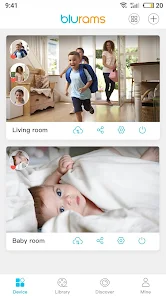
The user experience offered by the blurams app is commendable. The interface is clean and intuitive, making it easy for users of all tech levels to navigate. Setting up the camera and connecting it to the app is a straightforward process, often requiring just a few taps. The app delivers high-quality video with minimal lag, ensuring that users can view live feeds and recorded footage without interruptions. Notifications for motion detection are timely and customizable, allowing users to stay informed without being overwhelmed. Furthermore, the app's ability to support multiple camera views simultaneously is a notable feature for those monitoring larger areas. Overall, the blend of functionality and usability makes the blurams app a preferred choice among its users.

Pricing

The blurams app offers competitive pricing that caters to a wide audience. The basic version of the app is free to download and provides essential features suitable for casual users. For those seeking advanced functionalities such as cloud storage, enhanced video quality, and longer recording times, premium subscription plans are available. These plans are priced reasonably, allowing users to select a subscription that aligns with their specific needs and budget. This flexible pricing model ensures that anyone, regardless of financial capability, can access quality surveillance solutions.

Updates & Support

Regular updates keep the blurams app running smoothly and securely. The developers are committed to enhancing user experience by frequently adding new features and addressing any bugs or issues that arise. Users can expect consistent improvements that enhance the app's functionality. Support is readily available through various channels, including in-app help sections, email support, and community forums. This ensures that users can quickly find solutions to any problems or questions they may have. Overall, the continuous commitment to updates and user support positions blurams as a reliable choice for security solutions.

verified Security & Privacy Review

The blurams app prioritizes user security and privacy through a range of robust practices. It employs end-to-end encryption for video feeds, ensuring that your surveillance data remains secure and accessible only to authorized users. Furthermore, the app requires minimal permissions, primarily focused on camera access, which is essential for its core functionality. Users are informed about data collection practices, with clear options to manage their data preferences. The app does not store personal information unless explicitly provided by the user for account creation, thus reducing unnecessary exposure. Additionally, blurams adheres to GDPR guidelines, giving users control over their data and the ability to delete their accounts at any time. However, users should remain vigilant regarding their own device security, as weak passwords or unsecured networks can compromise their privacy. Overall, blurams demonstrates a commitment to maintaining user confidentiality while delivering a reliable surveillance solution.

User Reviews

  • Siddhartha Mehta
    2026/05/19

    Reliable connection and packs many features that even the expensive Arlo system does not provide in its app. Update: Devices are still running perfect, but the App has become annoying. Upon opening the app, you get an ad, some of which are with sound. These cameras are used for security or baby monitoring. In such cases, you want to the video feed as soon as possible and not get delayed by ads. Moreover, at night if you need to check the feed then you might wakeup others. Poor decision Blurams.

  • Gary Casto
    2026/04/29

    Pretty bad. It takes a step or two to log in that I didn't have to use to use with my other camera. Tremendous amount of advertising. I wouldn't purchase this Amazon camera again just because of the amount of bloated ads on this app. UPDATE. Lost another star. Just about to throw the camera out the window! You're shooting yourself in the foot along with your mediocre China Webcam. Update! lost another star! you guys just don't know when to quit with the advertising and login bs!

  • Ramiro Carrillo
    2026/05/28

    overall I really enjoy the quality of the recordings and the ease of use, from initial setup to everyday use. I don't pay for services so everything is stored onto an SD card. when we first got it, it did a great job at detecting only human/ pet motion, but after a while it started detecting everything from random particles floating to every car driving by our windows (which is extremely annoying). my wish is that I could zoom in on the timelines. It's so finicky.

  • Arewhyain Alexander
    2026/06/11

    Great Camera for viewing & communicating. Easy to use controls, reactive timing is good also. The not so good qualities are: zoom in quality (fuzzy, the more/closer you zoom, which is to be expected), record time is very minimal (12 seconds per vid..), and the zoom out (Regular view mode) is not wide enough. But overall, this is an Awesome Camera for the price. I would definitely recommend for a starter setup...

  • Oddie Coleman
    2026/06/09

    They were given to me as gifts. I had no idea how helpful and useful they would be. I only need the Internet to operate them. I don't need cloud space, although I could choose it. I use a chip instead. The pictures are clear, with perfect time and date. It tracks with no clarity and precision. I have used them for over a year and so far I have had no problem. Since then I have found other cameras that do even more for little more cost than these costs. 2 for $25 is a steal.

Review Source: Google Play store public user reviews.

FAQ

1

Does blurams collect my personal data?

blurams may collect certain user data to enhance the app's functionality and improve services, but it adheres to privacy policies to safeguard user information.

2

Does blurams offer a free trial or free version?

Yes, blurams provides a free version with basic features, and users can also take advantage of a free trial for premium features.

3

Does blurams require an internet connection?

Yes, blurams requires an internet connection to access live feeds and receive notifications, as it operates over Wi-Fi.

4

How can I contact support or send feedback for blurams?

You can contact blurams support through the app by accessing the help section, or by visiting their official website where you can find contact information and submit feedback.

5

How do I manage or cancel my blurams subscription?

You can manage or cancel your blurams subscription through the app settings under your account section or by following the instructions provided in the subscription confirmation email.

How to use blurams

1

How can I contact customer service for the blurams app?

You can contact blurams customer service through the app's support section or visit their official website for contact details.

2

How do I activate my blurams device?

To activate, follow the in-app instructions after connecting your device to Wi-Fi. You'll need to scan the QR code displayed on the app.

3

How do I find the customer number for blurams?

The customer number can be found in the app's settings under "About Us" or in the support section.

4

How do I log in to the blurams app?

Open the app and enter your registered email and password. Then, tap the "Log In" button to access your account.

What's New

- Localization: Added support for Polish.

Editor's Choice