This site uses cookies to enhance your user experience. By clicking any link on this site you are giving your consent to our cookie policy. Read more
Reject
Accept All

Advertiser and Editorial Disclosures

USPS MOBILE®

USPS MOBILE®

verified Verified App

Developer: United States Postal Service®

  • category

    Category: Business

  • price

    Price: free

  • age rating

    Age Rating: Everyone

  • rating

    Rating: 4.7

  • download

    Downloads: 1,000,000+

  • version

    Version: 6.2.1

Screenshot 1
Screenshot 2
Screenshot 3
Screenshot 4
Screenshot 5
Screenshot 6
Screenshot 7
Screenshot 8

Features & Highlights

Find Post Offices

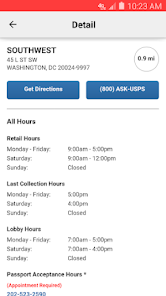
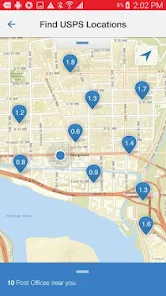
Searching for the nearest post office is a breeze with the USPS MOBILE® app. Whether you need to drop off a package or purchase stamps, you can easily locate nearby branches, check their hours of operation, and even get directions, making your postal errands much more efficient.

Manage Notifications

Stay informed with customizable notifications that keep you updated on your shipping status and important alerts. The USPS MOBILE® app lets you choose how and when you receive updates, so you can focus on what matters while staying in the know about your mail.

Schedule Deliveries

Need to receive a package at a more convenient time? With the USPS MOBILE® app, you can quickly schedule deliveries to fit your schedule. This feature provides flexibility, allowing you to select specific days and times for package arrivals, ensuring you never miss an important delivery again.

Track Packages

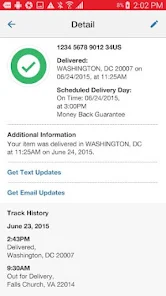
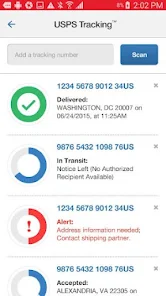
Stay updated on your shipments with real-time tracking. The USPS MOBILE® app allows you to easily view the status of your packages, ensuring you're always in the loop about delivery times and locations, making it hassle-free to plan your day around incoming mail.

Pros & Cons

Pros
  • Track packages easily from your smartphone
  • Receive real-time delivery notifications and updates
  • Access shipping services anytime, anywhere
  • Manage your mail and packages efficiently
  • Securely hold or redirect mail as needed
Cons
  • Limited features compared to the full website
  • May experience occasional technical glitches
  • Slow response times during peak hours
  • Not all services available in-app

Real Experience Using USPS MOBILE®

Application Scenarios

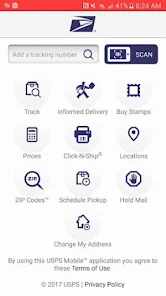
The USPS MOBILE® app is designed to cater to a variety of shipping and mailing needs, making it an essential tool for both casual users and frequent shippers. Users can track packages in real-time, schedule pickups, and find nearby post office locations with ease. For individuals who send and receive mail regularly, the app provides a streamlined solution for managing their postal needs. It is particularly useful during holiday seasons or peak shipping times when users can easily monitor their shipments and ensure timely deliveries. Furthermore, small business owners can utilize the app to manage their shipping logistics efficiently, enhancing their operational workflow without needing to visit the post office physically. Whether you are a traveler needing to track a mail package while on the go or a parent sending birthday gifts, the USPS MOBILE® app offers a convenient platform for all your mailing scenarios.

User Experience

The user experience of the USPS MOBILE® app is largely positive, characterized by an intuitive interface that simplifies navigation. Users often commend the app for its clean design and straightforward functionality, making it accessible for individuals of all tech-savviness levels. The tracking feature stands out, providing detailed updates on package status, which helps alleviate the anxiety often associated with waiting for deliveries. Additionally, the app's ability to integrate with users' USPS accounts enables personalized features such as saved addresses and shipment history. While some users have reported occasional bugs or delays in updates, the overall experience remains favorable, with many users appreciating the seamless integration of services and the ease of communicating with USPS customer service through the app.

Pricing

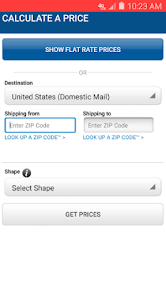
The USPS MOBILE® app is free to download and use, which makes it an attractive option for users looking to manage their postal services without incurring extra costs. While the app itself does not have any subscription fees or hidden charges, users should be aware that standard USPS shipping rates apply when sending packages. The pricing for mailing services varies depending on the chosen service type, weight, and delivery speed. This transparency in pricing allows users to make informed decisions based on their shipping needs and budget. Overall, the app offers a cost-effective solution for managing mailing and shipping activities.

Updates & Support

The USPS MOBILE® app is regularly updated to enhance functionality and address user feedback. Users can expect improvements in performance, bug fixes, and new features that align with evolving postal service needs. The USPS support team is accessible through the app, providing users with assistance for any issues they may encounter. Additionally, the app includes a comprehensive FAQ section, which addresses common inquiries about shipping, tracking, and service options. With a commitment to customer satisfaction, USPS ensures that users have the resources and support necessary for a smooth experience. Overall, the continual updates and responsive support contribute to a reliable app experience.

verified Security & Privacy Review

The USPS MOBILE® app prioritizes user security and privacy through robust data protection measures. It employs encryption protocols to safeguard sensitive information during transmission. Users are encouraged to create strong passwords and utilize biometric authentication features when available, adding an extra layer of protection to personal accounts. Regarding permissions, the app requires access to certain device features, such as location services for tracking packages and notifications for delivery updates. Users are informed about these permissions and can manage them through their device settings. The app does not request excessive permissions, maintaining a balance between functionality and user privacy. USPS is committed to transparency in its data handling practices. The app’s privacy policy outlines how user data is collected, used, and shared, ensuring that personal information is not sold to third parties. Users can review their data preferences and have the option to delete their accounts if they choose to discontinue service, demonstrating a commitment to user control over personal information.

Reviews

4.7

“Easy tracking and delivery updates are fantastic!”

“User-friendly interface makes shipping a breeze.”

“Occasional glitches, but overall a solid app.”

“Great for managing packages on the go.”

“Notifications keep me informed about my mail.”

FAQ

1

Are there any fees for using the USPS MOBILE® app?

Downloading and using the USPS MOBILE® app is free of charge. However, certain services, such as purchasing postage for shipping, may involve fees based on the type of service selected and the weight of the package being sent. It's important to review the costs associated with specific services when using the app.

2

Can I manage my USPS delivery preferences in the app?

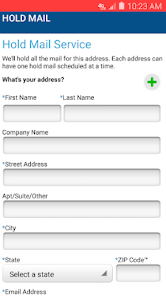
Absolutely! The USPS MOBILE® app offers options to manage your delivery preferences, including requesting package holds or scheduling redeliveries. You can customize your delivery options to suit your schedule, making it easier to receive your mail and packages at your convenience.

3

Can I purchase postage through the USPS MOBILE® app?

Yes, the app allows users to purchase postage for various mailing options. You can create shipping labels and pay for postage directly through the app. This feature simplifies the mailing process, making it more convenient for users who need to send packages without needing to visit a post office.

4

Can I use the app to access my USPS account?

Yes, you can log in to your USPS account through the app. This feature allows you to access your mailing history, track packages, and manage your preferences all in one place. Having your account integrated into the app makes it easier to handle your postal needs efficiently.

5

Does the USPS MOBILE® app provide information about local post office hours?

Yes, the app includes a feature that allows you to find and view local post office locations, along with their hours of operation. You can easily search for the nearest post office by entering your zip code or using your device's location services. This helps you plan your visits according to the post office's operating hours.

How to use USPS MOBILE®

1

How can I contact USPS customer service regarding the USPS MOBILE® app?

You can contact USPS customer service at 1-800-ASK-USPS (1-800-275-8777) or visit their website for assistance.

2

How do I activate the USPS MOBILE® app?

Download the app, create an account or log in, and follow the on-screen prompts to complete activation.

3

How do I find my customer number for the USPS MOBILE® app?

Your customer number can be found on your USPS account profile or on shipping receipts.

4

How do I log in to the USPS MOBILE® app?

Open the app, tap on "Log In," enter your email and password, then tap "Sign In."

Editor's Choice