This site uses cookies to enhance your user experience. By clicking any link on this site you are giving your consent to our cookie policy. Read more
Reject
Accept All

Advertiser and Editorial Disclosures

DoorDash - Dasher

DoorDash - Dasher

verified Verified App

Developer: DoorDash

  • category

    Category: Business

  • price

    Price: free

  • age rating

    Age Rating: Everyone

  • rating

    Rating: 4.2

  • download

    Downloads: 10,000,000+

  • version

    Version: 8.65.10

Screenshot 1
Screenshot 2
Screenshot 3
Screenshot 4
Screenshot 5
Screenshot 6
Screenshot 7

Features & Highlights

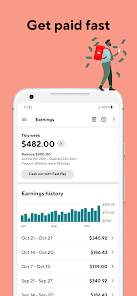
Earnings Dashboard

Keep track of your earnings in real-time with the intuitive dashboard feature. You can easily see your daily income, tips, and bonuses, giving you a clear picture of your financial progress and motivating you to set and achieve your personal goals.

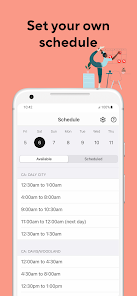
Flexible Scheduling

With DoorDash - Dasher, you have the freedom to choose your own hours and work when it suits you best. Whether you're looking for a full-time gig or a side hustle, this flexibility empowers you to balance your work and personal life according to your needs.

In-App Navigation

The app provides integrated navigation tools to guide you seamlessly to each delivery location. This feature minimizes the hassle of finding addresses and helps you complete deliveries faster, allowing you to maximize your earnings with each shift you take.

Real-Time Order Tracking

Stay updated with real-time tracking of your deliveries, which allows you to see exactly where your orders are at any moment. This feature helps you manage your time efficiently and ensures that your customers receive their meals promptly, enhancing overall satisfaction.

Pros & Cons

Pros
  • Flexible hours for a balanced lifestyle
  • Earn money on your own terms
  • Access to daily payouts for quick cash
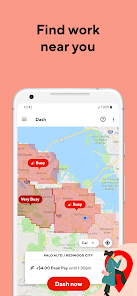
  • Choose your preferred delivery zones easily
  • Supportive community and resources for dashers
Cons
  • Low pay rates can lead to financial instability
  • High competition reduces order availability for Dashers
  • Inconsistent scheduling affects work-life balance negatively
  • Customer ratings impact Dasher income and opportunities

Real Experience Using DoorDash - Dasher

Application Scenarios

The DoorDash - Dasher app serves as an essential tool for food delivery drivers, known as Dashers, facilitating a flexible and convenient way to earn money. Whether you’re a student looking to make extra cash, a stay-at-home parent seeking a flexible schedule, or someone wanting to turn spare time into income, this app fits a variety of lifestyles. Users can choose their own hours, accepting orders whenever it suits them, ranging from busy lunch hours to late-night snack runs. The app also allows Dashers to navigate through bustling urban environments, ensuring they can quickly and efficiently deliver food from local restaurants to customers’ doorsteps. In addition to food delivery, Dashers can occasionally participate in grocery and convenience store deliveries, broadening their earning potential and keeping the work dynamic and interesting.

User Experience

The user experience of the DoorDash - Dasher app is generally smooth and intuitive. Upon logging in, Dashers are greeted with a simple interface that displays available orders, estimated earnings, and the distance to delivery locations. The app provides real-time navigation support integrated with maps, making it easier for Dashers to find the quickest routes. Additionally, Dashers can track their earnings and tips in real-time, which can be motivating and help them strategize their delivery times. However, some users have reported occasional glitches or slow loading times, particularly during peak hours, which can be frustrating. Overall, the app is designed to be user-friendly, and the ability to accept or decline orders allows Dashers to maintain control over their work schedules.

Pricing

One of the most appealing aspects of the DoorDash - Dasher app is its pricing structure, which revolves around a commission-based model. Dashers are paid based on the distance traveled and the complexity of the delivery, along with potential tips from customers. There are no upfront costs to become a Dasher, making it accessible for anyone looking to start earning income quickly. However, it’s important for Dashers to be aware that DoorDash takes a percentage of the delivery fee as their service charge. This means that while the pay can be competitive, it can vary significantly based on location, time of day, and demand for deliveries. Understanding these factors is crucial for Dashers to maximize their earnings.

Updates & Support

DoorDash continually updates the Dasher app to enhance performance and introduce new features, ensuring that delivery drivers have the tools they need to succeed. Recent updates have focused on improving navigation accuracy, streamlining the order acceptance process, and enhancing in-app communication features between Dashers and customers. The support system for Dashers is robust, offering a help center within the app where users can find answers to common questions or reach out for assistance. Many Dashers report that the support team is responsive and helpful, addressing concerns swiftly. Overall, the commitment to regular updates and solid customer support demonstrates DoorDash's dedication to enhancing the Dasher experience.

verified Security & Privacy Review

The DoorDash - Dasher app prioritizes user security and privacy through robust data protection measures. The app employs encryption protocols to safeguard sensitive information, ensuring that payment details and personal data remain secure during transactions. When it comes to permissions, DoorDash requests access to location services, contacts, and storage. Users should be informed that these permissions are necessary for optimizing delivery routes, facilitating communication, and storing app-related data. However, the app allows users to customize permissions, providing control over what data is shared. DoorDash adheres to strict privacy policies that detail how user data is collected, utilized, and shared. The app transparently informs users about data practices, including the potential sharing of information with third parties for operational purposes. Users can review and manage their data preferences through the app settings, promoting a sense of control over personal information. Overall, the DoorDash - Dasher app demonstrates a commitment to user privacy and security, making it a reliable choice for those seeking a secure food delivery platform.

Reviews

4.2

“Easy to use and convenient for food delivery”

“Great earnings potential for dashers”

“Support team is responsive and helpful”

“App glitches occasionally disrupt the experience”

“Flexible hours fit my schedule perfectly”

FAQ

1

Does DoorDash - Dasher collect my personal data?

Yes, DoorDash - Dasher collects personal data necessary for providing services, including your name, contact information, location, and payment details, in accordance with their privacy policy.

2

Does DoorDash - Dasher offer a free trial or free version?

DoorDash - Dasher does not offer a free trial, but it is free to download and use as an independent contractor without any upfront fees.

3

Does DoorDash - Dasher require an internet connection?

Yes, DoorDash - Dasher requires an internet connection to receive delivery requests, communicate with customers and restaurants, and track your earnings in real-time.

4

How can I contact support or send feedback for DoorDash - Dasher?

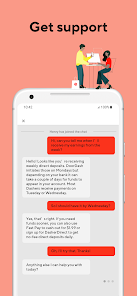
You can contact DoorDash support through the app by navigating to the 'Help' section or visit their website for additional support options and feedback forms.

5

How do I manage or cancel my DoorDash - Dasher subscription?

Since DoorDash - Dasher operates without a subscription model, there is no need to manage or cancel a subscription. You can simply stop using the app at any time.

How to use DoorDash - Dasher

1

How can I contact DoorDash customer service?

You can reach DoorDash customer service through the app by tapping on “Help” or visiting their website for support options.

2

How can I update my account information in the Dasher app?

Go to the app’s settings and select “Account” to update your personal information.

3

How do I activate my Dasher account?

After signing up, follow the instructions in the email from DoorDash to activate your Dasher account.

4

How do I change my Dasher payment method?

You can change your payment method in the app under the "Earnings" section by selecting “Payment Methods.”

5

How do I find the customer service number for DoorDash?

The customer service number for DoorDash is available in the app under “Help” or on their website.

Editor's Choice