This site uses cookies to enhance your user experience. By clicking any link on this site you are giving your consent to our cookie policy. Read more
Reject
Accept All
Slack

Slack

verified Verified App

Developer: SLACK TECHNOLOGIES L.L.C.

  • category

    Category: Business

  • price

    Price: free

  • age rating

    Age Rating: Everyone

  • rating

    Rating: 4.7

  • download

    Downloads: 10,000,000+

  • version

    Version: 26.01.30.0

Screenshot 1
Screenshot 2
Screenshot 3
Screenshot 4
Screenshot 5
Screenshot 6
Screenshot 7
Screenshot 8

Features & Highlights

Customizable Notifications

Slack offers robust notification settings that let users tailor their experience to fit their needs. Whether you want to be alerted for every message or only for mentions, these customizable options help you stay focused on what matters most while minimizing distractions throughout your day.

File Sharing Made Easy

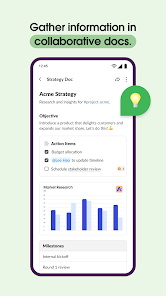
With Slack, sharing files is a breeze. Users can upload documents, images, and videos directly into conversations, allowing for quick access and collaboration. The platform also integrates with popular cloud storage services, making it simple to share links and keep everyone on the same page without clutter.

Integration with Tools

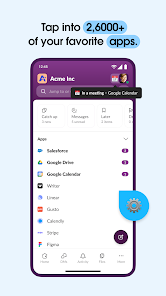
Slack's extensive integration capabilities allow users to connect with a multitude of third-party applications. This means you can bring your favorite productivity tools right into your conversations, streamlining workflows and enhancing team productivity without having to switch between multiple platforms.

Real-Time Messaging

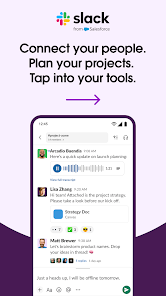
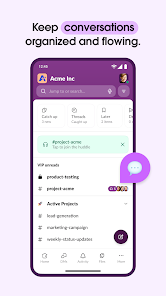
Slack enables seamless real-time communication among team members through instant messaging. Users can create channels for specific topics, ensuring conversations are organized and easy to follow, while also allowing for direct messaging for private discussions, making collaboration more efficient and engaging.

Pros & Cons

Pros
  • Enhances team communication in real-time
  • Integrates with numerous third-party applications
  • Organizes conversations into manageable channels
  • Facilitates file sharing and collaboration easily
  • Supports searchable message history for quick access
Cons
  • Can become overwhelming with constant notifications
  • Limited search functionality in free version
  • Integrations can complicate workflow for users
  • Information may get lost in numerous channels

Real Experience Using Slack

Application Scenarios

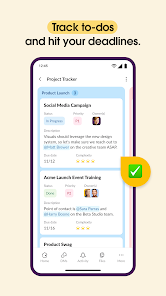
Slack has become an indispensable tool for organizations of all sizes, serving various communication needs in diverse environments. Whether it's for remote teams collaborating across different time zones or in-house departments coordinating on projects, Slack's versatility shines through. Many users utilize it for project management, integrating with tools like Trello and Asana to streamline workflows. Additionally, Slack is ideal for educational institutions, where teachers and students can create channels for specific classes or group projects, facilitating seamless communication. Event planning teams also find Slack invaluable, as it allows for real-time updates and coordination among team members. In short, Slack adapts effortlessly to any situation where clear and efficient communication is key.

User Experience

The user experience on Slack is designed to be intuitive and engaging. Upon entering the platform, users are greeted with a clean, organized interface that makes navigation easy. The ability to create channels for specific topics or projects enhances focus and reduces clutter, which is often a challenge in traditional email communication. Slack's integration capabilities with third-party applications further enrich the user experience, allowing users to pull in tools they already use. Notifications are customizable, ensuring that users stay informed without feeling overwhelmed. Furthermore, the mobile app mirrors the desktop experience, enabling users to stay connected even on the go. Many users appreciate the search functionality, which allows for quick retrieval of past conversations and shared files.

Pricing

Slack offers a tiered pricing model catering to different needs. The free version provides basic features, including message history, which is ideal for small teams or casual users. For those requiring advanced functionalities, such as unlimited message history, video calls, and enhanced administrative controls, Slack offers a Standard and Plus plan. These paid options come at a reasonable price compared to other collaboration tools, making them accessible for startups and larger enterprises alike. Additionally, Slack frequently runs promotions and discounts for educational institutions and non-profits, ensuring that cost does not become a barrier to effective communication.

Updates & Support

Slack continually evolves, with regular updates that introduce new features and enhancements. User feedback is taken seriously, leading to improvements that address common pain points. The platform also provides extensive support resources, including a comprehensive help center filled with articles, tutorials, and community forums. For those needing immediate assistance, Slack offers a dedicated support team available through email and chat. Moreover, their commitment to user satisfaction is evident in their proactive approach to resolving issues and implementing user-requested features. Overall, Slack's ongoing improvements and robust support ensure that users have the tools they need to communicate effectively.

verified Security & Privacy Review

The security and privacy of user data are paramount in Slack, which employs robust encryption methods to protect information both in transit and at rest. This means that messages, files, and sensitive data are safeguarded from unauthorized access. Slack uses Transport Layer Security (TLS) to encrypt data during transmission, ensuring that communications remain private. In terms of privacy practices, Slack provides users with granular control over their data. Users can customize their privacy settings, including who can access their channels and direct messages. Slack has a clear privacy policy that outlines how user data is collected, used, and shared, promoting transparency. Regarding permissions, Slack requires users to grant access to specific features, such as notifications and file sharing. However, users can manage these permissions to align with their comfort levels. Slack also offers enterprise-level security features, including single sign-on (SSO) and two-factor authentication (2FA), enhancing overall account protection. Overall, Slack demonstrates a strong commitment to data security and privacy, making it a suitable choice for individuals and organizations concerned about safeguarding their information.

Reviews

4.7

“Great for team collaboration and communication!”

“Customizable notifications help manage distractions.”

“Integrates well with other productivity tools.”

“User-friendly interface, easy to navigate.”

“Search function needs improvement for better usability.”

Editor's Choice