This site uses cookies to enhance your user experience. By clicking any link on this site you are giving your consent to our cookie policy. Read more
Reject
Accept All
LinkedIn: Jobs & Business News

LinkedIn: Jobs & Business News

verified Verified App

Developer: LinkedIn

  • category

    Category: Business

  • price

    Price: free

  • age rating

    Age Rating: Everyone

  • rating

    Rating: 4.1

  • download

    Downloads: 1,000,000,000+

  • version

    Version: 4.1.1161.1

Screenshot 1
Screenshot 2
Screenshot 3
Screenshot 4
Screenshot 5
Screenshot 6

Features & Highlights

Business News Updates

Stay informed with the latest business news through LinkedIn's curated articles and updates. The platform sources relevant industry news, keeping you in the loop about market trends and developments, which is essential for making informed decisions in your professional life.

Job Recommendations

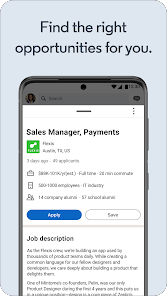
LinkedIn's Job Recommendations feature tailors job suggestions based on your profile, skills, and interests, making it easier to find opportunities that align with your career goals. With personalized insights, you can discover roles that might not be on your radar but are a perfect fit for your expertise.

Networking Opportunities

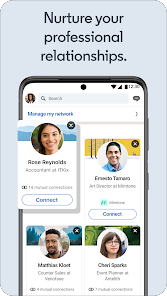
LinkedIn enhances your networking experience by connecting you with professionals in your field and beyond. You can join industry-specific groups, participate in discussions, and expand your professional circle, fostering relationships that can lead to collaboration and mentorship.

Skill Development Resources

Access a wealth of resources to enhance your skills with LinkedIn's learning modules and courses. Whether you're looking to upskill or pivot to a new career, these resources offer valuable insights and training tailored to your professional growth.

Pros & Cons

Pros
  • Connect with professionals worldwide for networking opportunities
  • Access a vast array of job listings tailored to your skills
  • Stay informed with the latest industry news and trends
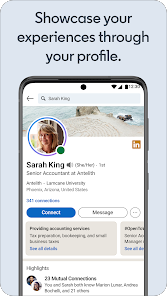
  • Showcase your expertise through a professional profile
  • Engage in discussions to enhance your knowledge and visibility
Cons
  • Limited engagement with users' posts
  • Overwhelming amount of irrelevant content
  • Subscription costs for premium features
  • Privacy concerns with personal data

Real Experience Using LinkedIn: Jobs & Business News

Application Scenarios

The LinkedIn: Jobs & Business News app serves as a multifaceted tool tailored for professionals seeking to enhance their careers and expand their networks. Users can explore job opportunities that align with their skills and aspirations, making it an essential resource for job seekers. Whether you are a recent graduate entering the job market, a mid-career professional seeking advancement, or someone looking to pivot to a new industry, the app provides a wealth of listings across various sectors. Additionally, the app caters to entrepreneurs and business owners who want to stay abreast of the latest industry news and trends, enabling them to make informed decisions. Networking opportunities abound, with features that allow users to connect with potential employers, colleagues, and industry leaders, fostering meaningful professional relationships.

User Experience

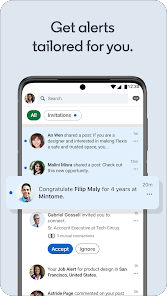
The user experience of the LinkedIn app is intuitive and streamlined, designed to facilitate easy navigation through its numerous features. Upon opening the app, users are greeted with a clean, user-friendly interface that allows them to quickly access job listings, news feeds, and networking options. The search functionality is robust, enabling users to filter job searches by location, industry, and job type, making it easier to find relevant opportunities. The app also incorporates personalized recommendations based on users’ profiles and activity, enhancing the relevance of job suggestions. Notification features keep users informed about job alerts, connection requests, and important updates in their network, ensuring they stay engaged. The integration of professional articles and news updates keeps users informed about industry developments, making it a valuable resource for ongoing professional education.

Pricing

The LinkedIn app is free to download and use, providing access to a wide array of features at no cost. However, it also offers a premium subscription service, LinkedIn Premium, which provides additional benefits such as enhanced visibility to recruiters, access to exclusive job postings, and insights into who viewed your profile. The premium service operates on a monthly subscription basis, with various tiers to cater to different user needs, including options for job seekers, sales professionals, and recruiters. While the free version suffices for many users, those serious about advancing their careers may find the investment in a premium account worthwhile for the added visibility and resources it provides.

Updates & Support

LinkedIn is committed to continuously enhancing its app by rolling out regular updates that improve functionality and introduce new features. Users can expect updates that address bugs, enhance security, and refine user interface elements, ensuring a smooth experience. The platform also maintains an active support system where users can access a comprehensive FAQ section, community forums, and direct customer support for more complex issues. Users can report problems or seek assistance through the app, ensuring that any concerns are addressed promptly. This commitment to user support and app improvement contributes to a positive overall experience, reinforcing LinkedIn's position as a leading platform for professional networking and job searching.

verified Security & Privacy Review

The LinkedIn app prioritizes user security and privacy, implementing robust measures to protect personal information. The app uses encryption protocols to safeguard data during transmission, ensuring that user information remains confidential and secure. LinkedIn adheres to industry standards for data protection, providing users with transparency regarding data collection and usage practices. Users are informed about the types of permissions requested, including access to contacts, location, and camera, enabling them to make informed decisions. The app allows users to manage these permissions easily within their device settings, promoting user control over their personal data. LinkedIn’s privacy policy outlines how user data is collected, processed, and shared, emphasizing a commitment to user privacy. Users can customize their privacy settings, including visibility options for their profiles and activity. However, it’s essential for users to remain vigilant, as any social platform can pose risks if personal information is not managed wisely. Overall, LinkedIn demonstrates a strong commitment to security and privacy, ensuring a safe environment for networking and job searching.

Reviews

4.1

“User-friendly interface for job searching and networking.”

“Great platform for professional growth and connections.”

“Helpful job alerts and tailored recommendations.”

“Useful articles and insights on industry trends.”

“Easy to connect with potential employers and colleagues.”

Editor's Choice