This site uses cookies to enhance your user experience. By clicking any link on this site you are giving your consent to our cookie policy. Read more
Reject
Accept All
Loom

Loom

verified Verified App

Developer: Loom, Inc

  • category

    Category: Business

  • price

    Price: free

  • age rating

    Age Rating: Everyone

  • rating

    Rating: 3.8

  • download

    Downloads: 1,000,000+

  • version

    Version: 254.2.2

Screenshot 1
Screenshot 2
Screenshot 3
Screenshot 4
Screenshot 5
Screenshot 6
Screenshot 7

Features & Highlights

Customizable Video Settings

Users can personalize their video settings in Loom, including adjusting the recording quality and choosing between different camera views. This flexibility allows you to create videos that fit your specific needs and preferences, enhancing the overall viewing experience.

Instant Sharing Options

With Loom, sharing your videos is a breeze. Once recorded, you can instantly share your video via a unique link, making it easy for team members or clients to view without the need for downloads, ensuring seamless communication and collaboration.

Video Recording Made Easy

Loom simplifies the video recording process with its intuitive interface, allowing users to capture their screen, webcam, or both in just a few clicks. This user-friendly approach makes it perfect for creating tutorials, presentations, or quick updates without any technical hassle.

Viewer Insights

Loom provides valuable viewer insights, allowing you to track who watched your videos and how long they engaged. This feature helps you understand your audience better, enabling you to tailor your content for maximum impact and engagement.

Pros & Cons

Pros
  • Enhances communication with visual storytelling.
  • Saves time with quick video creation.
  • Boosts engagement through personalized content.
  • Facilitates remote collaboration effortlessly.
  • Simplifies feedback with easy sharing options.
Cons
  • Limited editing features for videos created
  • Dependency on internet connection for access
  • Storage limitations in free version apply
  • Privacy concerns with shared video links

Real Experience Using Loom

Application Scenarios

Loom is a versatile video messaging tool that shines in various application scenarios, making it a favorite among professionals, educators, and teams. One of the primary uses of Loom is for creating quick instructional videos. Teachers can record lectures or tutorials, allowing students to learn at their own pace. In the corporate world, Loom is often utilized for onboarding new employees, enabling HR teams to deliver essential information efficiently. Additionally, remote teams leverage Loom for project updates and feedback, fostering better communication and collaboration without the need for lengthy emails or meetings.

User Experience

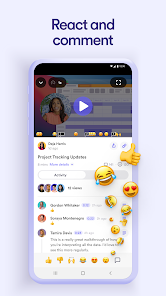
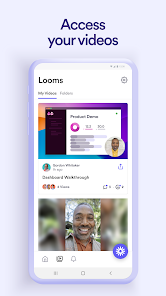
The user experience with Loom is generally seamless and intuitive. The interface is clean and user-friendly, allowing users to navigate through its features with ease. Recording a video is as simple as clicking a button, and users have the option to share their screen, record themselves, or do both simultaneously. The video quality is commendable, with crisp visuals and clear audio. One standout feature is the ability to add call-to-action buttons and captions, which enhances viewer engagement. Users appreciate the instant sharing capabilities, as videos can be sent via links directly to colleagues or students. Moreover, Loom provides analytics, allowing users to track how many people viewed their videos and how engaged they were. This data can be invaluable for refining communication strategies.

Pricing

Loom offers a variety of pricing plans to cater to different user needs. The free version allows users to record videos up to five minutes long, which is suitable for quick messages or updates. For those requiring more advanced features, Loom offers a Pro plan that includes unlimited video length, custom branding, and advanced analytics, priced competitively for individuals and small teams. Additionally, there is a Business plan designed for larger organizations, providing team management features and priority support. Users find the pricing structure flexible, and many appreciate the value offered by the paid plans, especially when compared to traditional video conferencing solutions.

Updates & Support

Loom is committed to continuous improvement, frequently rolling out updates that enhance functionality and user experience. These updates often incorporate user feedback, addressing common requests and issues. The support network is robust, with a comprehensive help center that includes tutorials, FAQs, and troubleshooting guides. Users can also reach out to the support team via email for more personalized assistance. Most users report prompt and helpful responses, which contributes to a positive overall experience. Regular webinars and community forums provide additional avenues for users to interact and learn from one another, fostering a supportive ecosystem around the app.

verified Security & Privacy Review

Loom places a strong emphasis on security and privacy, ensuring that user data is handled with the utmost care. The app employs end-to-end encryption for video recordings, safeguarding content from unauthorized access during transmission. User data is stored securely in compliance with industry standards, minimizing risks associated with data breaches. When it comes to permissions, Loom requires access to the microphone and camera to facilitate video creation, but it does not request excessive permissions that could compromise user privacy. Users have control over their recordings, with options to share privately or publicly, allowing them to manage their content as they see fit. Loom's privacy policy is transparent, outlining how user data is collected, used, and shared. The app does not sell personal information to third parties, and users can request data deletion at any time, ensuring compliance with data protection regulations. Overall, Loom demonstrates a commitment to protecting user privacy while providing a seamless video creation experience.

Reviews

3.8

“User-friendly interface makes recording a breeze”

“Excellent for quick video updates and tutorials”

“Great integration with other tools and platforms”

“High-quality video output, very impressed”

“Perfect for remote team collaboration and communication”

Editor's Choice