This site uses cookies to enhance your user experience. By clicking any link on this site you are giving your consent to our cookie policy. Read more
Reject
Accept All

Advertiser and Editorial Disclosures

Shopify - Your Ecommerce Store

Shopify - Your Ecommerce Store

verified Verified App

Developer: Shopify Inc.

  • category

    Category: Business

  • price

    Price: 0

  • age rating

    Age Rating: Everyone

  • rating

    Rating: 4.3

  • download

    Downloads: /

  • version

    Version: 9.2445.0

Screenshot 1
Screenshot 2
Screenshot 3
Screenshot 4
Screenshot 5
Screenshot 6
Screenshot 7
Screenshot 8

Features & Highlights

Extensive App Marketplace

Shopify's extensive app marketplace provides countless options to extend your store's functionality. Whether you need tools for email marketing, inventory management, or social media integration, there's an app to help you streamline operations and enhance customer engagement.

Integrated Payment Solutions

Shopify offers a variety of integrated payment options that cater to global customers. With support for major credit cards, PayPal, and even cryptocurrency, you can provide a seamless checkout experience that boosts conversion rates and builds customer trust.

Robust Analytics Tools

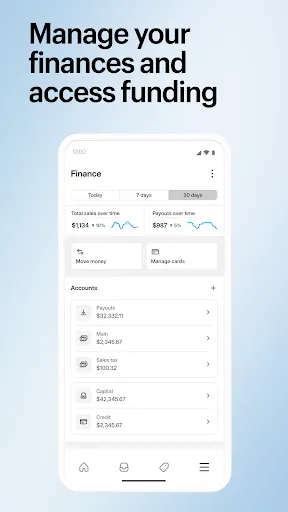
Gain valuable insights into your store's performance with Shopify's powerful analytics tools. Track sales, monitor customer behavior, and assess marketing effectiveness, all in one place, empowering you to make data-driven decisions that enhance your business strategy.

User-Friendly Interface

Shopify's intuitive interface makes it easy for anyone to set up and manage an online store. With a simple drag-and-drop functionality, you can customize your store's design without any technical skills, allowing you to focus on what really matters—growing your business.

Pros & Cons

Pros
  • Easy-to-use interface allows anyone to create a store quickly.
  • Extensive app marketplace enhances functionality and customization options.
  • Secure payment processing builds trust with customers and protects transactions.
  • Responsive themes ensure your store looks great on any device.
  • 24/7 customer support helps resolve issues whenever they arise.
Cons
  • Limited customization options may restrict unique branding opportunities.
  • Higher transaction fees can reduce overall profit margins.
  • Dependence on third-party apps may increase complexity and costs.

Real Experience Using Shopify - Your Ecommerce Store

Application Scenarios

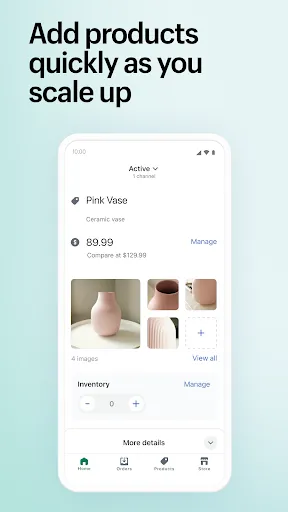
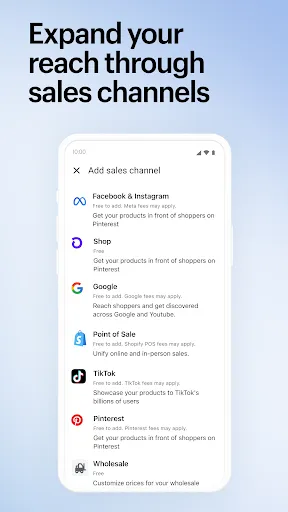
Shopify serves as a versatile platform for various eCommerce needs, making it suitable for businesses of all sizes. Whether you are a small boutique looking to sell handmade crafts, a large retailer managing extensive inventories, or even a dropshipping entrepreneur, Shopify has tailored features to enhance your selling experience. Users can create online stores within minutes, customize their storefronts, and integrate payment gateways seamlessly. Additionally, Shopify supports multiple sales channels, allowing users to sell not only through their websites but also on social media platforms like Facebook and Instagram, and even through brick-and-mortar locations with Shopify POS. This multi-faceted approach makes it easy for entrepreneurs to reach their target audience wherever they may be.

User Experience

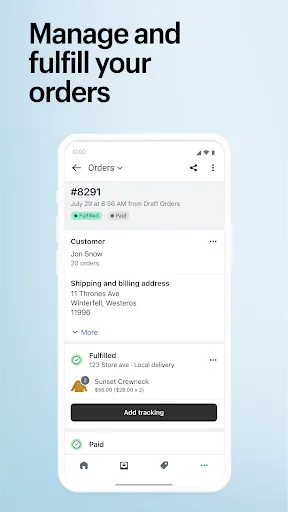
The user experience offered by Shopify is often lauded for its intuitive interface and ease of use. Even those with limited technical skills can navigate the platform with relative ease, thanks to its drag-and-drop editor and comprehensive tutorials. The templates are visually appealing and mobile-responsive, ensuring that stores look great on any device. Customers often appreciate the robust reporting tools that Shopify provides, enabling them to track sales, analyze customer behavior, and manage inventory effectively. Furthermore, the app's integration with numerous third-party applications enhances functionality, allowing users to expand their store capabilities without hassle. However, some users note that while the platform is user-friendly, the learning curve for more advanced features may require additional time and effort.

Pricing

Shopify offers several pricing plans to accommodate varying business needs. Starting with the Basic plan, users can access essential features at a competitive monthly rate, making it an attractive option for startups. As businesses grow, they can easily upgrade to more advanced plans that offer additional features like professional reports and better credit card rates. Although some users may find the transaction fees on the lower-tier plans less appealing, the value provided by Shopify's extensive tools and support often outweighs these costs. Overall, Shopify's pricing structure is flexible, allowing businesses to choose a plan that aligns with their growth trajectory and budget.

Updates & Support

Shopify is committed to continuous improvement and regularly updates its platform to introduce new features and enhancements. Users can expect regular updates that address bugs, improve performance, and expand functionality. The support system is robust, featuring a comprehensive help center filled with articles, guides, and community forums. For urgent issues, users can access 24/7 customer support via live chat or email, ensuring that assistance is always available when needed. Many users report positive experiences with the support team, highlighting their responsiveness and expertise. This commitment to user satisfaction significantly enhances the overall experience with the app.

verified Security & Privacy Review

The Shopify app prioritizes security and privacy, implementing robust measures to protect user data. With end-to-end encryption, sensitive information such as payment details and personal data is safeguarded during transmission. Shopify complies with global security standards, including PCI DSS, ensuring that all transactions are processed securely. Users retain control over their data, with clear options to manage permissions for app access. Shopify’s privacy policy outlines how user information is collected, used, and shared, emphasizing transparency in data handling practices. The app does not sell personal data to third parties, and users can request data deletion or access their stored information at any time. Regular security audits and updates are conducted to address potential vulnerabilities, bolstering the app's defenses against unauthorized access. Additionally, two-factor authentication is available, adding an extra layer of security for user accounts. Overall, Shopify demonstrates a strong commitment to maintaining user privacy and data security, making it a trustworthy choice for ecommerce operations.

Reviews

4.3

“User-friendly interface makes setup a breeze”

“Excellent customer support, always helpful”

“Great for small businesses looking to scale”

“Wide range of themes and apps available”

“Reliable platform with minimal downtime”

FAQ

1

Can I submit suggestions or feedback to Shopify - Your Ecommerce Store?

Yes, users can submit suggestions or feedback through the app's support section or via Shopify's official channels to help improve the app and its features.

2

Does Shopify - Your Ecommerce Store collect my personal data?

Shopify - Your Ecommerce Store collects certain personal data to facilitate transactions and improve user experience, but it adheres to strict privacy policies to protect user information.

3

Does Shopify - Your Ecommerce Store support offline use?

Yes, Shopify - Your Ecommerce Store supports offline use, allowing users to manage their stores and process transactions even without an internet connection, with data syncing once the connection is restored.

4

How do I cancel my Shopify - Your Ecommerce Store subscription?

You can cancel your subscription by accessing your Shopify account settings through the app or the Shopify website, where you'll find the option to manage or cancel your plan.

5

How much does a subscription to Shopify - Your Ecommerce Store cost?

Subscription costs vary depending on the chosen Shopify plan, with different tiers offering various features and pricing options to suit different business needs.

How to use Shopify - Your Ecommerce Store

1

Can I change my customer number?

Customer numbers cannot be changed, but you can reach out to customer support for specific inquiries related to your account.

2

Can customer service help me with my account activation issues?

Yes, our customer service team can assist you with any account activation issues you may encounter.

3

How can I contact customer service for my Shopify store?

You can reach our customer service team via the Help Center or by emailing support

4

How do I activate my Shopify account after signing up?

To activate your Shopify account, check your email for an activation link and follow the instructions provided.

5

How do I log in to my Shopify admin panel?

To log in, go to your Shopify store URL followed by /admin and enter your credentials.

Editor's Choice