This site uses cookies to enhance your user experience. By clicking any link on this site you are giving your consent to our cookie policy. Read more
Reject
Accept All

Advertiser and Editorial Disclosures

FedEx Mobile

FedEx Mobile

verified Verified App

Developer: FedEx

  • category

    Category: Business

  • price

    Price: free

  • age rating

    Age Rating: Everyone

  • rating

    Rating: 3.9

  • download

    Downloads: 10,000,000+

  • version

    Version: 9.28.0

Screenshot 1
Screenshot 2
Screenshot 3
Screenshot 4
Screenshot 5
Screenshot 6
Screenshot 7
Screenshot 8

Features & Highlights

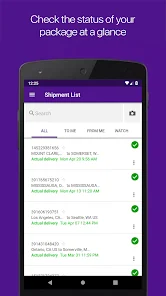
Access to Shipping History

Keep track of all your past shipments effortlessly. The FedEx Mobile app allows you to access your shipping history, making it simple to reference previous orders or reprint labels, ensuring that you have everything you need at your fingertips.

Easy Shipping Options

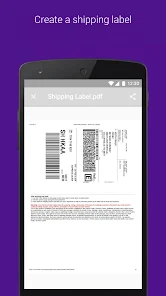
Creating shipments has never been easier with the FedEx Mobile app. You can quickly generate shipping labels, choose from various shipping options, and even schedule pickups, all from the convenience of your mobile device, streamlining your shipping process.

Personalized Notifications

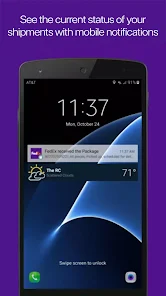
Receive tailored notifications to keep you informed about your shipments. Whether it’s alerts for package deliveries, updates on status changes, or reminders for upcoming shipments, FedEx Mobile ensures you never miss an important update.

Real-Time Tracking

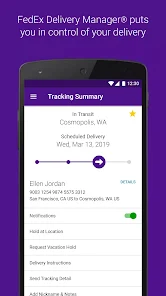
Stay updated with real-time tracking of your shipments from pickup to delivery. The FedEx Mobile app provides detailed information on your package's location, estimated delivery time, and any delays, ensuring you’re always in the loop about your important deliveries.

Pros & Cons

Pros
  • Track shipments in real-time for peace of mind
  • Access shipping tools anytime, anywhere with ease
  • Get instant notifications for delivery updates
  • Manage multiple shipments from a single app
  • Easily create and print shipping labels on-the-go
Cons
  • Limited functionality compared to the desktop version
  • Occasional app crashes disrupt user experience
  • Slow loading times during peak usage
  • Navigation can be confusing for new users

Real Experience Using FedEx Mobile

Application Scenarios

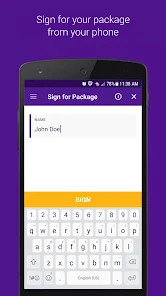
The FedEx Mobile app is designed to enhance the shipping and tracking experience for both individuals and businesses. Users can utilize the app to easily send packages, track shipments in real time, and manage their delivery preferences. Whether you are a small business owner looking to ship products or a consumer sending gifts to family and friends, the app provides a streamlined solution. The app's features come in handy during various scenarios, such as last-minute shipping needs, tracking a vital package during the holiday season, or managing multiple shipments for a business. Users can schedule pickups, find nearby FedEx locations, and even access shipping rates, making it a comprehensive tool for all shipping needs.

User Experience

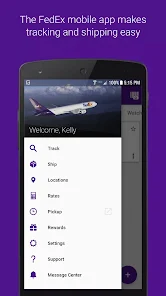
The user experience of the FedEx Mobile app is generally intuitive and user-friendly. The app’s interface is clean and organized, making navigation straightforward even for those who may not be tech-savvy. Users have reported that the tracking feature is particularly impressive, providing detailed updates on package status with GPS tracking capabilities. Notifications about delivery updates are timely and helpful, ensuring users are always informed. Additionally, the app allows users to save their favorite locations and shipping preferences, which can significantly speed up the shipping process. However, some users have encountered occasional glitches, such as slower loading times during peak periods, which can be frustrating. Overall, though, most users find the app to be reliable and effective.

Pricing

The FedEx Mobile app itself is free to download, which is a significant advantage for users. However, it is important to note that shipping costs are determined based on package dimensions, weight, and destination. The app provides a shipping calculator that helps users estimate costs before finalizing their shipment. While some might find FedEx services to be slightly pricier compared to competitors, the convenience, reliability, and extensive network often justify the expense for many users. The app also occasionally offers promotional discounts and deals, making it even more appealing for budget-conscious users or businesses looking to save on shipping costs.

Updates & Support

FedEx regularly updates its mobile app to enhance functionality and user experience. These updates often include bug fixes, new features, and improvements based on user feedback. The company also provides robust customer support through the app, allowing users to access help articles, FAQs, and live chat options. Users can report issues or seek assistance directly within the app, making it easy to resolve any concerns. Overall, the commitment to regular updates and responsive support adds significant value to the FedEx Mobile app, ensuring that users have a reliable tool at their fingertips.

verified Security & Privacy Review

The FedEx Mobile app prioritizes user security and privacy through a robust framework of data protection measures. The app employs encryption protocols to safeguard sensitive information, ensuring that users' shipment details and personal data are transmitted securely. FedEx adheres to industry standards for data security, which helps mitigate risks related to unauthorized access and data breaches. In terms of privacy practices, FedEx is transparent about its data collection policies, clearly outlining what information is gathered and how it is used. Users can review FedEx's privacy policy within the app, which provides insights into data handling and sharing practices. The app requires permissions such as location access for tracking shipments, but users have control over these settings, allowing them to customize their privacy preferences. Furthermore, FedEx commits to not selling user data to third parties, reinforcing its dedication to user privacy. Overall, the FedEx Mobile app demonstrates a strong commitment to maintaining user security and privacy, making it a reliable choice for managing shipments and deliveries.

Reviews

3.9

“Easy tracking and updates, very convenient app”

“Smooth interface, love the notifications”

“Fast and reliable, great for shipping needs”

“Occasional bugs, but overall user-friendly”

“Customer service feature needs improvement”

FAQ

1

Does FedEx Mobile collect my personal data?

Yes, FedEx Mobile may collect personal data to provide services, enhance user experience, and for operational purposes as outlined in their privacy policy.

2

Does FedEx Mobile offer a free trial or free version?

FedEx Mobile is free to download and use, with no subscription required for basic features; however, some premium services may incur charges.

3

Does FedEx Mobile require an internet connection?

Yes, FedEx Mobile requires an internet connection to access real-time tracking information, shipping services, and other app features.

4

How can I contact support or send feedback for FedEx Mobile?

You can contact FedEx Mobile support through the app's help section or visit the FedEx website for customer service options, including phone and email support.

5

How do I manage or cancel my FedEx Mobile subscription?

Since FedEx Mobile does not require a subscription for its basic features, there are no subscription management or cancellation processes; however, for premium services, follow the app's instructions or contact customer support for assistance.

How to use FedEx Mobile

1

Can I track my shipments using the mobile app?

Yes, you can track your shipments by entering the tracking number in the "Track" section of the app for real-time updates.

2

How can I contact FedEx customer service through the mobile app?

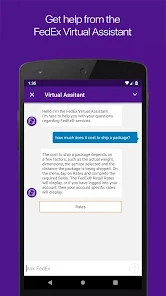
You can contact FedEx customer service by tapping on the "Help" section within the app, where you’ll find options for chat, email, or phone support.

3

How can I find the nearest FedEx location using the app?

Tap on "Locations" in the app, allow location access, and it will display the nearest FedEx locations along with their hours and services.

4

How do I log into my FedEx account using the mobile app?

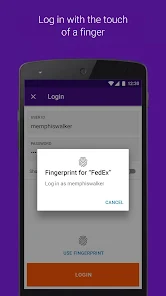
Open the app, tap on "Log In," enter your username and password, and then tap "Log In" again to access your account.

5

How do I reset my password in the FedEx mobile app?

Tap on the "Forgot Password?

Editor's Choice