This site uses cookies to enhance your user experience. By clicking any link on this site you are giving your consent to our cookie policy. Read more
Reject
Accept All

Advertiser and Editorial Disclosures

Xactimate ®

Xactimate ®

verified Verified App

Developer: Xactware Solutions, Inc.

  • category

    Category: Business

  • price

    Price: free

  • age rating

    Age Rating: Everyone

  • rating

    Rating: 4.6

  • download

    Downloads: 50,000+

  • version

    Version: 2026.1.1000.444.444

Screenshot 1
Screenshot 2
Screenshot 3
Screenshot 4
Screenshot 5
Screenshot 6
Screenshot 7
Screenshot 8
Screenshot 9
Screenshot 10
Screenshot 11
Screenshot 12

Features & Highlights

Collaboration Features

Xactimate® facilitates seamless collaboration among team members through shared estimates and real-time updates. This ensures that everyone stays on the same page, reducing miscommunication and increasing productivity, especially during large projects or claims processing.

Comprehensive Estimating Tools

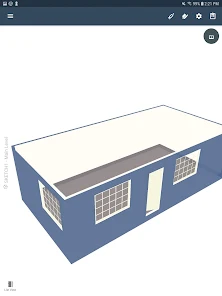
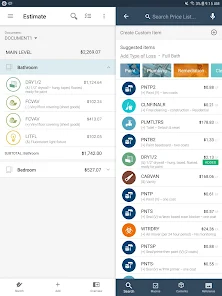
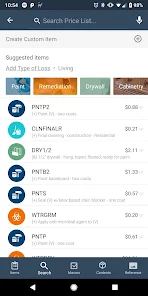
Xactimate® offers a robust set of estimating tools that streamline the process of creating accurate and detailed insurance claims. With its extensive database of building costs and materials, users can ensure that their estimates are not only precise but also reflective of current market conditions.

Custom Reporting Options

With customizable reporting options, Xactimate® enables users to generate tailored reports that meet specific needs. Whether for internal reviews or client presentations, these reports can be easily adjusted to highlight key data and insights, making communication clearer and more effective.

Integrated Mobile App

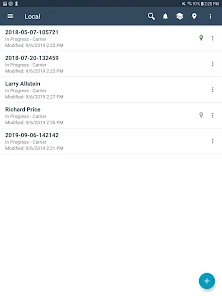
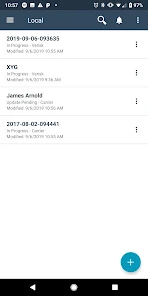
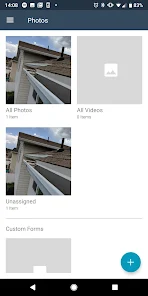
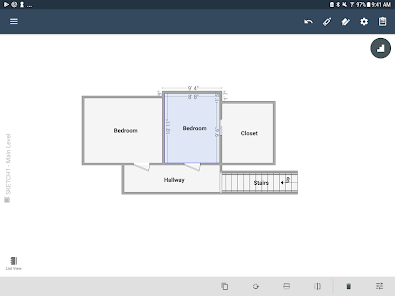
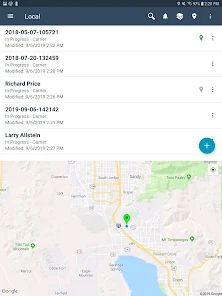
The integrated mobile app allows users to create and manage estimates on-the-go, ensuring that you can work from any location. This flexibility is perfect for adjusters and contractors who need to access vital information and make updates in real time, enhancing efficiency.

Pros & Cons

Pros
  • Xactimate® streamlines claims processing for faster payouts.
  • It offers accurate cost estimations for repairs.
  • Users can easily access a vast database of materials and labor rates.
  • The software integrates seamlessly with other industry tools and software.
  • Its user-friendly interface enhances workflow efficiency for all users.
Cons
  • Xactimate® can be expensive for smaller contractors and businesses.
  • The learning curve may hinder quick adoption for new users.
  • Limited flexibility in customizations can frustrate some users.

Real Experience Using Xactimate ®

Application Scenarios

Xactimate® is an essential tool for professionals in the insurance and construction industries, specifically designed for estimating property damages and repair costs. It is widely utilized by insurance adjusters, contractors, and restoration professionals to create detailed and accurate estimates for claims processing. In scenarios such as water damage, fire restoration, or natural disasters, users can quickly input data related to the extent of damage, necessary repairs, and materials needed. The application also allows for the estimation of labor costs, making it ideal for both small-scale projects and large restoration jobs. Additionally, Xactimate® is beneficial in scenarios where compliance with insurance guidelines is crucial, ensuring that estimates align with industry standards and practices.

User Experience

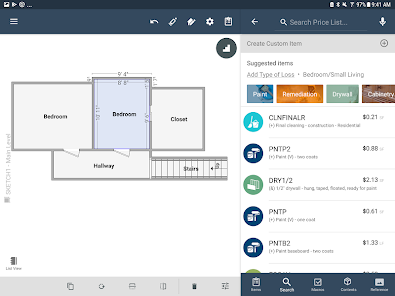
The user experience of Xactimate® is generally positive, with many users praising its intuitive interface and robust functionality. The app provides a comprehensive library of pricing information and repair items, which users can easily navigate. The ability to generate professional-looking reports and proposals directly from the app adds to its appeal, allowing users to present their estimates in a clear and organized manner. However, some users have reported a learning curve associated with the software, particularly for those who are new to estimating tools. The inclusion of tutorials and customer support features helps mitigate these challenges, making it easier for users to get accustomed to the app’s capabilities. Overall, Xactimate® effectively combines functionality with usability, catering to both seasoned professionals and newcomers alike.

Pricing

Xactimate® operates on a subscription-based pricing model, which can be a consideration for potential users. The cost varies depending on the features required and the size of the user base. Users can choose from different plans that cater to individual users or teams, providing flexibility for varying business needs. While some may find the subscription cost to be on the higher side, many users assert that the value it brings in terms of time savings and accuracy justifies the expense. Additionally, Xactimate® often offers promotions or trial periods, allowing potential customers to explore its features before committing to a subscription.

Updates & Support

Xactimate® is regularly updated to enhance its features and functionality, ensuring that users have access to the latest pricing data and industry standards. The development team actively seeks user feedback, which informs future updates and improvements. Customer support is an integral part of the user experience, with various channels available, including phone, email, and online chat. Users can also access a comprehensive knowledge base and community forums, which provide valuable resources for troubleshooting and tips on best practices. Overall, the combination of frequent updates and responsive support contributes to a reliable user experience, making Xactimate® a trusted choice in the estimating software market.

verified Security & Privacy Review

The Xactimate ® app places a strong emphasis on security and privacy, ensuring that user data is handled with care and integrity. The app employs advanced encryption protocols to protect sensitive information during transmission and storage, safeguarding users from unauthorized access. Regarding permissions, Xactimate ® requests access to essential features necessary for its functionality, such as camera and location services. Users are informed of these permissions upfront, allowing for informed consent. The app does not collect excessive personal information, focusing instead on data that directly enhances user experience. Xactimate ® adheres to industry-standard privacy practices, including data minimization and anonymization techniques. This approach ensures that any data collected is used solely for its intended purpose, such as improving service efficiency and user experience. Additionally, the app provides users with clear privacy policy guidelines, detailing how their information is used and shared. Overall, Xactimate ® demonstrates a commitment to maintaining user trust through robust security measures and transparent privacy practices, making it a reliable choice for users concerned about data protection.

Reviews

4.6

“Easy to use and saves time on estimates”

“Great for detailed cost breakdowns”

“Excellent tool for insurance adjusters”

“User-friendly interface with helpful features”

“Reliable and accurate pricing information”

FAQ

1

Can I submit suggestions or feedback to Xactimate ®?

Yes, users can submit suggestions or feedback directly through the app or by contacting customer support, as the developers value user input for improving the software.

2

Does Xactimate ® collect my personal data?

Xactimate ® may collect personal data as part of its user registration and usage processes, but it adheres to privacy regulations and maintains measures to protect user information.

3

Does Xactimate ® support offline use?

Yes, Xactimate ® offers offline functionality, allowing users to work on estimates without an internet connection and sync their data once they are back online.

4

How do I cancel my Xactimate ® subscription?

To cancel your Xactimate ® subscription, you can access your account settings within the app or contact customer support for assistance with the cancellation process.

5

How much does a subscription to Xactimate ® cost?

The cost of a subscription to Xactimate ® varies based on the plan selected, and users should visit the official website or contact sales for the most accurate pricing information.

How to use Xactimate ®

1

Can I access my account from multiple devices?

Yes, you can log in to your Xactimate account from multiple devices as long as you have your login credentials. If you face issues, contact customer service.

2

Can I change my customer number if I need to?

Customer numbers are typically fixed, but you can contact customer service for any specific requests or issues regarding your account.

3

How can I contact customer service for Xactimate?

You can reach Xactimate customer service by calling our support line or using the chat feature on our website. We’re here to help!

4

How do I log in to my Xactimate account?

To log in, visit the Xactimate website, enter your credentials, and click the login button. If you need help, contact customer service.

5

How do I update my customer information?

To update your customer information, log in to your account and navigate to the profile section, or contact customer service for help.

Editor's Choice