This site uses cookies to enhance your user experience. By clicking any link on this site you are giving your consent to our cookie policy. Read more
Reject
Accept All

Advertiser and Editorial Disclosures

WorkJam

WorkJam

verified Verified App

Developer: WorkJam, Inc.

  • category

    Category: Business

  • price

    Price: free

  • age rating

    Age Rating: Everyone

  • rating

    Rating: 4.7

  • download

    Downloads: 1,000,000+

  • version

    Version: 2026.1.15

Screenshot 1
Screenshot 2
Screenshot 3
Screenshot 4
Screenshot 5
Screenshot 6

Features & Highlights

Employee Engagement Features

WorkJam focuses on enhancing employee engagement through customizable surveys and feedback tools. By gathering insights directly from team members, organizations can create a more inclusive workplace culture that values input and drives satisfaction.

Real-Time Communication

WorkJam offers seamless real-time communication tools that keep teams connected and informed. With features like instant messaging and announcements, employees can easily share updates and collaborate, ensuring everyone is on the same page regardless of their location.

Scheduling Flexibility

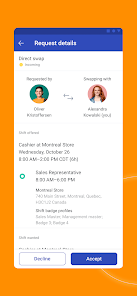
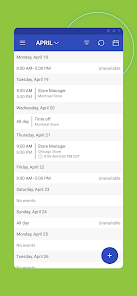
With advanced scheduling features, WorkJam allows managers to create and manage employee schedules with ease. Employees can view their shifts, request changes, and swap shifts, providing the flexibility needed to maintain work-life balance while ensuring adequate staffing.

Task Management Tools

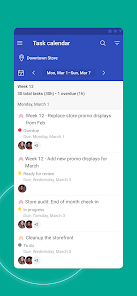
The platform provides robust task management capabilities that help teams prioritize and track their work effectively. Users can assign tasks, set deadlines, and monitor progress, fostering accountability and ensuring that projects stay on schedule.

Pros & Cons

Pros
  • Enhances employee engagement and satisfaction levels
  • Streamlines communication across teams and locations
  • Boosts operational efficiency with smart scheduling
  • Provides real-time analytics for informed decision-making
  • Supports training and development for workforce growth
Cons
  • Limited customization options for specific business needs
  • User interface can be confusing for new users
  • Integration issues with existing software systems
  • Inconsistent customer support response times

Real Experience Using WorkJam

Application Scenarios

WorkJam is designed to cater to a variety of sectors, making it an ideal choice for businesses in retail, hospitality, healthcare, and more. In retail environments, managers can utilize WorkJam to streamline shift scheduling and communicate with employees in real-time about store promotions or policy changes. For the hospitality industry, the app facilitates the management of staff schedules, ensuring that critical shifts are always covered. In healthcare, WorkJam offers a platform for staff to coordinate their schedules effectively, allowing for seamless communication between medical staff and administration. Whether it's for frontline workers or corporate teams, the application adapts to meet the specific needs of different industries, enhancing overall operational efficiency.

User Experience

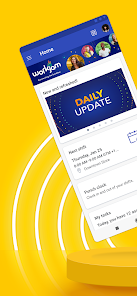
The user experience with WorkJam is intuitive and user-friendly. The interface is clean and organized, making navigation straightforward for users of all tech-savviness levels. Employees can easily access their schedules, request time off, and communicate with their teams, all from a single dashboard. The mobile app is responsive, ensuring that users can manage their work-related tasks on-the-go. Furthermore, the real-time notification system keeps users informed of any schedule changes or important announcements, reducing the chances of miscommunication. Overall, the user experience is designed to foster engagement and satisfaction among employees, which can significantly boost morale and productivity.

Pricing

WorkJam offers a flexible pricing model tailored to the needs of businesses of all sizes. The pricing structure typically includes different tiers based on the features required, allowing companies to choose a plan that fits their budget. While specific pricing details may vary, potential users can expect a subscription-based model that provides ongoing access to updates and new features. The investment in WorkJam often pays off through increased productivity and reduced operational inefficiencies, making it a valuable tool for organizations looking to optimize their workforce management.

Updates & Support

WorkJam is committed to continuous improvement, with regular updates that introduce new features and enhance existing functionalities. Users can expect a steady stream of enhancements that keep the app relevant and aligned with industry trends. Additionally, the support team is responsive and knowledgeable, providing assistance through various channels, including live chat, email, and an extensive knowledge base. This commitment to customer support ensures that users have the resources they need to effectively utilize the app and troubleshoot any issues that may arise. Overall, the combination of ongoing updates and reliable support makes WorkJam a trustworthy partner for businesses aiming to improve their workforce management processes.

verified Security & Privacy Review

WorkJam prioritizes the security and privacy of its users by implementing robust data protection measures. The app employs encryption protocols to safeguard sensitive information both in transit and at rest, ensuring that user data remains confidential and secure from unauthorized access. In terms of privacy practices, WorkJam adheres to industry standards and regulations, including GDPR and CCPA, providing transparency about data collection, usage, and sharing. Users are informed about the types of data collected, which typically includes personal information, location data, and usage statistics, allowing them to make informed decisions regarding their privacy. WorkJam requests specific permissions to function effectively, such as access to location services and notifications. Users have the option to manage these permissions, ensuring they maintain control over their personal information. The app also features privacy settings that enable users to customize their data-sharing preferences. Overall, WorkJam demonstrates a strong commitment to data security and user privacy, making it a trustworthy choice for businesses and employees alike.

Reviews

4.7

“User-friendly interface and easy navigation.”

“Great communication tool for team collaboration.”

“Scheduling features save us so much time.”

“Reliable app with excellent customer support.”

“Increased employee engagement and satisfaction overall.”

FAQ

1

Does WorkJam collect my personal data?

WorkJam may collect personal data, such as user information and usage patterns, to improve its services and enhance user experience, in accordance with its privacy policy.

2

Does WorkJam offer a free trial or free version?

WorkJam typically offers a free trial to allow users to explore its features, but it does not have a free version for ongoing use.

3

Does WorkJam require an internet connection?

Yes, WorkJam requires an active internet connection for users to access its features and functionalities, as it operates as a cloud-based platform.

4

How can I contact support or send feedback for WorkJam?

You can contact WorkJam support or send feedback through the in-app support feature, or by visiting their official website where you can find additional contact options and resources.

5

How do I manage or cancel my WorkJam subscription?

You can manage or cancel your WorkJam subscription through your account settings in the app or website, where you can also find detailed instructions for subscription management.

How to use WorkJam

1

How can I contact Customer Service for WorkJam?

You can reach WorkJam's Customer Service by visiting their official website and utilizing the contact form or support chat feature.

2

How do I activate my WorkJam account?

To activate your account, follow the activation link sent to your email after registration and set your password.

3

How do I find the Customer Number for WorkJam?

The Customer Number is typically provided in your account settings or can be found on your subscription invoice.

4

How do I log in to the WorkJam app?

Open the app, enter your registered email and password, then tap 'Log In.' If you forget your password, use the 'Forgot Password?' link.

Editor's Choice