This site uses cookies to enhance your user experience. By clicking any link on this site you are giving your consent to our cookie policy. Read more
Reject
Accept All

Advertiser and Editorial Disclosures

V380

V380

verified

Guangzhou Hongshi information Technology Co., Ltd

3.8
Rating
10,000,000+ Downloads
6.4.60 Version
  • category

    Category: Business

  • price

    Price: free

  • age rating

    Age Rating: Everyone

  • rating

    Rating: 3.8

  • available on

    Available on: /

  • updated on

    Updated on: Jun 4, 2026

Screenshot 1
Screenshot 2
Screenshot 3
Screenshot 4
Screenshot 5
Screenshot 6

Features & Highlights

Cloud Storage Option

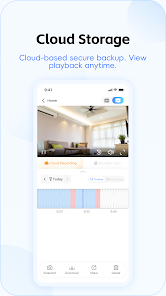
With V380's cloud storage option, you can securely save and access your video footage anytime, anywhere. This feature not only protects your data but also provides a reliable backup, so you can review recordings whenever you need to revisit important events.

Live Video Streaming

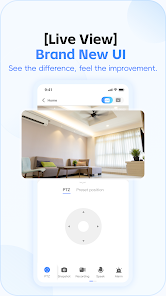
V380 offers real-time video streaming, allowing users to monitor their spaces from anywhere at any time. With high-definition clarity, you can enjoy crisp visuals that help you stay connected and informed about your environment, whether at home or on the go.

Motion Detection Alerts

V380 comes equipped with motion detection alerts that notify you instantly of any activity in your monitored area. This proactive feature ensures you never miss a moment, providing peace of mind and enhancing your security by keeping you informed of unusual movements.

Two-Way Audio

The app features two-way audio, enabling seamless communication between users and their loved ones or pets. This interactive capability allows you to hear and speak through the camera, fostering a sense of presence even when you're physically away.

Pros & Cons

Pros
  • V380 offers high-definition video streaming for crystal-clear surveillance.
  • Its user-friendly app allows for easy remote access and control.
  • Night vision capabilities ensure visibility in low-light conditions.
  • Two-way audio enables real-time communication with monitored areas.
  • Motion detection alerts keep you informed of any unusual activity.
Cons
  • Limited customer support can hinder timely problem resolution.
  • The app may experience connectivity issues, affecting user experience.
  • Video quality may falter in low-light conditions, compromising surveillance effectiveness.

Real Experience Using V380

Application Scenarios

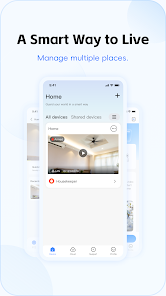
The V380 app is primarily designed for users looking to monitor their surroundings through IP cameras. It's particularly useful for home security, allowing homeowners to keep an eye on their property in real-time. Users can place cameras in various locations such as entrances, nurseries, or even garages, and receive instant alerts if any unusual activity is detected. The app is also suitable for small business owners who wish to supervise their establishments remotely. Additionally, pet owners have found it beneficial for checking in on their furry friends when they are away, ensuring their pets are safe and comfortable.

User Experience

The user experience of the V380 app is generally positive, with an intuitive interface that makes navigation simple for both tech-savvy users and beginners. Setting up the app is relatively easy; users can connect their cameras quickly with step-by-step instructions. The live streaming feature works seamlessly, providing clear video quality and minimal lag. Users appreciate the ability to pan, tilt, and zoom their cameras directly from the app, enhancing the surveillance experience. However, some users have reported occasional connectivity issues, which can be frustrating, especially when critical monitoring is required. The app does offer a variety of settings for notifications, recording schedules, and motion detection sensitivity, allowing users to customize their experience based on their monitoring needs.

Pricing

The V380 app is free to download and use, which is a significant advantage for users looking for budget-friendly surveillance solutions. However, certain premium features, such as cloud storage for recorded footage and advanced analytics, may come at a cost. Users have varying opinions on the pricing structure for these additional features. While some believe that the free version provides ample functionality for basic needs, others feel that the premium features are essential for comprehensive security and are worth the investment. Overall, the app offers flexibility in pricing, catering to different user requirements and budgets.

Updates & Support

V380 frequently updates its app to enhance performance and add new features, which demonstrates the developers' commitment to user satisfaction. Users have reported improvements in video quality and app stability after updates. The support system is accessible, with a dedicated FAQ section and user guides available on their website. Additionally, users can reach out to customer support via email for troubleshooting assistance. However, response times can vary, and some users have expressed a desire for more responsive customer service. Nevertheless, the continuous updates and commitment to user feedback are promising indicators of the app's potential for future growth and improvement.

verified Security & Privacy Review

The V380 app is designed for managing surveillance cameras, providing users with a convenient way to monitor their homes or businesses. However, when it comes to security and privacy, there are several considerations to keep in mind. The app requires access to the device's camera, microphone, and location services, which raises potential concerns about unauthorized data collection. Users should be aware that the app may transmit video feeds and personal data over the internet. It is crucial to ensure that these connections are secured, preferably through encryption, to protect against potential breaches. The app’s privacy policy outlines how user data is collected, used, and shared, but it is essential for users to review this document to understand their rights and the extent of data handling. While V380 provides essential functionalities, users should exercise caution by regularly updating the app to benefit from security patches and by enabling two-factor authentication if available. Overall, considering the permissions required and the nature of surveillance apps, users should weigh the benefits against potential privacy risks.

User Reviews

  • me not you
    2024/08/17

    If you reinstalled the software and get invalid password, you have to use the number on the camera as user ID. Took me a while to figure it out. Now onto a new issue. The app is not pushing notifications. I am pretty sure that the old version did. That makes it not very useful as a security camera.. On the plus side, this is the only software that has programmable PTZ points. That is an awesome feature.

  • Traildude
    2021/07/10

    As I worked at learning to use this app it struck me repeatedly that if I’d turned in a piece of software like this for a university computer science course back about 1991 I would have been lucky to get a passing grade! It’s not surprising that the resolution sucks; what is shocking is that playback has no speed controls — no double-time, no fast forward, no rewind, no replay , indeed almost nothing to make it user-friendly. If you want an app that’s thirty years behind the times in terms of usefulness, this is a great choice, but if you want something that works like it was written in the twenty-first century, go elsewhere.

  • Terry Schwartz
    2021/06/28

    Edit: This app just gets worse and worse. Now subjects me to an ad I can't close for 5 seconds, then pops up another ad I have to close, displays yet a 3rd at at all times while using it. Would be tolerable if the app was more reliable, but it's not. About 1 in 3 or 4 times it simply hangs and I need to close it and re-open the app to monitor my camera. It's also gotten slower with more lag from real time, and more "reconnecting". Menus are poorly organized and written in Chinglish. For instance, there is an "arm" button, but pushing it disarms the alarm function. Hate that the new version pushes ads at me constantly, spams me with push notifications multiple times a day. Does seem more reliable than before, but now I hate it enough to consider uninstalling it and tossing camera.

  • A Google user
    2018/10/31

    Great video. However EVERY time you exit the app, you have to force it to close. UPDATE: It no longer connects when outside the WiFi. Other cameras that I have stream to my phone no problem. It also states that I have an update but fails after every attempt. Last update- since updating it opens all day looking without any reason. Only way to shut down is forcing it closed. Then 5 minutes later it is running in the tank bar. Uninstalled

  • Bryan Jackson
    2020/09/11

    the app disconnects from the WiFi often. I have to keep signing in before viewing. the use and controls are OK. the PTZ controls are very slow to respond and backwards on my phone. the audio and video are good. the app will not save recordings unless I pay for cloud storage. There is no phone app to desktop interface. there is no help available through the app.

Review Source: Google Play store public user reviews.

FAQ

1

Can I submit suggestions or feedback to V380?

Yes, users can submit suggestions or feedback directly through the app or by contacting customer support via their website.

2

Does V380 collect my personal data?

Yes, V380 may collect certain personal data such as email addresses and device information for account management and app functionality.

3

Does V380 support offline use?

V380 primarily requires an internet connection to function; however, some features may be accessible offline if previously cached.

4

How do I cancel my V380 subscription?

You can cancel your V380 subscription through your account settings in the app or via the app store where you purchased it.

5

How much does a subscription to V380 cost?

The subscription cost for premium features in V380 can vary, typically ranging from a few dollars per month to a discounted annual rate.

How to use V380

1

Can I change my customer number after activation?

Unfortunately, customer numbers cannot be changed once your account is activated. For further assistance, please contact customer service.

2

Can I get help with my account settings from customer service?

Yes, customer service can assist you with any account settings issues or questions you may have. Just reach out to them for help.

3

How can I log in to my V380 account?

To log in, open the app, enter your registered email and password, then tap the login button.

4

How do I activate my V380 account?

To activate your account, follow the link in the confirmation email you received after registration. If you need help, contact customer service.

5

How do I contact customer service for V380?

You can reach our customer service by calling the support number listed on our website or using the chat feature in the app.

What's New

1. Optimized 4G device binding process2. Adapted to custom notification sound function3. Optimized user experience of AI alarm analysis service4. Optimized user experience of cloud storage5. Added AI alarm daily report function6. Other optimizations and adjustments7. Fixed known issues

Editor's Choice