This site uses cookies to enhance your user experience. By clicking any link on this site you are giving your consent to our cookie policy. Read more
Reject
Accept All
Salesforce Authenticator

Salesforce Authenticator

verified Verified App

Developer: Salesforce.com, inc.

  • category

    Category: Business

  • price

    Price: free

  • age rating

    Age Rating: Everyone

  • rating

    Rating: 4.5

  • download

    Downloads: 1,000,000+

  • version

    Version: 4.7.1

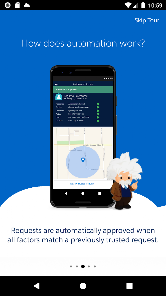
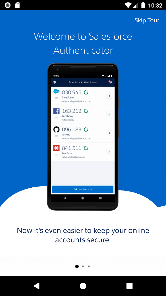
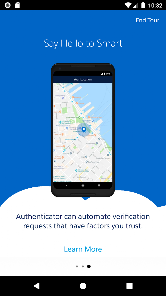
Screenshot 1
Screenshot 2
Screenshot 3
Screenshot 4
Screenshot 5
Screenshot 6

Features & Highlights

Device Management

Salesforce Authenticator offers a comprehensive device management feature that allows users to review and manage devices linked to their accounts. This ensures that you can easily identify and remove any unauthorized devices, maintaining the integrity of your account's security.

Login Approvals

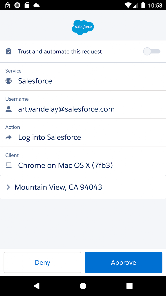
With the Login Approvals feature, users can manage and approve login requests directly from the app. This adds an extra layer of security, allowing you to control who accesses your Salesforce account and ensuring that only authorized users can log in, even from unfamiliar devices.

One-Tap Verification

The one-tap verification feature streamlines the login process by allowing users to approve access requests with a single tap. This user-friendly approach not only saves time but also reduces friction during authentication, making secure access to your Salesforce account easier than ever.

Two-Factor Authentication

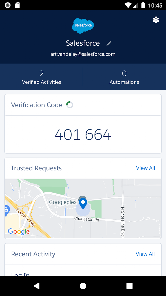
Salesforce Authenticator provides a robust two-factor authentication system that enhances your account's security. By requiring a secondary verification step, it helps protect your sensitive information from unauthorized access, making it a crucial tool for businesses and individuals alike.

Pros & Cons

Pros
  • Enhances security with two-factor authentication.
  • Easy to use with intuitive interface.
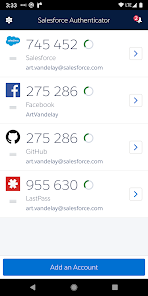
  • Supports multiple Salesforce accounts seamlessly.
  • Real-time notifications for login attempts.
  • Works offline for added convenience.
Cons
  • Requires a smartphone for authentication access
  • Limited to mobile devices only
  • May face issues with connectivity or battery life
  • User experience can be complicated for beginners

Real Experience Using Salesforce Authenticator

Application Scenarios

The Salesforce Authenticator app is designed to enhance security for Salesforce users by providing an additional layer of authentication through two-factor verification. It is particularly beneficial for businesses that handle sensitive data, ensuring that only authorized personnel can access their Salesforce accounts. The app is ideal for organizations of all sizes, from small businesses to large enterprises, particularly those in sectors like finance, healthcare, and e-commerce, where data security is paramount. Users can utilize the app during the login process to receive security notifications, approve login attempts, and even generate one-time passwords when necessary. Additionally, the app can be used in tandem with other Salesforce services, making it a versatile tool for safeguarding a variety of business operations.

User Experience

Users generally find the Salesforce Authenticator app to be user-friendly and intuitive. The setup process is straightforward, with clear instructions guiding users through linking their accounts. Once set up, the app delivers a seamless experience during the login process. Users appreciate the quick notifications and the option to approve or deny login requests with a simple tap. The interface is clean and easy to navigate, making it accessible even for those who may not be tech-savvy. However, some users have reported occasional connectivity issues, particularly in areas with poor internet access, which can hinder the approval process. Despite this, the overall sentiment is that the app significantly enhances security without hindering productivity.

Pricing

The Salesforce Authenticator app is available for free, which is one of its most appealing features. This no-cost option ensures that businesses of all sizes can implement two-factor authentication without financial barriers. By providing a robust security solution at no additional cost, Salesforce demonstrates its commitment to user safety and data protection. However, companies should be aware that while the app itself is free, utilizing Salesforce's broader suite of services may involve subscription fees or other charges. Thus, it is essential for users to review their overall Salesforce package to understand the complete financial commitment involved.

Updates & Support

Salesforce is known for its commitment to continuous improvement, and the Authenticator app receives regular updates to enhance functionality and security features. Users can expect periodic enhancements that address bugs, improve performance, and introduce new features based on user feedback. Support is readily available through Salesforce’s extensive help center, which includes FAQs, user guides, and community forums where users can share experiences and solutions. Additionally, Salesforce provides customer support channels for more personalized assistance, ensuring that users can resolve issues effectively. This level of ongoing support and improvement reinforces the app's reliability and user satisfaction.

verified Security & Privacy Review

The Salesforce Authenticator app prioritizes data security and user privacy, implementing robust measures to protect sensitive information. With two-factor authentication, it enhances account security by requiring a second verification step beyond just a password, significantly reducing the risk of unauthorized access. Salesforce employs end-to-end encryption for data transmission, ensuring that user credentials and authentication tokens are safeguarded against interception. The app does not store user passwords, further minimizing the risk of data breaches. Privacy practices are aligned with industry standards, and Salesforce provides clear guidelines on how user data is collected, used, and shared. The app requests only essential permissions, such as access to notifications for authentication prompts, which enhances user experience while maintaining a focus on privacy. Users have control over their data, with options to manage settings and opt out of data sharing where applicable. Overall, Salesforce Authenticator demonstrates a strong commitment to security and privacy, making it a reliable choice for users seeking to protect their accounts.

Reviews

4.5

“Easy to use and setup!”

“Highly secure two-factor authentication.”

“Great integration with Salesforce services.”

“User-friendly interface, love the notifications.”

“Reliable app, never had issues logging in.”

Editor's Choice