This site uses cookies to enhance your user experience. By clicking any link on this site you are giving your consent to our cookie policy. Read more
Reject
Accept All

Advertiser and Editorial Disclosures

RXCamView

RXCamView

verified Verified App

Developer: ZhangHao

  • category

    Category: Business

  • price

    Price: free

  • age rating

    Age Rating: Everyone

  • rating

    Rating: 3.4

  • download

    Downloads: 1,000,000+

  • version

    Version: 5.31.1

Screenshot 1
Screenshot 2
Screenshot 3
Screenshot 4
Screenshot 5
Screenshot 6
Screenshot 7
Screenshot 8

Features & Highlights

Cloud Storage Options

RXCamView provides flexible cloud storage solutions for your recorded footage, ensuring that your video history is safe and easily accessible. With options to customize storage plans, you can choose what works best for you, keeping your important recordings secure and organized.

Live Streaming

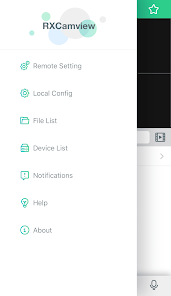
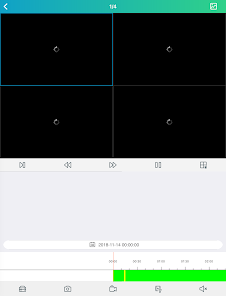
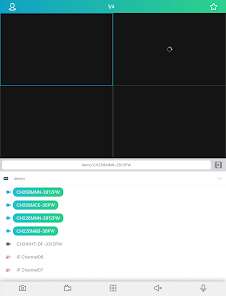
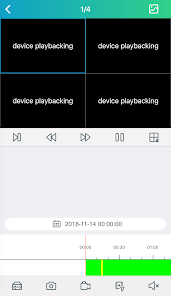
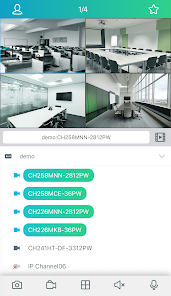
RXCamView offers real-time video streaming, allowing users to monitor their surroundings from anywhere at any time. With a user-friendly interface, you can easily access live feeds and ensure that you never miss a moment, whether you’re at home or on the go.

Motion Detection Alerts

Stay informed with RXCamView’s advanced motion detection feature that sends instant alerts to your device when movement is detected. This capability ensures you’re always aware of any unusual activity, providing peace of mind and enhancing your security measures.

Two-Way Audio

The app supports two-way audio, enabling you to communicate directly through your camera. Whether you want to greet visitors or deter intruders, this feature adds an interactive element to your monitoring experience, making it versatile for various situations.

Pros & Cons

Pros
  • User-friendly interface for easy navigation and setup
  • Real-time video streaming for instant monitoring access
  • Supports multiple camera connections for comprehensive coverage
  • Cloud storage options ensure secure data management
  • Advanced motion detection alerts enhance security awareness
Cons
  • Limited customer support options available for users
  • Frequent connectivity issues with certain devices
  • User interface can be confusing and unintuitive
  • Lacks advanced features found in competitor apps

Real Experience Using RXCamView

Application Scenarios

RXCamView is designed primarily for users who need a reliable surveillance solution for their homes or businesses. This app is perfect for monitoring live feeds from IP cameras, making it suitable for a variety of scenarios. Homeowners can keep an eye on their properties while away, ensuring that everything is secure. Businesses can utilize RXCamView to oversee their premises, monitor employee activities, and deter theft or misconduct. Additionally, parents can use the app to check on their children or pets when they are not at home. The versatility of RXCamView allows it to cater to different needs, whether it’s for personal security or professional surveillance.

User Experience

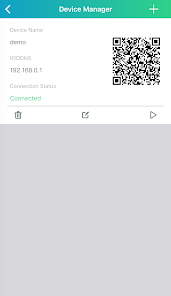
The user experience of RXCamView is commendable, as the app is designed with a clean and intuitive interface that makes navigation straightforward. Users can easily set up their cameras by following a step-by-step process, which simplifies the initial configuration. Once set up, accessing live feeds is seamless, with minimal lag time, allowing users to monitor their premises in real-time. The app also provides options for recording footage, which can be crucial during incidents. Users have reported positive experiences with the app's alert system, as it sends notifications when motion is detected, ensuring that users are always aware of any unusual activities. The overall performance of RXCamView is reliable, making it a preferred choice for many surveillance needs.

Pricing

RXCamView is available for free with basic functionalities, which is an attractive option for casual users who need simple surveillance capabilities. However, for those looking for advanced features such as cloud storage, enhanced recording options, or multiple camera support, a premium subscription is available. The pricing structure is competitive compared to other surveillance apps, and it offers good value for the features provided. Users can choose from various subscription plans depending on their needs, making it flexible for both individual users and larger businesses.

Updates & Support

The developers of RXCamView are dedicated to maintaining the app, regularly releasing updates to enhance functionality and security. Users have noted that these updates often come with new features that improve the overall experience, making it a continuously evolving platform. Support is readily available through the app, with a responsive customer service team that assists users with issues or inquiries. The presence of an FAQ section within the app also helps users troubleshoot common problems without needing direct support. Overall, the commitment to updates and user support enhances the reliability and overall satisfaction with RXCamView.

verified Security & Privacy Review

RXCamView places a strong emphasis on security and privacy, which is crucial for users concerned about their data protection. The app requires several permissions, including access to the camera and storage, to function effectively. It is essential for users to understand these permissions and consider the implications of granting them. The app employs encryption protocols to secure data transmission, ensuring that video feeds and user information remain protected from unauthorized access. However, users should regularly review and update their privacy settings to maintain control over their data. RXCamView also provides options for local storage, allowing users to store footage on their devices rather than relying solely on cloud services, which can enhance privacy. Additionally, the app's privacy policy outlines how user data is collected, used, and shared. It is recommended that users familiarize themselves with these guidelines to make informed decisions regarding their information. Overall, RXCamView demonstrates a commitment to safeguarding user data while offering functionality that meets security standards.

Reviews

3.4

“User-friendly interface and easy setup process.”

“Great video quality and reliable performance.”

“Occasional connection issues, but works well overall.”

“Excellent customer support and quick responses.”

“Versatile features for monitoring and security.”

FAQ

1

Does RXCamView collect my personal data?

RXCamView may collect certain data to provide its services, such as app usage statistics and device information, but it is designed to prioritize user privacy and security. Always refer to the privacy policy for detailed information.

2

Does RXCamView offer a free trial or free version?

RXCamView offers a free version with limited features, as well as a free trial period for its premium subscription plans, allowing users to explore additional functionalities before committing.

3

Does RXCamView require an internet connection?

Yes, RXCamView requires an internet connection to access remote camera feeds and features, although some functionalities may be available on local networks without internet access.

4

How can I contact support or send feedback for RXCamView?

You can contact RXCamView support through the app's help section, where you can find contact information, or by visiting the official website to submit feedback or request assistance.

5

How do I manage or cancel my RXCamView subscription?

You can manage or cancel your RXCamView subscription through the app's settings or your app store account settings, depending on how you subscribed. Detailed instructions are usually provided within the app.

How to use RXCamView

1

How can I contact customer service for the RXCamView app?

You can reach customer service by emailing support at their official website or through the app's contact feature.

2

How do I activate my RXCamView account?

To activate your account, follow the email confirmation link sent to your registered email after your first sign-up.

3

How do I log in to the RXCamView app?

Open the app, enter your registered email and password, then tap on the login button.

4

Is there a need to activate the RXCamView app?

Yes, you may need to activate the app by following the setup instructions provided after your initial download.

5

What is the customer service number for RXCamView?

The customer service number can be found on the official RXCamView website under the support section.

Editor's Choice