This site uses cookies to enhance your user experience. By clicking any link on this site you are giving your consent to our cookie policy. Read more
Reject
Accept All

Advertiser and Editorial Disclosures

Roborock

Roborock

verified

Roborock

4.7
Rating
5,000,000+ Downloads
4.57.02 Version
  • category

    Category: Lifestyle

  • price

    Price: free

  • age rating

    Age Rating: Everyone

  • rating

    Rating: 4.7

  • available on

    Available on: /

  • updated on

    Updated on: Jun 30, 2026

Screenshot 1
Screenshot 2
Screenshot 3
Screenshot 4
Screenshot 5
Screenshot 6

Features & Highlights

App Control

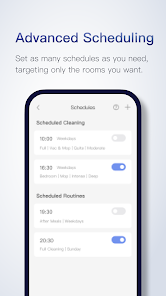
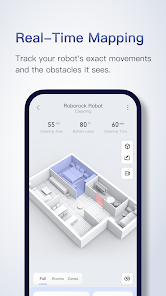
The intuitive Roborock app provides complete control over your cleaning experience. You can start or schedule cleanings, adjust suction power, and monitor cleaning progress in real-time, all from the convenience of your smartphone, making it easy to keep your home tidy with minimal effort.

Multi-Surface Cleaning

Roborock is designed to seamlessly transition between different floor types, whether it's hardwood, tile, or carpet. Its advanced sensors detect surface changes and adjust cleaning modes accordingly, ensuring optimal performance and thorough cleaning across all areas of your home.

Powerful Suction

With its robust suction power, Roborock effectively captures dirt, dust, and pet hair from various surfaces including carpets and hard floors. This strong performance ensures a thorough clean, leaving your home spotless while also being gentle enough not to damage delicate surfaces.

Smart Mapping

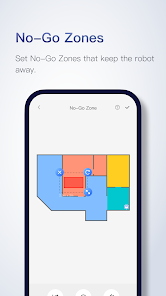
Roborock utilizes advanced mapping technology to create detailed and customizable floor plans of your home. This allows you to designate specific cleaning zones, set no-go areas, and even schedule cleanings for individual rooms, ensuring that every corner of your space gets the attention it deserves.

Pros & Cons

Pros
  • Powerful suction for deep cleaning
  • Smart navigation avoids obstacles effectively
  • Long battery life for extended cleaning sessions
  • App control for convenient scheduling and monitoring
  • Mopping feature enhances overall cleanliness
Cons
  • High initial cost compared to competitors
  • Limited navigation in cluttered spaces
  • Battery life may not last for larger homes
  • Requires regular maintenance for optimal performance

Real Experience Using Roborock

Application Scenarios

The Roborock app is designed to enhance the experience of using Roborock robotic vacuum cleaners, making it a valuable tool for anyone seeking to maintain a clean home with minimal effort. Users can control their vacuum remotely, customizing cleaning schedules based on their daily routines. Whether you’re at work or on vacation, the app allows you to start, pause, or stop cleaning sessions, ensuring your living space remains tidy. Additionally, the app is particularly useful for pet owners, as it can be programmed to target areas where pet hair tends to accumulate the most. Users can also create no-go zones and virtual barriers, providing them with the flexibility to keep certain areas off-limits, such as children’s playrooms or delicate furniture. This adaptability makes the Roborock app suitable for a variety of living scenarios, ensuring that it meets the specific needs of all users.

User Experience

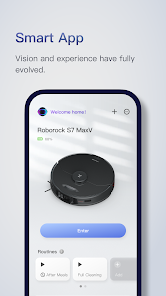
The Roborock app boasts an intuitive user interface that is easy to navigate, allowing users to configure settings without any hassle. The app provides real-time monitoring of cleaning progress, showcasing the areas that have been cleaned and those that are yet to be tackled. Users appreciate the mapping feature, which creates a detailed layout of their home, enabling the vacuum to clean efficiently and systematically. Notifications keep users informed about the vacuum's status, battery life, and when it's time to empty the dustbin. Furthermore, the app supports voice commands through popular smart assistants, making it even more convenient for users to command their vacuum hands-free. Overall, the user experience is enhanced by the seamless integration of technology, ensuring that cleaning becomes a stress-free task.

Pricing

The Roborock app itself is free to download and use, making it accessible to all Roborock vacuum owners. However, the cost of Roborock devices can vary significantly depending on the model and features. Users can expect to pay anywhere from $300 to $900 for a Roborock vacuum, depending on its capabilities such as mopping features, advanced navigation, and suction power. Considering the app's functionality and the efficiency of the vacuums, many users find the pricing to be a worthwhile investment for the level of convenience and cleanliness it brings.

Updates & Support

The Roborock app is regularly updated to enhance performance and introduce new features based on user feedback. These updates often include improvements to mapping technology, additional cleaning modes, and enhanced compatibility with smart home systems. Users report a proactive customer support team that is responsive to inquiries and offers troubleshooting assistance for any technical issues. The app also includes a comprehensive FAQ section and community forums where users can exchange tips and advice, contributing to a strong support network. This commitment to ongoing improvements and user support ensures that Roborock maintains its reputation for quality and reliability in home cleaning solutions.

verified Security & Privacy Review

The Roborock app prioritizes user security and privacy by implementing a range of protective measures. It employs encryption protocols to safeguard communication between the app and the connected devices, ensuring that sensitive data is transmitted securely. Users are informed about the types of data collected, which primarily includes device usage statistics and user preferences, enhancing transparency. When installing the app, users are prompted to grant specific permissions, including access to location services and storage. While these permissions are essential for optimal functionality, users should review them carefully to understand their implications. The app provides options to manage permissions, allowing users to customize their data-sharing preferences. Roborock adheres to strict privacy policies, ensuring that user data is not shared with third parties without explicit consent. Furthermore, the app regularly updates its security features to address potential vulnerabilities, demonstrating a commitment to maintaining user trust and data integrity. Overall, the Roborock app offers a balanced approach to security and privacy, empowering users to control their information effectively.

User Reviews

  • Amy Margraff
    2026/06/16

    Love this little machine. Overall both the vacuuming and mopping work great. I've had 3 other brands of robot vacuums and mops but this is my first combo unit. It's equivalent or better so far. It's fairly quiet too. The negatives: it does not always recognize items stuck in the vacuum so it frequently drags things like socks or cords around the house while it works. If its path is blocked on its initial route, it does not return to try that area again so you may have to send it out again.

  • Kristin Chase
    2026/04/19

    My app has been working great until the April 15 update. Suddenly I can't access any of my maps, and I now don't have any controls over when the bin empties. My robot seems to know where it's going, so I think it still has access to the maps, but I just don't. I have uninstalled and reinstalled the app twice this weekend, and have reset the Wi-Fi on my robot, powered it down, etc, but nothing is working to fix it. Very frustrating.

  • Nathan Stufflebeam
    2026/01/21

    I really liked the vacuum and app at first. The mapping feature is cool. I like that you can put no-go zones, mark carpet areas, etc. However, after using it a few days I came home and it was disconnected from the network. It took me 30 minutes to reconnect and pair through my network to the app. it was very frustrating. A few weeks later I didn't use it for a day. Then an update came out and suddenly it lost the map of my house. Now when I try to reprogram the no-go zones it cuts off the map

  • Noneofyour Business
    2026/02/15

    I've loved my Qrevo since day 1, but immediately after updating the app, it became a very expensive brick. It changed my cleaning routine just enough to get nothing clean, then it stopped working mid-mop cycle. It says it has a lidar jam, but the lidar spins freely... however, the wheels won't move. Now I can't get it to recognize that it's been put (manually) on the dock, so I can't empty the very full onboard water bin.

  • jeanne franklin
    2026/03/20

    The suction is excellent. It's got about a 4inch in diameter that's an inch +/- high that causes the unit to get stuck or trapped when it goes under things. My Eufy had a smooth top and was able to easy go under all my furniture. the 2nd issue, and the biggest reason for my 4 star, is the dust bin is on the same side it uses to charge. So to empty the bin, you have to manually take it off, and return it to the charging station. it's difficult to tell if you put the unit on the charger correct

Review Source: Google Play store public user reviews.

FAQ

1

Does Roborock collect my personal data?

Roborock may collect certain personal data to enhance user experience, but it adheres to privacy regulations and has measures in place to protect user information.

2

Does Roborock offer a free trial or free version?

Roborock does not offer a free trial or free version, as the app is designed to work seamlessly with Roborock devices without additional subscription fees.

3

Does Roborock require an internet connection?

Yes, Roborock requires an internet connection for initial setup and to access features like remote control and real-time monitoring of your vacuum cleaner.

4

How can I contact support or send feedback for Roborock?

You can contact Roborock support through the app, their official website, or via email; they also provide a user feedback option within the app.

5

How do I manage or cancel my Roborock subscription?

Since Roborock does not have a subscription model, there is no need to manage or cancel a subscription. Users can simply use the app as needed.

How to use Roborock

1

Do I need to activate my Roborock vacuum in the app?

Yes, you need to activate your Roborock vacuum by connecting it to the app. Follow the in-app instructions to complete the activation process.

2

How do I contact customer service for the Roborock app?

You can reach customer service through the app by going to Settings > Help & Feedback > Contact Us. Alternatively, visit the Roborock website for support options.

3

How do I log in to the Roborock app?

Open the app and tap "Log In." Enter your email and password, or use a third-party account like Google or Facebook to sign in.

4

What is the customer service phone number for Roborock?

The customer service number varies by region. Please check the Roborock website for the correct number for your area.

What's New

1. Fixed bugs to optimize the user experience and improve stability.

Editor's Choice