This site uses cookies to enhance your user experience. By clicking any link on this site you are giving your consent to our cookie policy. Read more
Reject
Accept All

Advertiser and Editorial Disclosures

Quo (formerly OpenPhone)

Quo (formerly OpenPhone)

verified Verified App

Developer: OpenPhone Technologies Inc

  • category

    Category: Business

  • price

    Price: free

  • age rating

    Age Rating: Everyone

  • rating

    Rating: 4.5

  • download

    Downloads: 500,000+

  • version

    Version: 4.2.95

Screenshot 1
Screenshot 2
Screenshot 3
Screenshot 4
Screenshot 5
Screenshot 6
Screenshot 7
Screenshot 8

Features & Highlights

Customizable Voicemail

Quo offers customizable voicemail greetings that can be tailored to suit your brand's voice. This feature not only enhances professionalism but also provides callers with a personalized experience, making them feel valued and appreciated.

Multiple Numbers

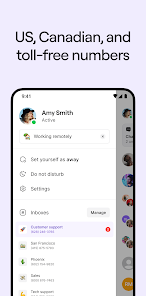
With Quo, you can manage multiple phone numbers from a single app, which is ideal for freelancers or small business owners. This feature allows you to keep your personal and professional communications separate while maintaining a professional image.

Team Collaboration

Quo enhances team collaboration with shared inboxes and internal messaging, enabling your team to stay connected and responsive. This feature is perfect for businesses looking to improve communication efficiency and streamline their workflows.

Unified Communication

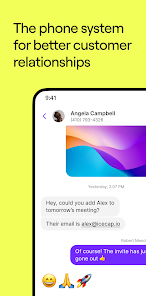
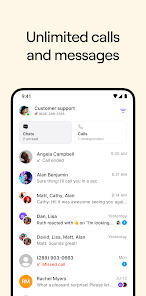
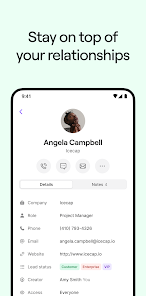
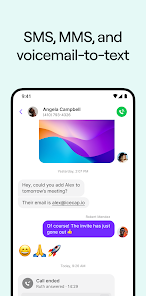
Quo streamlines your communication by combining voice calls, texts, and voicemails in one easy-to-use app. This unified approach ensures you never miss an important message, making it perfect for both personal and professional interactions.

Pros & Cons

Pros
  • OpenPhone offers a professional business phone number for seamless communication.
  • It integrates effortlessly with your existing tools and apps.
  • Enjoy unlimited calling and texting within the U.S. and Canada.
  • Access your messages and calls from any device, anywhere.
  • Benefit from smart features like auto-replies and call forwarding.
Cons
  • Limited customer support options can lead to frustration during technical issues.
  • Some users report difficulties with call quality and connectivity.
  • Monthly fees may add up for users with multiple lines.

Real Experience Using Quo (formerly OpenPhone)

Application Scenarios

Quo, formerly known as OpenPhone, is designed to cater to a wide range of professionals and businesses looking for efficient communication solutions. Freelancers can utilize Quo to manage client calls and texts seamlessly, providing a dedicated business number that keeps personal and professional interactions separate. Small businesses benefit from Quo’s collaborative features, allowing team members to share a single business line, ensuring no customer inquiry goes unanswered. Remote teams can also take advantage of the app's cloud-based infrastructure, enabling them to communicate from anywhere, whether they're in a coffee shop or working from home. Additionally, real estate agents and sales professionals find Quo invaluable for managing high volumes of calls while maintaining organized records of conversations, making follow-ups and client engagement more streamlined.

User Experience

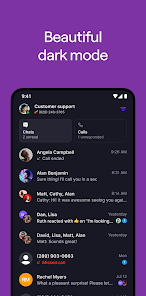
The user experience of Quo is characterized by its intuitive interface and ease of navigation. Upon downloading the app, users are greeted with a clean layout, making it simple to access features like messaging, voicemail, and call logs. The onboarding process is straightforward, allowing users to set up their business number quickly. Quo’s ability to integrate with other tools, such as Google Contacts and calendar apps, enhances productivity by keeping all communication streamlined. Users appreciate the features such as call screening, voicemail transcriptions, and the ability to send automated text responses, which add to the overall efficiency. The app’s performance is reliable, with minimal lag during calls and quick message delivery, making it a preferred choice among busy professionals.

Pricing

Quo offers a competitive pricing model that caters to various user needs. With a free trial available, new users can test the app's features before committing. The pricing structure is tiered, with plans that typically start at a modest monthly fee. Each plan includes essential features like unlimited calls and texts, voicemail, and team collaboration tools. For businesses that require more advanced capabilities, such as multi-line support or integrations with customer relationship management (CRM) systems, higher-tier plans are available at a reasonable cost, making Quo accessible for startups and established enterprises alike. This flexibility allows users to choose a plan that aligns with their unique communication demands.

Updates & Support

Quo is consistently updated with new features and improvements based on user feedback, ensuring that the app remains relevant in an ever-evolving digital landscape. The development team actively engages with users to gather insights and suggestions, demonstrating a commitment to continuous enhancement. Support is readily available through multiple channels, including an extensive FAQ section, email support, and live chat options. Users report that response times are prompt and that the support team is knowledgeable and helpful when addressing issues. Regular updates not only enhance functionality but also improve security measures, providing peace of mind for users concerned about data protection.

verified Security & Privacy Review

Quo (formerly OpenPhone) prioritizes security and privacy, employing advanced encryption methods to protect user communications. All calls, texts, and media are secured using end-to-end encryption, ensuring that only intended recipients can access the content. The app also implements secure data storage practices, reducing the risk of unauthorized access to user information. When it comes to permissions, Quo requests only the necessary access to function effectively. Users can control permissions related to contacts, microphone, and storage, granting transparency in data handling. The app is designed with user privacy in mind, featuring options to manage visibility and control over personal information. Quo adheres to strict privacy policies, committing to not sell or share user data with third parties without explicit consent. Regular security audits and updates enhance the app's resilience against potential threats. Overall, Quo provides a reliable and secure platform for users seeking a private communication solution.

Reviews

4.5

“Great for team communication and collaboration!”

“Affordable pricing with excellent features.”

“User-friendly interface makes it easy to navigate.”

“Reliable service with minimal downtime.”

“Fantastic customer support and quick response times.”

FAQ

1

Can I submit suggestions or feedback to OpenPhone?

Yes, OpenPhone encourages users to submit suggestions or feedback through their support channels or in-app features to help improve the service.

2

Does OpenPhone collect my personal data?

OpenPhone does collect certain personal data to provide its services, but it is committed to user privacy and complies with relevant data protection regulations.

3

Does OpenPhone support offline use?

OpenPhone requires an internet connection to function, so it does not support offline use for making or receiving calls and messages.

4

How do I cancel my OpenPhone subscription?

Users can cancel their OpenPhone subscription through their account settings on the app or website, following the provided cancellation instructions.

5

How much does a subscription to OpenPhone cost?

Subscription costs for OpenPhone vary depending on the plan chosen, typically starting at a monthly rate that increases with additional features and users.

How to use Quo (formerly OpenPhone)

1

Can I change my customer number?

Customer numbers cannot be changed. If you need assistance, please reach out to customer service for help.

2

Can customer service help me with account activation issues?

Yes, our customer service team is here to assist you with any account activation issues you may encounter.

3

How can I reach customer service at Quo?

You can contact customer service through the in-app chat, email support

4

How can I update my customer service contact preferences?

You can update your contact preferences in the settings section of your Quo account under "Notifications."

5

How do I activate my Quo account?

To activate your Quo account, check your email for an activation link and follow the instructions provided.

Editor's Choice