This site uses cookies to enhance your user experience. By clicking any link on this site you are giving your consent to our cookie policy. Read more
Reject
Accept All

Advertiser and Editorial Disclosures

Modisoft Back Office

Modisoft Back Office

verified Verified App

Developer: Modisoft

  • category

    Category: Business

  • price

    Price: free

  • age rating

    Age Rating: Everyone

  • rating

    Rating: 4.1

  • download

    Downloads: 10,000+

  • version

    Version: 2.73

Screenshot 1
Screenshot 2
Screenshot 3
Screenshot 4
Screenshot 5
Screenshot 6

Features & Highlights

Integration Capabilities

Modisoft Back Office seamlessly integrates with various third-party applications, enhancing functionality and ensuring smooth data flow across platforms. This flexibility allows businesses to tailor their operations according to specific needs, streamlining processes and minimizing the hassle of switching between different software.

Real-Time Reporting

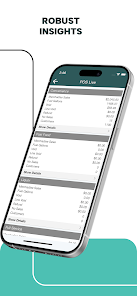
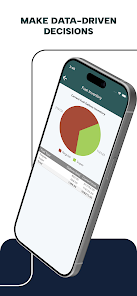
With powerful real-time reporting capabilities, Modisoft Back Office empowers businesses to make informed decisions based on up-to-date data. Users can generate customizable reports that reflect key performance indicators, helping teams stay aligned and focused on their goals while identifying areas for improvement.

Robust Security Features

Security is a top priority with Modisoft Back Office, which incorporates advanced encryption and user authentication protocols. This ensures that sensitive business information remains protected from unauthorized access, giving users peace of mind and allowing them to focus on growth and productivity.

User-Friendly Dashboard

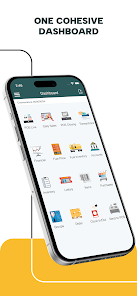
Modisoft Back Office offers an intuitive dashboard designed for easy navigation, allowing users to access critical tasks and metrics at a glance. This streamlined interface simplifies complex operations, making it easier for users to manage their workflow efficiently and effectively without feeling overwhelmed.

Pros & Cons

Pros
  • Streamlines administrative tasks for increased efficiency and productivity.
  • Enhances data accuracy with automated processes and real-time updates.
  • Offers customizable features to meet specific business needs effectively.
  • Improves collaboration with intuitive tools for team communication and sharing.
  • Provides robust reporting capabilities for informed decision-making and insights.
Cons
  • Limited customization options may hinder tailored workflows and processes.
  • User interface can be unintuitive, leading to a steep learning curve.
  • Customer support response times can be slow, impacting timely issue resolution.

Real Experience Using Modisoft Back Office

Application Scenarios

Modisoft Back Office is designed to streamline various business operations, making it an essential tool for organizations of all sizes. This app is particularly beneficial for companies in retail, hospitality, and service industries, where managing inventory, tracking sales, and maintaining customer relationships are crucial. Users can seamlessly integrate the app into their existing systems, allowing for real-time data synchronization. Whether it's managing a restaurant's table reservations, overseeing a retail store's inventory, or handling service appointments, Modisoft provides a comprehensive solution that caters to diverse operational needs. By utilizing this app, businesses can enhance efficiency and ensure that all aspects of their back-office operations are well-organized.

User Experience

The user experience of Modisoft Back Office is commendable, characterized by an intuitive interface that minimizes the learning curve. New users can easily navigate through the app, thanks to its well-structured layout and accessible features. The dashboard presents key metrics and reports in a visually appealing manner, allowing users to grasp important information at a glance. The app's responsiveness further enhances the overall experience, ensuring smooth interactions regardless of the device being used. Additionally, the comprehensive training materials and tutorials available within the app empower users to maximize its potential. Feedback from users indicates a high level of satisfaction, particularly regarding the app's ability to save time and reduce manual errors in data entry and reporting.

Pricing

Modisoft Back Office offers a flexible pricing model that caters to different business sizes and requirements. The app provides tiered subscription plans, allowing companies to choose a package that aligns with their operational needs and budget. Each plan comes with varying features, such as additional user access, advanced analytics, and dedicated support. This pricing strategy ensures that even small businesses can access essential tools without breaking the bank. Furthermore, the app often includes a free trial period, enabling potential users to explore its capabilities before committing to a subscription. Overall, the pricing structure is designed to provide value while accommodating the diverse financial capabilities of its user base.

Updates & Support

Regular updates and robust customer support are hallmarks of Modisoft Back Office, ensuring that users benefit from the latest features and improvements. The development team is proactive in addressing user feedback, releasing updates that enhance functionality and security. Users can expect regular enhancements, keeping the app relevant in a rapidly changing business environment. Additionally, the support team is readily accessible, providing assistance through various channels, including email, live chat, and an extensive knowledge base. This commitment to customer service fosters a supportive community where users can seek help and share experiences, further enriching their overall experience with the app.

verified Security & Privacy Review

Modisoft Back Office prioritizes data security and privacy, implementing robust measures to protect user information. The app employs advanced encryption protocols during data transmission and storage, ensuring that sensitive information remains secure from unauthorized access. Additionally, it adheres to industry standards for data protection, providing users with peace of mind regarding their personal and business data. The app's privacy practices are transparent, clearly outlining how user data is collected, used, and shared. Modisoft Back Office only requests permissions that are essential for its core functionalities, minimizing the risk of unnecessary data exposure. Users have control over their data, with options to manage permissions and access settings within the app. Furthermore, the app regularly updates its security features to counter emerging threats, reflecting a commitment to maintaining a secure environment for its users. Overall, Modisoft Back Office demonstrates a strong dedication to safeguarding user data and ensuring compliance with privacy regulations, making it a reliable choice for businesses seeking effective back-office solutions.

Reviews

4.1

“Intuitive interface makes navigation easy and efficient.”

“Great customer support, always ready to help.”

“Time-saving features streamline our daily operations.”

“Reliable software with minimal downtime experienced.”

“Affordable pricing for small businesses like ours.”

FAQ

1

Can I submit suggestions or feedback to Modisoft Back Office?

Yes, users are encouraged to submit suggestions or feedback through the app’s feedback feature or by contacting customer support, as the team values user input for future improvements.

2

Does Modisoft Back Office collect my personal data?

Modisoft Back Office prioritizes user privacy and collects minimal personal data necessary for app functionality, adhering to data protection regulations.

3

Does Modisoft Back Office support offline use?

Yes, Modisoft Back Office offers offline functionality, allowing users to access essential features without an internet connection, with data syncing when the connection is restored.

4

How do I cancel my Modisoft Back Office subscription?

You can cancel your Modisoft Back Office subscription through your account settings in the app or by contacting customer support for assistance.

5

How much does a subscription to Modisoft Back Office cost?

The subscription cost for Modisoft Back Office varies depending on the plan chosen, with options available for small businesses to larger enterprises, ensuring affordability and scalability.

How to use Modisoft Back Office

1

Can I change my customer number if I need to?

Customer numbers are typically assigned and cannot be changed. For specific requests, please contact customer service.

2

How can I log in to my Modisoft Back Office account?

To log in, visit the login page and enter your username and password. If you have trouble, click on "Forgot Password?" for help.

3

How do I activate my Modisoft Back Office account?

To activate your account, check your email for the activation link and follow the instructions provided.

4

How do I contact customer service for Modisoft Back Office?

You can reach our customer service by calling the support line or using the chat feature on our website. We’re here to help!

5

How do I reset my password if I can't log in?

Click on "Forgot Password?" on the login page, then follow the instructions to reset your password via email.

Editor's Choice