This site uses cookies to enhance your user experience. By clicking any link on this site you are giving your consent to our cookie policy. Read more
Reject
Accept All
Intune Company Portal

Intune Company Portal

verified Verified App

Developer: Microsoft Corporation

  • category

    Category: Business

  • price

    Price: free

  • age rating

    Age Rating: Everyone

  • rating

    Rating: 2.6

  • download

    Downloads: 50,000,000+

  • version

    Version: 5.0.6864.0

Screenshot 1
Screenshot 2
Screenshot 3
Screenshot 4
Screenshot 5
Screenshot 6
Screenshot 7
Screenshot 8

Features & Highlights

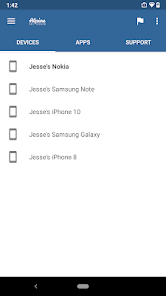
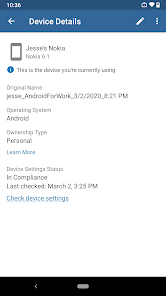
Device Compliance Checks

With Intune Company Portal, users can check the status of their devices to ensure compliance with company policies. This feature helps employees understand if their devices meet security requirements, fostering a culture of accountability while protecting sensitive company data. It’s a simple way to keep devices secure and up-to-date.

Remote Wipe Capability

In the event of a lost or stolen device, Intune Company Portal offers a remote wipe feature to safeguard company information. Users can quickly erase all data on their devices, ensuring that sensitive information remains protected. This capability adds an extra layer of security, giving employees peace of mind when it comes to device management.

Self-Service Access

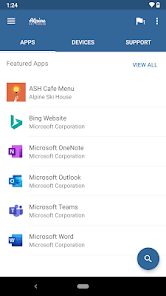
Intune Company Portal empowers employees with self-service access to corporate resources and applications. Users can easily install or uninstall apps, ensuring they have the tools they need at their fingertips without waiting for IT support. This leads to increased productivity and a more efficient workflow for everyone involved.

User-Friendly Interface

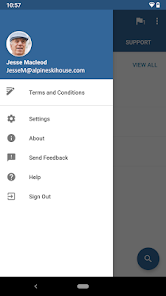
The Intune Company Portal boasts a user-friendly interface that simplifies navigation for employees. With a clean design and intuitive layout, users can easily find and manage their applications, view device compliance status, and access support resources. This enhances the overall user experience and encourages engagement with the platform.

Pros & Cons

Pros
  • Simplifies app installation for users.
  • Enhances security through device compliance checks.
  • Streamlines access to corporate resources.
  • Facilitates remote device management for IT.
  • Improves user experience with self-service options.
Cons
  • Limited support for non-Windows devices
  • User interface can be confusing
  • Frequent updates may disrupt usage
  • Requires internet access for full functionality

Real Experience Using Intune Company Portal

Application Scenarios

The Intune Company Portal app serves as an essential tool for organizations that utilize Microsoft Intune for device management. It is particularly beneficial in corporate environments where employees need to access company resources securely. The app allows users to enroll their devices, ensuring compliance with corporate policies while also providing a streamlined method to access work-related applications and data. Additionally, it is ideal for IT departments that need to manage and monitor devices remotely, enabling them to push updates, enforce security measures, and resolve issues without physical access to the devices. This makes the app indispensable in scenarios involving remote work, bring-your-own-device (BYOD) policies, and managing a diverse range of devices in an enterprise setting.

User Experience

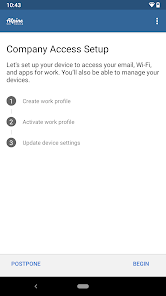
User experience with the Intune Company Portal app is generally positive, with many users appreciating its intuitive interface. The onboarding process is straightforward, allowing employees to easily enroll their devices without extensive technical knowledge. Once enrolled, users can access company resources and applications seamlessly. The app also provides notifications about compliance status and any required actions, which helps users stay informed. However, some users have reported occasional glitches, such as slow loading times and issues with app updates. Overall, the app is designed to simplify device management for both employees and IT administrators, creating a balanced experience that caters to the needs of both parties.

Pricing

The Intune Company Portal app itself is free to download and use; however, it is part of the broader Microsoft Intune service, which requires a subscription. Pricing for Microsoft Intune varies depending on the licensing model chosen by the organization, whether it’s a standalone plan or part of the Microsoft 365 suite. Organizations can expect to pay per user, which makes budgeting predictable. Many businesses find value in this model as it consolidates various device management and security functionalities into one comprehensive service. For organizations looking to maximize their investment, it is advisable to evaluate the features included in each pricing tier to ensure they align with their specific needs.

Updates & Support

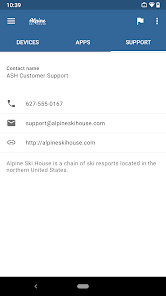
Microsoft regularly updates the Intune Company Portal app, adding new features and improving existing functionalities based on user feedback. These updates help enhance security, streamline user experience, and integrate with other Microsoft services more effectively. The support provided by Microsoft is also commendable, offering extensive documentation, user guides, and community forums where users can seek assistance. Additionally, organizations can utilize Microsoft’s support channels for more technical issues, ensuring that any problems are addressed promptly. This commitment to continuous improvement and user support helps maintain a high level of satisfaction among users, making the Intune Company Portal a reliable choice for device management.

verified Security & Privacy Review

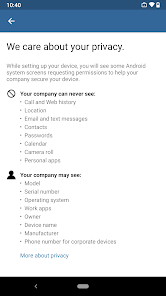
The Intune Company Portal prioritizes security and privacy, adhering to industry standards to ensure user information is protected. The app requires users to authenticate their identity, typically through corporate credentials, which helps safeguard sensitive data. Permissions requested by the app are primarily related to device management, allowing it to enforce security policies and manage access to corporate resources effectively. Intune Company Portal employs encryption for data both in transit and at rest, reducing the risk of unauthorized access. It also enables organizations to remotely wipe sensitive data from devices if they are lost or stolen, further enhancing data security. Users can expect transparency regarding data collection, as the app informs them about the types of data collected, which mainly include device information and usage statistics, necessary for maintaining compliance and security protocols. Overall, Intune Company Portal balances functionality with robust security measures, ensuring that user privacy is respected while still providing essential services for managing corporate devices and applications.

Reviews

2.6

“User-friendly interface makes device management easy.”

“Reliable app for accessing company resources.”

“Frequent updates improve performance and stability.”

“Quick support response when issues arise.”

“Occasional bugs but overall a solid experience.”

Editor's Choice