This site uses cookies to enhance your user experience. By clicking any link on this site you are giving your consent to our cookie policy. Read more
Reject
Accept All

Advertiser and Editorial Disclosures

IntelyCare - Nursing Jobs

IntelyCare - Nursing Jobs

verified Verified App

Developer: IntelyCare, Inc.

  • category

    Category: Business

  • price

    Price: free

  • age rating

    Age Rating: Everyone

  • rating

    Rating: 3.8

  • download

    Downloads: 100,000+

  • version

    Version: 9.4.75

Screenshot 1
Screenshot 2
Screenshot 3
Screenshot 4
Screenshot 5
Screenshot 6

Features & Highlights

Competitive Pay Rates

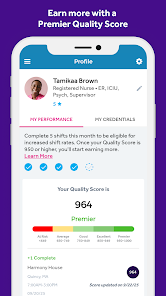
The app provides competitive pay rates, ensuring that nurses are compensated fairly for their expertise and hard work. By connecting healthcare professionals with top facilities, IntelyCare helps users maximize their earning potential while doing what they love.

Flexible Scheduling

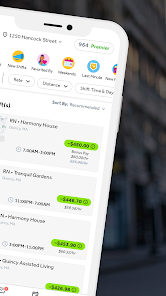
IntelyCare offers nurses the ability to choose their own shifts, allowing for a work-life balance that fits individual needs. With options to work when it suits you best, this feature empowers healthcare professionals to take control of their schedules and optimize their time off.

Real-Time Job Alerts

Stay informed with real-time job alerts tailored to your preferences. IntelyCare notifies you of new opportunities that match your skills and schedule, ensuring you never miss out on the perfect job while helping you to stay connected within the healthcare community.

User-Friendly Interface

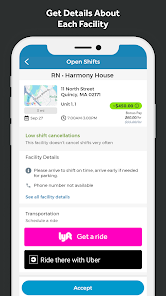
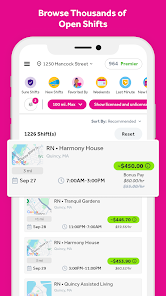
IntelyCare's intuitive interface makes it easy for nurses to navigate job listings, apply for shifts, and manage their schedules. The streamlined design enhances the user experience, allowing healthcare workers to focus on what truly matters—providing excellent patient care.

Pros & Cons

Pros
  • Flexible scheduling allows nurses to choose when they work.
  • Access to a wide range of job opportunities across various facilities.
  • Competitive pay rates help maximize your earning potential.
  • A user-friendly app simplifies job searching and management.
  • Supportive community fosters networking and professional growth among nurses.
Cons
  • Limited job security can lead to inconsistent work opportunities.
  • High competition among nurses may drive down pay rates.
  • Scheduling flexibility might result in unpredictable income and hours.

Real Experience Using IntelyCare - Nursing Jobs

Application Scenarios

The IntelyCare app is specifically designed for nursing professionals seeking flexible job opportunities in healthcare. Users can easily navigate through a variety of job listings that cater to their experience level and preferred work environment. Whether you’re looking for part-time shifts to supplement your income or full-time positions for stability, this app allows you to browse, filter, and apply for jobs that meet your criteria. The platform is particularly beneficial for nurses who need to balance work with personal commitments, such as family or education. In addition, the app allows for quick applications, making it easier to secure shifts in real-time, which can be crucial in the fast-paced healthcare industry.

User Experience

The user experience on the IntelyCare app is generally positive. The interface is intuitive and user-friendly, allowing nurses to create profiles with their credentials and preferences in just a few steps. Users can quickly upload their resumes, certifications, and other necessary documents, streamlining the hiring process. Notifications alert users to new job postings that match their profile, ensuring they never miss an opportunity. Moreover, the app features reviews and ratings for various facilities, giving users insights into potential workplaces. However, some users have noted that the app can occasionally lag during peak hours, which may hinder quick job applications. Overall, the experience is tailored to meet the needs of nursing professionals, making it a valuable tool in their job search.

Pricing

IntelyCare operates on a unique pricing model that prioritizes transparency and value for nursing professionals. The app itself is free to download and provides access to numerous job listings without any upfront costs. Nurses can enjoy the flexibility of choosing shifts and facilities without worrying about subscription fees or hidden charges. However, it’s essential to be aware that the pay rate can vary depending on the facility and shift selected. Users typically find the pay competitive, and many appreciate the ability to earn higher rates during peak times or high-demand shifts. Overall, the pricing structure is designed to benefit nurses, making it an attractive option for those looking for flexible employment.

Updates & Support

IntelyCare regularly updates its app to improve functionality and user experience. These updates often include bug fixes, new features, and enhancements based on user feedback. The support team is readily available through the app, providing assistance with any issues or inquiries users may have. Many users report prompt responses from the support team, which contributes to the overall satisfaction with the service. Additionally, the app encourages feedback, allowing users to suggest features that could improve their experience further. This commitment to continuous improvement reflects IntelyCare’s dedication to supporting nursing professionals in their career journeys.

verified Security & Privacy Review

The IntelyCare app prioritizes user security and privacy, implementing industry-standard measures to protect sensitive information. All data transmitted through the app is encrypted, ensuring that personal and professional details remain confidential. Users are required to create secure accounts, utilizing strong password protocols to prevent unauthorized access. In terms of permissions, IntelyCare requests access to certain device features, such as location services, to enhance job matching and improve user experience. However, users are informed of these permissions and can choose to accept or decline them during the setup process. The app minimizes data collection to only what is necessary for its functionality, helping to safeguard user privacy. IntelyCare also adheres to relevant privacy regulations, providing a transparent privacy policy that outlines how user data is collected, used, and shared. Users have control over their data and can request deletion or modification of their information at any time. Overall, IntelyCare demonstrates a strong commitment to protecting user data while delivering a valuable service to nursing professionals.

Reviews

3.8

“Easy job search and flexible scheduling options available.”

“Great pay rates and supportive staff.”

“User-friendly interface and quick application process.”

“Helpful resources for nurses and excellent job matches.”

“Reliable platform for finding local nursing opportunities.”

FAQ

1

Can I submit suggestions or feedback to IntelyCare - Nursing Jobs?

Yes, users can submit suggestions or feedback through the app's support section, where they can share their thoughts to help improve the platform.

2

Does IntelyCare - Nursing Jobs collect my personal data?

Yes, IntelyCare - Nursing Jobs collects personal data necessary for job matching and user profile management, but it adheres to privacy regulations to protect your information.

3

Does IntelyCare - Nursing Jobs support offline use?

While IntelyCare - Nursing Jobs primarily functions online, some features may be accessible offline, such as previously viewed job listings. However, full functionality requires an internet connection.

4

How do I cancel my IntelyCare - Nursing Jobs subscription?

To cancel your IntelyCare - Nursing Jobs subscription, go to your account settings within the app, and follow the prompts to manage your subscription preferences.

5

How much does a subscription to IntelyCare - Nursing Jobs cost?

Subscription costs for IntelyCare - Nursing Jobs may vary based on the features selected; users are encouraged to check the app for the most current pricing information.

How to use IntelyCare - Nursing Jobs

1

Can I log in from a different device?

Yes, you can log in from any device by entering your credentials. Just ensure you have a stable internet connection.

2

How can I contact customer service for help with my account?

You can reach our customer service team via the support section on our website or by calling the customer number provided in your welcome email.

3

How can I update my customer number?

To update your customer number, please log in to your account and navigate to the profile settings or contact customer service for help.

4

How do I reach customer service if I have an urgent issue?

For urgent issues, you can call our customer number directly or use the live chat feature on our website.

5

I forgot my password. How do I log in?

Click on the "Forgot Password?" link on the login page, and follow the instructions to reset it.

Editor's Choice