This site uses cookies to enhance your user experience. By clicking any link on this site you are giving your consent to our cookie policy. Read more
Reject
Accept All

Advertiser and Editorial Disclosures

HCMToGo

HCMToGo

verified

Workforce Ready

3.6
Rating
1,000,000+ Downloads
1.102.4 Version
  • category

    Category: Business

  • price

    Price: free

  • age rating

    Age Rating: Everyone

  • rating

    Rating: 3.6

  • available on

    Available on: /

  • updated on

    Updated on: Jun 26, 2026

Screenshot 1
Screenshot 2
Screenshot 3
Screenshot 4
Screenshot 5
Screenshot 6
Screenshot 7
Screenshot 8
Screenshot 9
Screenshot 10

Features & Highlights

Employee Self-Service

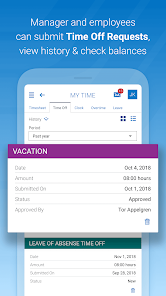
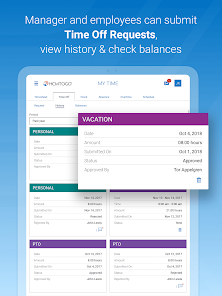
HCMToGo's employee self-service capabilities enable users to take control of their HR needs without the need for constant manager intervention. Employees can update personal information, access benefits information, and manage time-off requests, fostering a sense of autonomy and satisfaction in the workplace.

Mobile Access

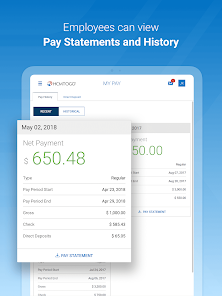
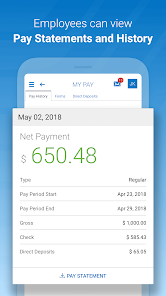
HCMToGo offers seamless mobile access, allowing users to manage HR tasks anytime and anywhere. This flexibility empowers employees to view pay stubs, request time off, and update personal information directly from their smartphones, enhancing overall convenience and efficiency in daily operations.

Real-Time Analytics

With real-time analytics, HCMToGo provides valuable insights into workforce data, helping HR professionals make informed decisions. Users can visualize trends and metrics related to employee performance, engagement, and turnover, allowing for strategic planning and enhanced organizational effectiveness.

Time Tracking

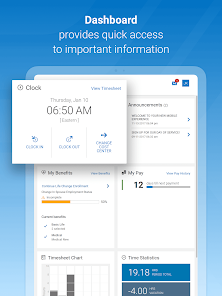
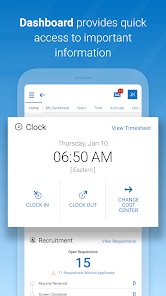
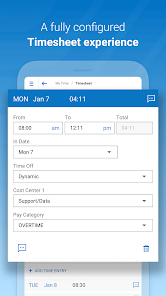
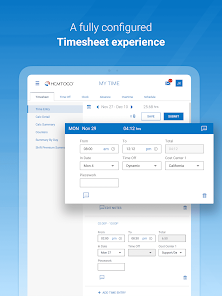
The time tracking feature in HCMToGo simplifies the process of logging hours worked for employees and managers alike. With user-friendly interfaces, employees can easily clock in and out, while supervisors can quickly approve timesheets, ensuring accurate payroll processing and compliance with labor regulations.

Pros & Cons

Pros
  • Mobile access for HR on-the-go
  • User-friendly interface enhances employee engagement
  • Streamlined payroll processing saves time and resources
  • Real-time analytics for informed decision-making
  • Customizable features to fit unique business needs
Cons
  • Limited customization options for user interface design
  • Inadequate customer support response times
  • High subscription costs for small businesses
  • Integration challenges with existing software systems

Real Experience Using HCMToGo

Application Scenarios

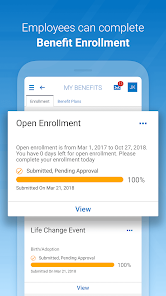
HCMToGo is a versatile mobile application designed to enhance human capital management for organizations of all sizes. The app is particularly beneficial for HR professionals, managers, and employees, as it provides a unified platform for managing various HR functions. Users can access essential features such as payroll information, benefits enrollment, time-off requests, and performance reviews directly from their smartphones. This accessibility makes it ideal for on-the-go professionals who need to stay connected with their HR needs while away from their desks. Whether you are an employee checking your leave balances or an HR manager approving requests, HCMToGo streamlines these processes, thereby improving efficiency and communication within organizations.

User Experience

The user experience of HCMToGo is one of its standout features. The app boasts an intuitive interface that makes navigation a breeze, even for those who may not be tech-savvy. Users can easily find the information they need, thanks to clearly labeled sections and a well-organized layout. The app is responsive and generally performs smoothly, with minimal lag time. Notifications keep users informed about important updates such as upcoming deadlines for benefits enrollment or performance reviews. Additionally, the app supports seamless integration with various HR systems, making it easy for organizations to implement without disrupting existing workflows. Overall, the user experience is designed to be straightforward and effective, catering to the diverse needs of its audience.

Pricing

HCMToGo operates on a subscription-based pricing model, which can vary depending on the size of the organization and the specific features required. While the app may be initially perceived as a significant investment, the value it provides in terms of time savings and improved HR management often justifies the cost. Organizations can choose from different tiers of service, allowing them to select the features that best suit their needs. This flexibility ensures that businesses can scale their usage according to their growth and evolving requirements. Potential users can often take advantage of free trials or demos, enabling them to assess the app's fit for their organization before committing financially.

Updates & Support

HCMToGo is regularly updated to ensure that users have access to the latest features and improvements. The developers are committed to enhancing the app based on user feedback, which fosters a community-driven approach to its evolution. Customer support is readily available through various channels, including email, live chat, and an extensive online knowledge base. This ensures that users can quickly resolve any issues or inquiries they may have. The combination of regular updates and responsive support makes HCMToGo a reliable choice for organizations looking to modernize their HR processes and enhance employee engagement.

verified Security & Privacy Review

The HCMToGo app prioritizes security and privacy, ensuring that user data is handled with the utmost care. The app employs advanced encryption protocols to safeguard sensitive information, both in transit and at rest. This means that users can trust that their personal and financial data is protected from unauthorized access. HCMToGo adheres to strict privacy practices, providing users with clear information on how their data is collected, used, and shared. The app requires permissions that are relevant to its functionalities, such as access to location services, but users can manage these permissions according to their preferences. Transparency is a key feature, as the app includes a detailed privacy policy outlining its data handling practices. Additionally, HCMToGo offers features that allow users to control their personal information, including options to update or delete data as needed. Regular updates and security patches are implemented to address potential vulnerabilities, further enhancing the app's security posture. Overall, HCMToGo demonstrates a strong commitment to protecting user privacy and ensuring a secure experience.

User Reviews

  • Derrick Rhoda
    2024/07/01

    Absolutely dislike this aplp. There are too many limitations, such as scheduled work hours. It seems you are always getting approval from a supervisor for one thing or another. Several times, I was not able to log in due to no internet. If you forget to clock out, you can not just put your time in. In the meantime, we are still doing paper time sheets to keep track of our equipment hours. We are also not getting hard copies of our checks anymore. E statements are difficult to read and compare.

  • Jennifer Roeder
    2021/09/18

    Our company just started using this App on September 1, 2021 and from about 9/7 to 9/17, every single time I logged into it, the app has badgered me to 'rate it'. I found that extremely annoying and distracting from the task of clocking in and out. I'm hoping that by rating the app now, that message will stop showing up? I also find the fact that a user cannot change their password without their administration's permission a downfall of their system, both on the app and on their web platform.

  • Thomas Conover
    2021/06/24

    This app is horribly designed compared to others (T-sheets, etc.). There is no way to stay logged in. There is no way to take a break without clocking out. There is not an easy way to add a note to a current shift (takes 4-5 steps). Truly poor. Edited: keeping it 1 star because now it keeps asking me to rate it. It will not stop asking. Would have been 2 stars because the turtles are cool.

  • Sarah Lechlitner
    2020/07/30

    Overall the app is good, it saves your username so you just have to type a password in. What I do not like is that when you are clocking in, it does not save location preferences. You have to type it in each time. It also does not give a summary of your clocked in hours, so when I am looking at how many hours I have in my 40 day work week, I have to add them up individually.

  • Ian Austin
    2020/05/26

    Would give a higher rating if 1" it didn't force you to change passwords every 3 months, and 2: if it allowed you to stay signed in instead of having to sign in & out every time you need to clock in and out. Also, you have to manually go in and change your break time if it is less than an hour. Example: I take a 1/2 hour lunch, but it takes a full hour out meaning I have to stay at work longer or go in every time and get it manually changed by the supervisor. It does however have a nice layout and the countdown feature till payday is very nice.

Review Source: Google Play store public user reviews.

FAQ

1

Does HCMToGo collect my personal data?

HCMToGo does collect personal data as necessary for the functioning of its services, but it adheres to strict privacy policies to protect user information.

2

Does HCMToGo offer a free trial or free version?

HCMToGo typically does not offer a free version, but it may provide a free trial period for new users to explore the app's features.

3

Does HCMToGo require an internet connection?

Yes, HCMToGo requires an internet connection to access the app's features and retrieve real-time data from the HCM system.

4

How can I contact support or send feedback for HCMToGo?

Users can contact support for HCMToGo through the app's help section or by visiting the official website, where they can also submit feedback or inquiries.

5

How do I manage or cancel my HCMToGo subscription?

Users can manage or cancel their HCMToGo subscription through the app's settings or by contacting customer support for assistance.

How to use HCMToGo

1

Can I access HCMToGo from my computer?

Yes, HCMToGo can be accessed via a web browser on your computer.

2

Do I need to activate my HCMToGo account?

Yes, activation is necessary to access your account features after registration.

3

How can I contact customer support for technical issues?

You can contact customer support via email at support

4

How do I activate my HCMToGo account?

To activate your account, follow the link in the activation email you received and set your password.

5

How do I log in to HCMToGo?

To log in, enter your username and password on the HCMToGo login page and click "Sign In."

What's New

Some great enhancements and bug fixes have been released to provide you with a better mobile experience, including:Enhanced in-app browsing to provide a smoother and more reliable experience when opening links.

Editor's Choice