This site uses cookies to enhance your user experience. By clicking any link on this site you are giving your consent to our cookie policy. Read more
Reject
Accept All

Advertiser and Editorial Disclosures

Grubhub for Drivers

Grubhub for Drivers

verified

Grubhub

4.6
Rating
1,000,000+ Downloads
5.25.2 Version
  • category

    Category: Business

  • price

    Price: free

  • age rating

    Age Rating: Everyone

  • rating

    Rating: 4.6

  • available on

    Available on: /

  • updated on

    Updated on: Jun 26, 2026

Screenshot 1
Screenshot 2
Screenshot 3
Screenshot 4
Screenshot 5
Screenshot 6

Features & Highlights

Customer Support Access

Grubhub for Drivers provides easy access to customer support whenever you need assistance. Whether you have questions about an order or encounter an issue while on the road, you can reach out for help quickly, ensuring a smoother delivery experience.

Flexible Scheduling

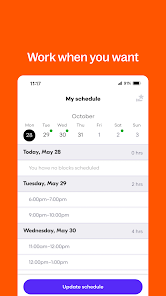
Grubhub for Drivers offers the flexibility to choose your own hours, allowing you to work when it suits you best. Whether you prefer the hustle of lunchtime or the calm of late evenings, you have the freedom to tailor your schedule around your life.

In-App Navigation

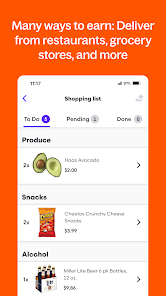
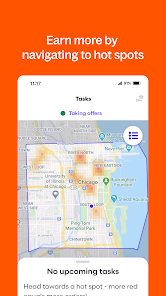
The app includes built-in navigation tools that provide optimal routes for deliveries, saving you time and reducing stress. This feature ensures that you can deliver food quickly and efficiently, allowing you to complete more orders in less time while enhancing customer satisfaction.

Real-Time Earnings Tracking

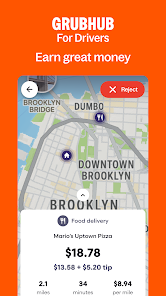
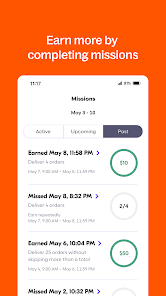
With real-time earnings tracking, drivers can easily monitor their daily income and tips as they complete deliveries. This feature helps you stay motivated and informed, giving you a clear picture of your earnings potential and helping you manage your finances more effectively.

Pros & Cons

Pros
  • Flexible scheduling allows drivers to choose their hours
  • Earn extra income with easy delivery opportunities
  • Access to driver promotions and incentives regularly
  • User-friendly app for efficient order management
  • Supportive community and resources for driver success
Cons
  • Low pay per delivery can be discouraging
  • High expenses reduce overall earnings significantly
  • Long wait times lead to wasted hours
  • Limited support from customer service is frustrating

Real Experience Using Grubhub for Drivers

Application Scenarios

The Grubhub for Drivers app serves as a vital tool for delivery drivers, providing a streamlined experience from start to finish. Whether you're a full-time driver or looking to earn some extra cash during weekends, this app fits various lifestyles. Imagine receiving a notification for a delivery while you're out running errands; with just a few taps, you can accept the order and reroute your journey. The app also allows you to select your preferred delivery times, making it easy to integrate with your existing schedule. Additionally, drivers can manage multiple deliveries simultaneously, optimizing their routes for efficiency and maximizing earnings. Whether you're in a bustling city or a quieter suburban area, the app adapts to your needs, allowing you to work when and where you want.

User Experience

The user experience of Grubhub for Drivers is generally intuitive and user-friendly. Upon logging in, drivers are greeted with a clean interface that displays available orders, earnings, and other essential metrics. The navigation is straightforward, allowing users to quickly accept orders, view delivery details, and navigate to restaurants and customers. Real-time GPS tracking ensures that drivers can find the quickest routes, reducing delivery times and increasing customer satisfaction. Notifications are timely, informing drivers of any order updates or potential issues. Additionally, the app provides features like earnings summaries and feedback options, enabling drivers to monitor their performance and make necessary adjustments. However, some users have reported occasional glitches or lag during peak hours, which can be frustrating when trying to secure high-demand deliveries.

Pricing

One of the appealing aspects of Grubhub for Drivers is that it is free to download and use. Drivers earn a commission for each delivery completed, which varies depending on factors like distance, time, and location. While there are no upfront costs, drivers should be aware of potential expenses, such as gas, vehicle maintenance, and insurance. Grubhub does not impose any hidden fees, and drivers can keep track of their earnings easily through the app. This transparency in pricing allows drivers to gauge their profitability effectively, making it easier to decide when to work and how much to invest in their delivery side hustle.

Updates & Support

Grubhub for Drivers routinely rolls out updates to enhance functionality and improve user experience. These updates often include new features, bug fixes, and performance enhancements, keeping the app relevant in a competitive market. The support system is robust, offering drivers multiple channels for assistance, including an in-app help section, email support, and a dedicated help center on the Grubhub website. Community forums also allow drivers to share tips and experiences, fostering a sense of camaraderie among users. Overall, Grubhub demonstrates a commitment to continuous improvement and user support, making it a reliable choice for delivery drivers.

verified Security & Privacy Review

The Grubhub for Drivers app prioritizes user security and privacy, implementing robust measures to protect personal and financial information. The app utilizes strong encryption protocols to safeguard data during transmission, ensuring that sensitive information remains secure from unauthorized access. In terms of privacy practices, Grubhub for Drivers clearly outlines its data collection policies within its privacy policy. The app collects essential information such as location data, payment details, and user identification to facilitate delivery services. However, it ensures that users have control over their data, allowing them to manage permissions effectively. Users are prompted to grant location access, which is integral for navigation and order management. The app also includes opt-out options for certain data sharing practices, promoting transparency. Grubhub commits to not selling personal data to third parties, reinforcing user trust. Overall, Grubhub for Drivers demonstrates a commitment to protecting user data, employing industry-standard security measures and transparent privacy practices to create a secure environment for drivers.

User Reviews

  • Kimberly George
    2025/04/24

    Constantly send orders far away or going a different direction from where I'm driving. It's like you don't know where I am or just don't care. And taking away a good order when I'm already heading to the location. Only sending orders if I have another order with another gig app. Otherwise I'm just waiting on orders. It just makes no sense. Your pay is the worst for high miles orders. I just don't bother using your app anymore....it's just a complete waste of time. Fix your app GH!!!!!!

  • High Desert Fishing (NVTROUTBUM)
    2025/02/04

    Stopped working awhile ago. I get notification of offer sounds and alert in notification bar, but no offer actually comes through on app. Then it says I missed 3 offers (when I've only gotten one notification), says it's gonna kick me off, then the whole app goes absolutely haywire. This has been going on at least 6 months and it's been absolutely unusable. Uninstall/reinstall, etc doesn't fix it.

  • Michael Norman
    2024/09/17

    Notification sounds for an offer goes off, check the app and there's no order displayed but yet the notification alarm continues to go off. I close out the app, log back on to see the app signed me out because I missed three offers in a row when only one notified ever came through but no offer ever displayed. This happenes every single day for weeks now.

  • TJ M
    2026/06/21

    They screw you over with the app that's not user friendly and the 'stats' they track on you to assign you a program level (higher ones come with privileges). They often mark you as not arriving on time to pick up at a restaurant even if you are. And they say restaurants cancelling orders won't hurt your stats but that's a lie since the only way to prevent that is spending a lot of time to get them to deal with it on the phone with you.

  • tlaubs
    2026/07/01

    I do deliveries for this awful app there are problems. I cant mark that I have arrived, that Ive picked up the order, that Ive dropped off the order, and it wont let me submit the picture of the drop off. Often the app will not even load despite me having 5g and full bars. I have to call support for almost every single delivery. I have a violation because support takes so long to mark the orders delivered. Maybe make sure your app works before alienating your only decent drivers. What a joke.

Review Source: Google Play store public user reviews.

FAQ

1

Does Grubhub for Drivers collect my personal data?

Yes, Grubhub for Drivers collects personal data such as your name, contact information, and location to facilitate deliveries and improve service quality.

2

Does Grubhub for Drivers offer a free trial or free version?

Grubhub for Drivers does not typically offer a free trial or free version, as it is primarily a platform for independent contractors rather than a subscription-based service.

3

Does Grubhub for Drivers require an internet connection?

Yes, Grubhub for Drivers requires a stable internet connection to receive orders, communicate with customers, and access navigation features.

4

How can I contact support or send feedback for Grubhub for Drivers?

You can contact support through the app by accessing the help section or visiting the Grubhub website, where you can find resources and submit feedback.

5

How do I manage or cancel my Grubhub for Drivers subscription?

Since Grubhub for Drivers does not have a subscription plan, drivers can simply choose to stop accepting deliveries at any time without needing to cancel a subscription.

How to use Grubhub for Drivers

1

Can I change my bank information in the Grubhub for Drivers app?

Yes, you can change your bank information in the app under the payment settings. Ensure your new information is accurate before saving.

2

Do I need to activate my Grubhub for Drivers account?

Yes, you need to activate your account after signing up. Check your email for an activation link and follow the instructions provided.

3

How can I contact Grubhub customer service for drivers?

You can reach Grubhub Driver customer service through the app by tapping on "Help" or by calling their dedicated driver support number available on the Grubhub website.

4

How can I reset my password for the Grubhub for Drivers app?

To reset your password, click on "Forgot Password?" on the login screen, then follow the instructions sent to your registered email.

5

How do I check my earnings in the Grubhub for Drivers app?

To check your earnings, open the app, go to the "Earnings" section, and view your daily or weekly summaries.

What's New

Continuing app enhancements to support safety at pickups and drop-offs

Editor's Choice