This site uses cookies to enhance your user experience. By clicking any link on this site you are giving your consent to our cookie policy. Read more
Reject
Accept All
Genius Scan - PDF Scanner

Genius Scan - PDF Scanner

verified Verified App

Developer: The Grizzly Labs

  • category

    Category: Business

  • price

    Price: free

  • age rating

    Age Rating: Everyone

  • rating

    Rating: 4.9

  • download

    Downloads: 10,000,000+

  • version

    Version: 7.35.0

Screenshot 1
Screenshot 2
Screenshot 3
Screenshot 4
Screenshot 5
Screenshot 6
Screenshot 7
Screenshot 8
Screenshot 9
Screenshot 10
Screenshot 11
Screenshot 12
Screenshot 13
Screenshot 14
Screenshot 15
Screenshot 16
Screenshot 17
Screenshot 18

Features & Highlights

Batch Scanning

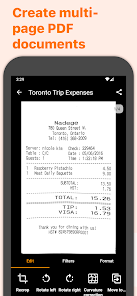
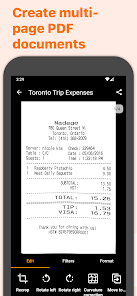
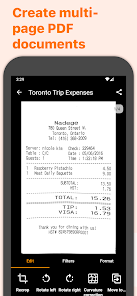
With Genius Scan, you can scan multiple pages in one go, making it easier to manage larger documents. This feature saves you time by allowing you to capture everything you need without the hassle of scanning each page individually, streamlining your document management process.

PDF Customization Options

The app offers a variety of customization options for your PDFs, including color adjustments, page sizes, and annotations. You can easily personalize your scanned documents to fit your specific needs, whether it's for archiving, sharing, or presenting important information.

Secure Document Sharing

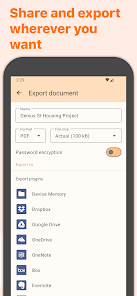
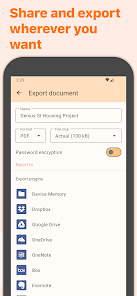
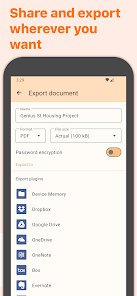
Genius Scan ensures your documents remain secure with options to password-protect your scans before sharing. You can confidently send your sensitive information via email or cloud storage, knowing that your documents are protected from unauthorized access.

Smart Document Detection

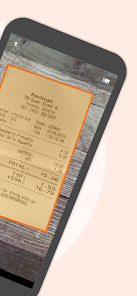
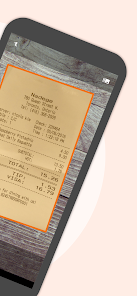
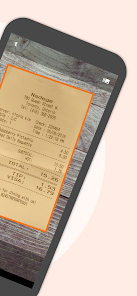
Genius Scan utilizes advanced algorithms to automatically detect and crop documents, ensuring that every scan looks crisp and professional. Say goodbye to uneven edges and cluttered backgrounds, as the app intelligently focuses on the content you need, providing a seamless scanning experience.

Pros & Cons

Pros
  • High-quality scans with automatic perspective correction
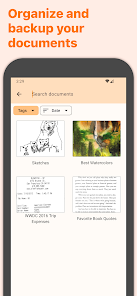
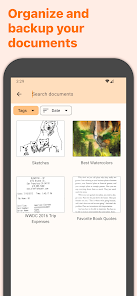
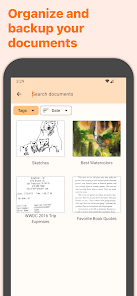
  • Easily organize documents with folders and tags
  • Share scans via email or cloud services
  • User-friendly interface for quick navigation
  • Supports multiple file formats for versatility
Cons
  • Limited export options for documents
  • Occasional image quality issues
  • In-app purchases can be expensive
  • Ads may disrupt user experience

Real Experience Using Genius Scan - PDF Scanner

Application Scenarios

Genius Scan - PDF Scanner is a versatile tool that is ideal for a variety of scenarios. Whether you are a student needing to scan lecture notes, a professional capturing documents for business, or a traveler preserving important receipts, this app caters to all. Its ability to quickly transform physical documents into high-quality PDF files means you can keep your paperwork organized without the clutter. It's particularly useful for freelancers who need to invoice clients or for anyone who needs to sign and send contracts on the go. The batch scanning feature also allows users to scan multiple pages at once, making it a time-saver for those with large volumes of documents.

User Experience

The user experience of Genius Scan is one of its standout features. Upon opening the app, users are greeted with a clean and intuitive interface, making navigation seamless. The scanning process is straightforward: simply align the document within the frame, and the app automatically detects edges and captures the image. The quality of scans is impressive, with options to enhance the text and adjust brightness and contrast for clearer visibility. Users can easily organize their scans into folders, search for keywords, and even add annotations or signatures directly onto PDFs. The app also integrates well with cloud services like Google Drive and Dropbox, ensuring that your documents are backed up and accessible from anywhere. Overall, the experience is smooth, efficient, and user-friendly, making document management a breeze.

Pricing

Genius Scan offers a free version with essential features, allowing users to perform basic scanning tasks without any financial commitment. For those seeking advanced functionalities, such as the ability to create multiple-page PDFs or utilize cloud integration, the premium version is available through a subscription or one-time purchase. The pricing is competitive within the market and provides good value given the app’s extensive features. Regular updates and improvements ensure that users continue to receive new functionalities, making the premium purchase worthwhile for frequent scanners.

Updates & Support

The development team behind Genius Scan is committed to delivering regular updates that enhance performance and introduce new features based on user feedback. The app is consistently optimized to ensure compatibility with the latest devices and operating systems. Support is readily available through an extensive help center, which offers FAQs, troubleshooting tips, and user guides. Additionally, users can reach out via email for personalized assistance. This level of support and commitment to improvement fosters a positive relationship between the developers and users, ensuring that any issues are promptly addressed and resolved.

verified Security & Privacy Review

The security and privacy practices of Genius Scan - PDF Scanner are commendable, prioritizing user data protection throughout its functionalities. The app employs strong encryption methods to safeguard documents stored locally and during cloud uploads, ensuring that sensitive information remains confidential. Genius Scan requests minimal permissions, primarily focusing on camera access for scanning documents and storage access for saving files. This limited scope helps minimize potential privacy risks associated with excessive data collection. Additionally, the app does not track user activity or collect personal information without explicit consent, aligning with best practices for user privacy. Users have the option to utilize local storage or various cloud services for document management, providing flexibility in data handling while maintaining control over their information. Regular updates and transparent privacy policies further enhance user trust, as the developers remain committed to addressing security vulnerabilities promptly. Overall, Genius Scan demonstrates a strong commitment to protecting user data and maintaining privacy standards, making it a reliable choice for scanning and managing sensitive documents.

Reviews

4.9

“User-friendly interface, perfect for quick document scanning”

“High-quality scans with excellent OCR accuracy”

“Reliable and efficient for on-the-go paperwork”

“Great features, but occasional app crashes”

“Subscription model can be pricey for casual users”

Editor's Choice