This site uses cookies to enhance your user experience. By clicking any link on this site you are giving your consent to our cookie policy. Read more
Reject
Accept All

Advertiser and Editorial Disclosures

Connecteam Team Management App

Connecteam Team Management App

verified Verified App

Developer: Connecteam Inc.

  • category

    Category: Business

  • price

    Price: free

  • age rating

    Age Rating: Everyone

  • rating

    Rating: 4.8

  • download

    Downloads: 1,000,000+

  • version

    Version: 9.1.5

Screenshot 1
Screenshot 2
Screenshot 3
Screenshot 4
Screenshot 5
Screenshot 6
Screenshot 7
Screenshot 8

Features & Highlights

Employee Scheduling

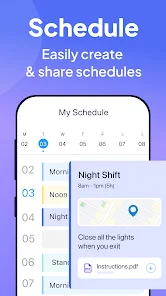
Connecteam's employee scheduling feature simplifies the process of creating and managing shifts. With easy drag-and-drop functionality, managers can quickly assign tasks, view availability, and accommodate time-off requests, ensuring that your team is always well-staffed and organized.

Real-Time Communication

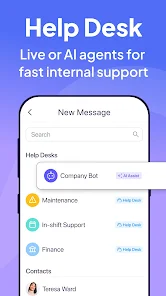
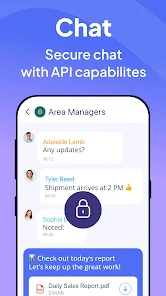
Stay connected with your team through Connecteam's real-time communication tools. Whether via chat, announcements, or comments on tasks, this feature fosters collaboration and ensures that everyone is on the same page, no matter where they are.

Task Management

The task management capability allows teams to create, assign, and track tasks seamlessly. You can set deadlines, attach files, and communicate directly within tasks, making it easy to keep everyone aligned and accountable for their work.

Time Tracking

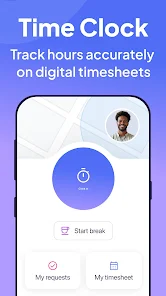
Connecteam offers a robust time tracking feature that lets employees clock in and out easily. With automated timesheets and reporting, managers can effortlessly monitor hours worked, ensuring accurate payroll and enhancing productivity across the organization.

Pros & Cons

Pros
  • Enhances team communication with real-time messaging and updates for seamless collaboration.
  • Streamlines task management, allowing for efficient project tracking and accountability.
  • Simplifies scheduling, enabling easy shift planning and availability management.
  • Offers time tracking features to monitor productivity and ensure accurate payroll.
  • Provides customizable templates to suit various business needs and workflows.
Cons
  • Limited customizability may not suit all team needs
  • Higher pricing tiers can be a barrier for small businesses
  • Some users report a steep learning curve for new features

Real Experience Using Connecteam Team Management App

Application Scenarios

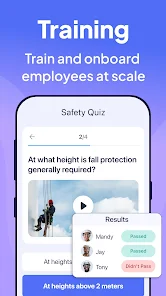
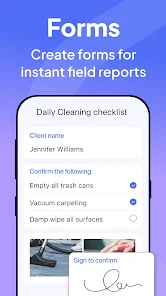
Connecteam is designed to cater to a variety of industries, making it an excellent choice for businesses of all sizes. Whether you're managing a remote team, overseeing a construction site, or coordinating activities in a healthcare facility, Connecteam has features tailored to your needs. The app excels in scheduling shifts, tracking time, and managing tasks, which makes it particularly useful for companies that require efficient workforce management. Users can create customizable checklists, conduct employee training, and facilitate communication through a centralized platform. The flexibility of the app allows it to adapt to different operational workflows, ensuring that teams can collaborate effectively, regardless of their location.

User Experience

The user experience of Connecteam is intuitive and straightforward, which is crucial for its diverse user base. The app offers a clean interface that simplifies navigation, allowing users to quickly access the features they need. The onboarding process is seamless, with helpful tutorials and guides that assist users in setting up their profiles and understanding the functionalities. Users appreciate the real-time updates and notifications that keep them informed about shifts, task deadlines, and team communications. Additionally, the mobile app is well-optimized, ensuring that team members can stay connected and engaged on the go. However, some users have noted that the sheer number of features can feel overwhelming at first, but with time and practice, navigating the app becomes second nature.

Pricing

Connecteam offers a range of pricing plans designed to fit various business needs and budgets. The pricing structure is competitive, with a free tier available for small teams looking to explore the app's capabilities. Paid plans introduce advanced features such as time tracking, reporting, and more extensive integrations. Users have reported that the value provided by Connecteam justifies the subscription costs, particularly for businesses that rely heavily on coordination and communication among team members. The flexibility to scale the plan as your business grows is another appealing aspect, allowing companies to pay for only what they need.

Updates & Support

Connecteam is committed to continuous improvement, regularly rolling out updates that enhance functionality and address user feedback. Their development team is responsive to user suggestions, which helps ensure that the app evolves to meet changing business needs. Support options are robust, with a dedicated help center that offers articles, tutorials, and a community forum for user interaction. Additionally, customer support is accessible through email and chat, which users have found to be prompt and helpful. Regular webinars and training sessions are also offered, allowing users to maximize the app's potential and stay updated on new features.

verified Security & Privacy Review

The Connecteam Team Management App prioritizes security and privacy, implementing robust measures to protect user data. All data transmitted through the app is encrypted using industry-standard protocols, ensuring that sensitive information remains secure during transit. Additionally, the app adheres to GDPR and CCPA regulations, providing users with transparency regarding data collection and processing practices. Connecteam employs strict access controls to limit user permissions, allowing administrators to manage team member access effectively. This minimizes the risk of unauthorized data exposure and enhances overall security. Users can also benefit from multi-factor authentication, adding an extra layer of protection to their accounts. Regarding user data handling, Connecteam commits to not selling personal information to third parties, reinforcing its dedication to user privacy. Furthermore, users have the ability to manage their data preferences, including opting out of certain data collection practices. Overall, Connecteam demonstrates a strong commitment to safeguarding user data and maintaining privacy, making it a reliable choice for team management.

Reviews

4.8

“User-friendly interface makes team management a breeze.”

“Great features for tracking employee performance effectively.”

“Excellent communication tools enhance team collaboration.”

“Customizable options suit various business needs perfectly.”

“Reliable support team always ready to help.”

FAQ

1

Can I submit suggestions or feedback to Connecteam Team Management App?

Yes, users can submit suggestions or feedback through the app or by contacting Connecteam's support team to help improve the app's features and functionality.

2

Does Connecteam Team Management App collect my personal data?

Connecteam Team Management App may collect personal data as outlined in its privacy policy, primarily to enhance user experience and ensure app functionality.

3

Does Connecteam Team Management App support offline use?

Yes, Connecteam Team Management App allows users to access certain features offline, enabling them to continue working without an internet connection.

4

How do I cancel my Connecteam Team Management App subscription?

Users can cancel their subscription by accessing their account settings within the app or by contacting customer support for assistance.

5

How much does a subscription to Connecteam Team Management App cost?

Subscription costs for Connecteam Team Management App vary based on the chosen plan and number of users, with detailed pricing available on their website.

How to use Connecteam Team Management App

1

Can I log in to Connecteam using my social media accounts?

Yes, you can log in using your Google or Facebook account if you linked them during registration. Otherwise, use your email and password.

2

How can I contact customer service for help with my Connecteam account?

You can reach customer service through the Help section in the app or by emailing support

3

How do I activate my Connecteam account after signing up?

To activate your account, check your email for the activation link sent by Connecteam and follow the instructions provided.

4

How do I reach customer service if I have an issue with my account?

You can contact customer service through the in-app chat feature or email support

5

I need assistance with activating my Connecteam account; who can help?

Our customer service team is ready to assist you. Please reach out via the app or email us at support

Editor's Choice